Cari Blog Ini

Kamis, 14 Januari 2010

Cara Pasang Follow me Twitter Di Blog

Saat Ini jejaring sosial bukan hal yang asing lagi bagi kita .seperti Twitter atau facebook yang sekarang ini sedang booming . Dalam postingan kali ini saya akan membahas bagaimana Cara memasang Ikon Follow me on twitter pada blog.Yang bisa dipasang pada sidebar .
Ikuti langkah-langkah berikut untuk memasang Ikon Follow me on twitter pada blog:

1.Login ke blogger.

2.Klik Tata Letak.

3.Klik tab Elemen Halaman.

4.Klik Tambah Gadget.

5.Kemudian Pilih HTML/Javascript.
Silakan pilih gambar yang kamu inginkan terys Copy paste Kode HTML Berikut :

Keterangan : Ganti link http://twitter.com/YourLink dengan link akun twitter kamu,contohnya http://twitter.com/denisahlan


By: Twitter Buttons


By: Twitter Buttons


By: Twitter Buttons


By: Twitter Buttons


By TwitterButtons.com


By TwitterButtons.com


By TwitterButtons.com


By TwitterButtons.com


By TwitterButtons.com


By TwitterButtons.com


By TwitterButtons.com


By TwitterButtons.com


By: Twitter Buttons


By: Twitter Buttons


By: Twitter Buttons


By: Twitter Buttons


By TwitterButtons.com


By TwitterButtons.com


By TwitterButtons.com


By TwitterButtons.com


By TwitterButtons.com


By TwitterButtons.com


By: Twitter Buttons


By: Twitter Buttons


By: Twitter Buttons


By: Twitter Buttons


By: Twitter Buttons


By TwitterButtons.com


By TwitterButtons.com


Maverick Money Makers


Maverick Money Makers


By TwitterButtons.com


By TwitterButtons.com


By TwitterButtons.com


By TwitterButtons.com


By TwitterButtons.com


By TwitterButtons.com


By TwitterButtons.com


By TwitterButtons.com


By TwitterButtons.com


By TwitterButtons.com


By TwitterButtons.com


Maverick Money Makers


By TwitterButtons.com


By TwitterButtons.com


Atau kamu juga bisa Memasang Follow me Twitter

ini BErjalan di samping Blog kamu .Sebagai Contoh KLIK DIDINI.Langsung aja iikuti langkah-langkahnya berikut ini.

1.Login ke Blogger.

2.Klik Tata Letak.

3.Klik Edit HTML.

4.Kemudian Cari kode ]]></b:skin>.

5.Kemudian Copy dan paste Kode berikut Di atas kode yang tadi.

#trik_pojok {
position:fixed;_position:absolute;bottom:0px; right:0px;
clip:inherit;
_top:expression(document.documentElement.scrollTop+
document.documentElement.clientHeight-this.clientHeight); _left:expression(document.documentElement.scrollLeft+ document.documentElement.clientWidth - offsetWidth); }

6.Selanjutnya Cari kode </body> kemudian copy dan paste kode berikut di atasnya.

<div id="trik_pojok">
<style type="text/css"><br />#followmeontwiter {<br />position:fixed;_position:absolute;<span style="color:blue;">top</span>:100px; left:0px;<br />clip:inherit;<br />_top:expression(document.documentElement.scrollTop+<br />document.documentElement.clientHeight-this.clientHeight);<br />_left:expression(document.documentElement.scrollLeft+<br />document.documentElement.clientWidth - offsetWidth); }<br /></style>
<div id="followmeontwiter">
<a href="http://twitter.com/%3Cspan%20style=">IDtwitter" target="_blank title="Follow Me on Twitter">
<img src="http://lh3.ggpht.com/_noownWFsWHg/Sy9XXErXDaI/AAAAAAAAAOE/xIWnIMtdqzE/followmeontwitterbyblackpinktemplates.jpg" border="0" /></a>
</div>
</div>


7.Ganti Tulisan IDtwitter dengan ID twiter kamu.sebagi contoh www.twitter.com/denisahlan ,yang di gunakan denisahlan nya saja.

8.Kalo sudah di lakukan semuanya Silakan Klik SAVE TEMPLATE.

Membuat Efek Marquee Atau Teks Berjalan

Bagaimana cara membuat teks berjalan Pada postingan,sidebar Atau tempat yang lainya dech .hehehe yupzz dalam postingan kali ini saya akan membahas bagaimana cara Membuat Efek Marquee Atau Teks Berjalan .apa itu marquee ?Marquee adalah suatu program HTML untuk membuat teks atau juga gambar bisa bergerak atau berjalan.
Perhatikan Kode HTML Berikut :

<MARQUEE align="center" direction="right" height="200" scrollamount="2" width="40%">

Blog tutorial|Free Template|HTML Tutorial|Dan tips&trik mengenai internet|

</MARQUEE>

Dari contoh kode diatas dapat mrnghasilkan efek seperti berikut :


Blog tutorial|Free Template|HTML Tutorial|Dan tips&trik mengenai internet|


Jadi untuk Membuat Efek Marquee Tinggal copy paste kode di atas lalu Ganti teks yang bertanda biru dengan teks yang anda ingin tampilkan..

Rabu, 13 Januari 2010

Shop of the Week: Lost Mitten


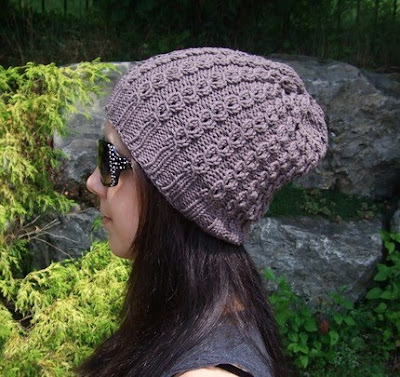
When stepping into this week's Shop of the Week, LostMitten.etsy.com, you can feel Lauren Y.'s love for all things that come from video games. Lauren's shop includes handmade crafts, Perler Bead goods for your office and home, needlepoint creations, Nintendo DS cases, and more. In addition to video games, she loves to knit and crochet! You have to check out these amazing fingerless gloves and awesome hats! A perfect gift for this chilly season (and I do mean chilly)! Lost Mitten is also known for a variety of pinback buttons.

Lauren's shop ships internationally and is located in Brantford, Ontario, Canada (near Hamilton, Toronto, London). Lauren would like all of her customers to know that "Each item in the Lost Mitten Etsy Shop is lovingly handmade by me. The designs and concepts for the creations are a collaboration between myself and my fiancé, Paul. My shop has been open since September 2006."


Here at the Etsy Twitter Team we love to share our tricks and favorite ways to use Twitter. Lauren has told me that she just "loves to tweet about my handmade creations and anything else that happens in day-to-day life. I have met some awesome people through my tweets, so I feel that it is important to make these connections and friendships for an improved Twitter experience. I think it is important to establish a balance between tweeting for your business and tweeting about yourself because people don't want to feel like they are being advertised to all of the time. They want to hear about your interests and other interesting things, too!"

So true Lauren and we love to read your tweets about what’s going on in your Etsy store and your day-to-day life!

Lauren's favorite part of her craft is when she finds out that one of her items have made a wonderful gift for anyone or themselves. Her favorite items to make are the Perler Bead items that she started to make in 2006 when her shop opened on Etsy. Lauren also enjoys taking on new challenges in her craft. (Please convo her for custom made items.)

Since it is the beginning of 2010, we have challenged all of our members to take on a New Year’s Resolution. Lauren admits (like most of us here at ETT) that Etsy becomes addicting. She hopes to spend more time creating this year as a part-time job. We wish you tons of luck, Lauren, in this new resolution and want to say congratulations to you and Paul on planning your wedding.

Follow her on Twitter: @lostmitten
Fan her Facebook Pages: http://www.facebook.com/lostmittenetsy
http://www.facebook.com/lostmitten
Read her blog: http://lostmittenblog.blogspot.com


This week ONLY (ends January 17, 2010):
10% off all items for anyone who mentions this article! Mention "Etsy Twitter Team" in comments at checkout and after payment is received via PayPal she will refund you for the amount of the discount.


Etsy: Your place to buy
& sell all things handmade

lostmitten.etsy.com


Article by Jen K.
www.jenco13.etsy.com

Selasa, 12 Januari 2010

Free Template 1 columns

Tiny Studio Template


Download


Grunge Template


Download

Cara Membuat Teks Tebal Dengan Html

Cara paling mudah Menebalkan teks Dengan Kode HTML pada postingan Adalah dengan menyisipkan Kode <b> Di Awal kalimat yang ingin di tebalkan Dan Kode </b> di akhir kalimat yang ditebalkan . Contoh "<b>Teks Ini ditebalkan</b>" Hasilnya Adah seperti ini "Teks Ini ditebalkan".

Selamat Mencoba..

Jumat, 08 Januari 2010

7 foto sharing terbaik untuk twitter


ini dia 7 pilihan foto sharing terbaik untuk twitter. enakan bisa berbagi foto atau gambar dengan follower-follwer kita. ini pilihan yang bisa digunakan:

1 TwitPic saat ini yang terbesar dan paling populer untuk layanan berbagi foto tweet.


2 Twitgoo adalah salah satu alat berbagi foto sederhana. Ketika login (dengan twitter), tampilannya mirip dengan twitter.

3 Yfrog katanya sih dibuat

widget twitter untuk blogger


pasang twitter di blog cukup gampang coba buka http://twitter.com/goodies/widgets , disitu ambilah kodenya, tentu dengan edit sana-sini agar terlihat keren sedikit. biar gampang, ikuti petunjuk pemasangan berikut:

1. buka halaman twitter widget. bisa klik ini http://twitter.com/goodies/widgets

2. pilih my website. trus disitu ada beberapa pilihan seperti Profile Widget, Search Widget, Faves

istilah-istilah yang ada di twitter (buat yang belajar twitter)


nah klo sebelumnya saya pernah posting art-arti singkatan yang ada di twitter, sekarang gilirang kata-kata atau istilah yang ada dan wajib diketahui oleh tweeple.


1. hashtag (#) : muncul di timeline bisa dibaca semua orang jika mencari mnggunakan hashtag. digunakan untuk menggambarkan tweet agar orang-orang untuk dengan mudah mengikuti percakapan. Hashtags dibuat sebagai upaya masyarakat

Selasa, 05 Januari 2010

Shop Of The Week: Scrap With Style


If you're always on the lookout for unique papers and embellishments, Scrap With Style is a dream come true.


As owner Janelle Jones says, "I have papers, ribbons, rub-ons, embellishments, cardstock, scrapbook albums, fun things that can bring family photographs to life! I also make some premade scrapbook albums (paper-bag, recycled CD style and others) and put together page kits and cut paper packs too."


A stay-at-home/work-at-home mom with two little girls, Janelle finds inspiration " in the tons of pictures I take of my two girls. Those pictures are what got me into scrapbooking and making photo projects! I really love displaying family photos."


She also loves the fact that the business allows her to work at home alongside her girls, ages 2 and 4. "My 4 year old particularly likes to help with packing the orders and ribbons!"

From a business perspective, Janelle finds Twitter great for connecting with fellow crafters. "I love to meet people and I really enjoy the social aspect of twitter. It's fun to meet other crafty people and share tricks and tips about papercrafting!"

The shop happily ships both across the country and internationally.

For more information about ScrapWithStyle:

http://www.twitter.com/scrapwithstyle
http://facebook.com/scrapwithstyle
http://janellescraps.com/
http://scrapwithstyle.com/


For this week, Janelle is offering the following great discounts:

10% off orders of $5 or more, 15% off orders of $10 or more, and 20% off orders of $20 or more just put "SOTW" in msg to seller @ checkout. Refunds made via paypal or you can request an updated invoice before payment.


Etsy: Your place to buy & sell all things handmade
scrapwithstyle.etsy.com