Cari Blog Ini

Tampilkan postingan dengan label improve. Tampilkan semua postingan

Sabtu, 12 Januari 2013

Other New Tools for a Blogger To Make Like Website

Free Keyword Density Tool:
Check the density of your keywords in your posts with this free keyword density tool from SEO chat.

Free File Size Checker:
Web sniffer will check the size of your burned Feedburner feed to avoid exceeding the 512k Maximum file size.

Free Google Page Ranking Lookup Tool:
Find out what your Blogger Blog's Google Page Ranking is with this free lookup tool from SEO chat.

Free Browser Testing Tool:
Look Up how your Blogger Blogspot Blog will appear to a variety of internet browser and detect any problems with your template with this free browser testing tool from Browsershots.

Free HTML Tutorial Help:
Need Help with HTML i have found w3schools.com Provides excellent tutorials and information on HTML.

Free File Storage:
FileAve.com offer  upto 50 MB of free file storage and hosting which is ideal for storing files and scripts. Particularly for storing any files that readers can download from your blog. Also try Boxnet.com which offer 1GB of storage and 4shared.com which gives you a whopping 5GB.

Free Web-Based File Extractor:
Sometimes you may wish to extract a file online. My Webzip provide a free archive creation and file extraction service that works on the fly supporting zip, rar, tar and tgz file archives. Also try Wobzip which offers a similar online service.

A collection of free internet tools aimed at beginner Blogspot Blogger. If you have any suggestion for other tools you have found useful please let me know.

Jumat, 11 Januari 2013

The Most Essential Tools for a Blogger Analytics

Today's Post is a collection of free internet tools essential for any Blogger Blogspot Webmaster but particularly beginners who wish to improve and grow their blog.
While their are lots of tools on the internet that are of use to a Blogger Blogspot Blogger you have to hunt for them. Chances are that you may have already discovered some of these while others may be quite new to you. Here is my list of some free internet tools that i find invaluable in building my blog. This is a not a definitive list by any means. I will update it regularly as i discover more and more tools.

Free Banner Generator:
Banner Sketch is an easy to use tool to help you create a title banner and other banners for your blog.

Free Image Watermarking Service:
Add a watermark to your image to deter image theft on your blog with this free image watermarking service from pictureshark.com 

Free Fav Icon Generator:
There are a bunch of places on the web that you can go to create your own fav icon. Try these:


Favicon.cc
Dynamic Drive
Online Icon Maker

 
Free Icons for Rss Feeds:
Find stylish Rss Feed Icons for your Blog at Hongkiat Ultimate List of Feed Icons.
Free Rss Icons to spice up your Blogge Blogspot Blog.

Free Clipart:
These are lots of places to find clip art on the net but WPClipArt is my personal favorite offering thousands of high quality public domain images all completely free.Get your public domain clip art from WPClip Art.com . It's AOK/ Free Code Converter Code Converter.

Free Keyword Tools:
Wordtracker will help you identify keywords in your subject area. You Could also try Google Adwords:

Meta Tag Analyzer:
These Meta Tag analyzers will provide you with detailed information about your blog description, keywords and meta tags submit Express Seo Centro.


Sabtu, 05 Januari 2013

How Manage Blogger Title Tags to Improve SEO

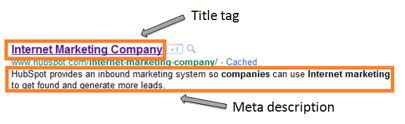
This Blogger tutorial explains how to improve search engine optimization SEO of your Blogger Blog by optimizing your post title tags for search engines like Google and Yahoo. How to improve search engine results by optimizing post title tags.


By default your Blogger Blog does not have search engine optimized title tags. This puts your blog at disadvantages compared to other blogs that have inbuilt SEO or enhance SEO modules as these sites are likely to be placed more highly in search engine results.

 The title tags of your blog are ordered by blog name first followed by the titles of the post. This is not ideal for popular search engines like Google and Yahoo which give more importance to the first words of a title. By ways of example take a look at how the title tags of this blog were viewed in a browser before any SEO. Note the order of the tags Blog Name, Blog Post Name. 


How Blogger Title Tags are viewed in an IE browser:
When this site was first indexed by Google this is the search engine results this site received. Note how the blog name is first in all the results.

Search Engine:


Fortunately there is a simple tweak to your template which can rectify this problem. By simply reversing the position of the blog name and page title significant improvement can be gained in search engine results. See the difference in the example.

How Your Blogger Title Tags are viewed in your browser with Change

Follow the step by step guide below to achieve higher rankings in Search Engine results. Tweak of Title Tags For New Blogger Blog.

1. Login to your blog at Blogger.com and navigate to Design> Edit HTML
2. Backup your template by downloading it to your computer. This will ensure that you can upload your template before these changes in case of problems.

3. Replace the following line of code about 8-10 lines from the top.

<title><data:blog.pageTitle/></title>

with highlight code Ctrl+C to Copy

<b:ifcond='data:blog.pageType==&quot;item&quot;'><title><data:blog.pageName/>

Replace With


<data:blog.title/></title>
<b:else/>
<title><data:blog.pageTitle/></title>
</b:if>

4. Check on save template and then view blog. Navigate to an individual post. You will see that your page title is now first followed by your blog title. A pipe symbol separates the two.