In this tutorial you will learn how to make the better SEO tips and trick which can rank your website or blog on rank in search engine. If you want to make this now then follow this techniques its really better and i apply all these tips in my WordPress.
Title Tags:
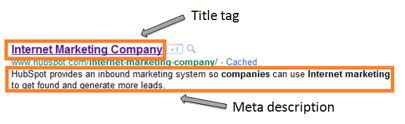
The title tag has long been thought of as the most important on-site factor in telling search engines what your site or a page is about. By default on older versions of WordPress, post title would display as "Blog Name Or Post Title". As your homepage is probably already ranking for your site name, you are not helping yourself by putting your site name at the start of your title. You don't need to rank for it more than once. On my blog you will see like this first my article name is first and then my blog title.
Like
Instead of leaving things this way, I personally like to remove the blog name altogether. This is not just because i think it looks better, but because it works. A client I worked with last year received a massive boost in search traffic when we removed their brand name from title tags on their blog post.

To Change your title tags, I recommend you install this awesome SEO plugin. Once installed, log into your WordPress admin and go to Setting > All in One SEO Pack. From there, I have entered the following.
This is the phrase I am trying to get my site to rank for and a brand name
Those are the main ones, and I recommend you tweak the rest to your preferred preferences. The post and homepage titles are the most important.
Meta Tags:
When your search for a site in Google, you will see a snippet of content under the page link. To control this, you can customize your meta description tag for the page. Similarly, you can also add keywords to your tag to tell search engines what your site is about. I should mention that Google announced a few months ago they do not crawl the keywords tag anymore.
 A good few years ago the keywords used to be important as search engines had less ways to be determine what a site is about. Now that technology is so advanced, search engine have better ways of determining rankings and relevance. I still like to put the keywords in there (for other search engines) and do this by enabling "dynamic" keywords with the All In One SEO pack.
As far as description go, there is no ideal way to automate the process. The best descriptions are hand written, and the plugin Headspace will allow you to configure them for each individual post. Headspace also allow you to auto-fill a posts meta-description based on the description of your category so if your post a lot, that may be useful for you.
In the next coming post all feature of SEO about WordPress is listed see daily about this blog.
Related Articles:
This is the phrase I am trying to get my site to rank for and a brand name
Post Title: %post_title%
Page Title: %page_title% | %blog_title%
Those are the main ones, and I recommend you tweak the rest to your preferred preferences. The post and homepage titles are the most important.
- Manage Permalinks Which Is Search Engine Friendly :
- How To Add Categories Link To Your Blogger Blog :
- You Should Make Internal Links And Backlinks and Increase in Blogger Blogspot:
Meta Tags:
When your search for a site in Google, you will see a snippet of content under the page link. To control this, you can customize your meta description tag for the page. Similarly, you can also add keywords to your tag to tell search engines what your site is about. I should mention that Google announced a few months ago they do not crawl the keywords tag anymore.
As far as description go, there is no ideal way to automate the process. The best descriptions are hand written, and the plugin Headspace will allow you to configure them for each individual post. Headspace also allow you to auto-fill a posts meta-description based on the description of your category so if your post a lot, that may be useful for you.
In the next coming post all feature of SEO about WordPress is listed see daily about this blog.
Related Articles: