Cari Blog Ini

Rabu, 14 Februari 2007

Second Life University


Universities register for virtual future | CNET News.com

According to this article on CNET News, "more than 70 universities have built island campuses in Second Life."

I think there is one known faculty member here at Northern Arizona University who is just barely starting to play with Second Life -- but not teaching. And if any of my students want to use Second Life for their final project this semester, they are welcome to do that. For me, it is hard enough to find time to sleep in my first life, let along to spend a lot of time on a second one.

That being said, I did sign up for the Second Life Educator's email list, and I was amazed and pleased to see the educational resources that Linden Labs is providing to encourage teaching in their virtual world. Maybe I need to find something in my first life to give up so I can explore Second Life more....

(The image above comes from this SLurl - "Second Live URL.")

Sabtu, 10 Februari 2007

Open Culture: University Podcast Collection


Stanford U. and UC Berkeley have gotten quite a lot of media coverage through their affiliation with Apple's iTunes U and Google Video to put audio and video podcasts of lectures up on the Internet. However, there are a lot more universities that are podcasting themselves in different ways to their students and the world.

The Open Culture Blog has put together a comprehensive list of university-sponsored podcasts. These are podcasts that are often accessible through some university (or other institutions of higher education) website portal. Business school podcasts are listed on a separate page.

Open Culture does not list independent university podcasts, such as my Geography for Travelers podcast, which supports my classes, but is not run through my university. Although the Open Culture blog has a more general list of podcasts, they are more culture than education-related.

More comprehensive directories of educational podcasts, covering K-12 and higher education, can be found at:

Formatpixel - Serious Online Graphic Publishing


Formatpixel is allows you to create gorgeous high resolution, page-folding, online magazines, similar to the Latitudes travel magazine our of Italy. This would be a wonderful tool for a graphic arts class to get their feet wet with quality online publishing. The list of online editing tools includes the following:

Editor (WYSIWYG)
- Insert pages
- Use the Spread Planner to arrange the order of, add and delete pages
- Layer objects on your pages in front of and behind one another
- Apply colour to your pages
- Apply background colours to your project
- Utilise the snap-to-grid functions and alignment helpers
- Upload your own images with the built in image library [ see Image object ]

Text objects
- Change font face
- Change font colour
- Change font style [ normal, bold, italic ]
- Change font alignment [ left, centered or right justified ]
- Change the background colour
- Add drop shadow
- Change the kerning [ spacing between letters ]
- Change the leading [ spacing between lines ]

Media objects
- Import your own JPG, GIF or PNG [ including support for transparency ] files
- Import FLV Video files
- Create your own formatpixel image library
- Edit the names of your images or delete them
- Crop your images
- Add blending modes to images
- Apply colour filters [ normal, greyscale or sepia ]
- Apply a customisable blur effect
- Scale object

Shape objects
- Change shape [ square or circle ]
- Change shapes colour
- Add blending modes to your shapes


There is a free account option, though it is limited to only one project at a maximum of 512k -- which will not get you many pages, but should be enough to introduce students to the concept of virtual magazines. Paid accounts go up to 20 UKPounds for 20 projects and 20MB of storage.

Senin, 11 Desember 2006

Tourism and Social Software Class at NAU

I have added Social Media to my Spring 2007 class, "Planning for Sustainable Tourism". The class is taught 100% online. Hopefully I will not overwhelm the more technologically challenged students in the class! Click on the title above to go to the current version of the class overview. Registration information can be NAU Distance Learning.

OVERVIEW of PL 376 for Spring 2007
- January 16 - May 11, 2007

Click here for Syllabus

Topic Groups: Each student will be assigned to one of the following three groups at the start of the semester. Students will be given the opportunity to switch groups later in the semester. The Final Project will be related to the topic of the group. A couple of sample topics for each group is shown below.

  1. Sustainable Tourism and Money
    • Promoting Destinations and Sustainability Online
    • Monetizing Sustainable Travel and Tourism Websites, Blogs and Podcasts
  2. Sustainable Tourism and the Environment
    • Social Networking for the Environment
    • Online Environmental Education
  3. Sustainable Tourism and Community (Physical and Digital)
    • Online Citizen Participation / Political Activism
    • Virtual Communities and Real Communities

CLASS SCHEDULE - Please See the LEARNING MODULES and CALENDAR for Actual Assignments and Due Dates

This Schedule is Under Construction, though it will probably not change much.

Week
Points
Module 1 - Intro to Class, Sustainability, and Social Media
1-2
Class Intro Assignment: Tourism Development Issues
75
3
Sustainable Development and Tourism
75
4
Social Media and Tourism
75
5
Planners and Planning for Tourism
75
6
Sustainable Tourism, Planning and Social Media
75
7
Midterm Exam #1
100
Module 2 - Tourism Impacts (using collaborative blogs)
8
Economic Impacts of Tourism
75
9
Social Impacts of Tourism
75
10
Environmental Impacts of (and on) Tourism
75
11
Topic Group Wiki Projects: Resources for Manging Tourism Impacts, Greening the Tourism Economy, or Tourism Planning for People
75
12
75
13
Midterm Exam #2
100
Module 3 - Social Media and Destination Marketing
14
Final Project: Place Promotion with Social Media (website creation, podcasting, and other Web 2.0 Travel Tools; there is no final exam)
75
15
75
16
100

Total Points (subject to change)
1200

Definitions: Social Media - Social Software - New Media

Social Software Tools that will be used in this class, include:

  • Message/Discussion Boards (we will use this in Blackboard-Vista)
  • Websites (this will be part of the final project, most student will use the simple online web creator at Weebly.com, or the free domain service from Microsoft Live)
  • Wikis (at a minimum, there will be one wiki for each of the Topic Groups above)
  • Social Bookmarking (e.g., Del.icio.us - optional)
  • Blogs (potentially including video and photo blogging; at a minimum there will be one collaborative group blog for each of the three Topic Groups above)
  • Podcasts ( this will be part of Final Project, and if it is good enough I will put it out on my Geography for Travelers podcast - with your permission, of course; this will also be shared with student at the University of Victoria in Melbourne, Australia)
  • Virtual Reality (optional; can you promote a destination through Second Life? want to try?)
  • Social Networks (all students will be required to join and report on a travel-related social network)

NEW: FYI - I presented a summary of this class, along with a small survey of the students, at my university's eLearning Institute in May. Here is the prsentation (audio and slides):


Senin, 04 Desember 2006

WikiMatrix - Wiki Comparison Tool


WikiMatrix.org is a website that allows you to compare different wiki tools available on the web. It is amazing how many wikis are out there -- currently 77 on the WikiMatrix site. Click on "Choice Wizard" to get started. Comparisons cover an incredible amount of items, including cost/fee options, storage and bandwidth quotas, intended audience, security and spam controls, editing and history features, formatting, media, and statistics. The wikis with the floppy disk icon next to them require server installation, while those with a hand icon are web-based. There is also a Discussion Forum on the topic of wikis.

I have used Wikis to some degree in my classes, and plan to do more. And I have had a few previous entries on this blog related to wikis that I have encountered:
Other interesting links that can be found at the very top of the WikiMatrix page are:

PodcatcherMatrix.org - Did you know that there are 20 different Podcatchers out there! (A podcatcher is a program for subscribing to and downloading podcasts -- iTunes added a podcatcher capability in summer 2005.) The WikiMatrix people also have PodcastMatrix.org -- which looks just like WikiMatrix, but compares podcatchers.

ForumMatrix.org - Compares 20 different Bulletin Board Systems to run your own discussion forums.

Jumat, 17 November 2006

Fleck - Annotate Any Webpage


If you click on the title link above, it will take you to the Fleck.com homepage that I just annotated (same as in the photo above). While not intended to be an educational tool, like many other Web 2.0 sites these days, it has a lot of potential.

Fleck allows you to go to any web page, start the Fleck tool (I dragged the link to my favorites toolbar), and then start adding post-it notes on the web page. You can then click on "Share" and get a URL for the annotated page, which you can then send to other people. When the other person goes to the URL, they can move and edit your notes, as well as add their own.

I was just in the process of preparing a class for next semester in which one of the options I will have is for students to create their own web pages about the topics we will be covering. Initially, I will have links to Google Page Creator and to Weebly.com. With Fleck I now have an easy way to comment on and grade their work. And, according to TechCrunch, Fleck is the easiest tool of this kind currently available. Plus, they say:
  • There’s a long list of features that Fleck aims to roll out in time, including photo integration, arrows, multi-language support and Pro accounts with premium features. If they can make this a more fleshed out service while retaining the incredible simplicity it offers now, Fleck could grow into a particularly solid contender in the web page annotation space. TechCruncha>, 16 Nov 2006
Very Cool!

Others that offer this type of annotation tool are: Stickis.com, Diigo.com, and Trailfire.com. Reviews of the different feature these offer can be found on TechCrunch.

NEW: The Newest site offering a tool like this is Zpeech.com - to create a comment or discussion page about a site, all you need to do is add http://zpeech.com/ before the URL.

Selasa, 31 Oktober 2006

Educause Videos + Podcasts Now Available

Educause is a higher education information technology association that sponsors the largest IT event in higher education in the US, and probably the world. This year's annual conference was in Dallas, Texas, earlier this month and drew close to 8000 participants. As of today, you can view videos of 10 of the hundred or more sessions that were held that week - Go Here, then click on the Videos tab. One that I attended and thought was quite good is titled "Pioneering New Territory and Technology".

They also have some interview podcasts (yes, you can subscribe to the feed) on the same site, and will eventually put recordings up of all of the sessions for free (you currently need to pay). Much of the conference is really for university IT and eLearning people, but there is also a lot that is of potential interest to faculty.

NEW: Alternatively, you can subscribe to the Educause Podcast, which includes the interviews from Dallas, on the Educause Connect website on the Podcast tab.

Minggu, 22 Oktober 2006

Social Networking for Students and (recent) Alumni


Every now and then I scan Emily Chang's eHub as one of my sources for Web 2.0 teaching and travel tools for my two blogs on those topics (this is the education one; the travel one is here). Recently she posted several social networking website for university students and alumni. Unlike Facebook, which is more of a college-based MySpace, these are focused on collaborative learning, networking for future employment, and campus life.

CLASSROOM NETWORKS

NoteMesh - "Collaborate to Graduate: NoteMesh is a free service that allows college students in the same classes to share notes with each other. It works by creating a wiki for individual classes that users can edit." I think this is a good idea and may even create my own wikis for my classes to discuss and share notes. However, when I mentioned this to my daughter, she suggested that the best students might not want to share their notes with the slackers in a class. In addition, just because there are a lot of students contributing to a set of notes does not mean the notes will be error-free.

Notecentric - "Notecentric is a web based note taking application. Notecentric keeps your notes organized and readily available online." Notecentric allows you to keep your notes online for a class that you are in. You can also elect to be connected with other students in the class (if they are registered with Notecentric), who you can then communicate with and, at your option, share your notes. This is an online version of the more traditional face-2-face ways of sharing notes in a class.

CAREER NETWORKING

Alumwire - "Alumwire is a professional college network that provides personal and career opportunities for alumni, students, and faculty." You either need to have a .edu email address or a Facebook account to register with Alumwire. The site appears to be very new. There is almost no information on the public website. Once you register and log in, there are sections on Job Search, Career Interviews, Career Advice Forums, My Connections (other members), and a Calendar tool. The Advice Forum only has a few postings. If you like basic and simple, you may find this of use, though I am not sure just how many job offers will come from it if the use base is small.

IdeaWhip - "An Entrepreneurial Community For Undergrads, Graduate Students, and Young Alumni...by Them." This is a social networking site for future business people to share ideas and experiences in starting their own business. It also included links to related news stories and online presentations.

CAMPUS LIFE

Campus Central - "For Life Outside the Classroom" at Canadian universities. Sections on this website include Books (for selling textbooks), Classified (for selling anything), Events, Articles (on sports, sex + dating, entertainment, studying, etc.), Profiles (of members), and Message Board (for general discussions). It appears to be very new with not many members or postings, as yet.

CampusReader - "America's College Newspaper" - I think I once saw a print version of this -- a collection of news articles from college and university papers around this US. This one is online and has a lot of articles. You can even customize a section of the homepage to show news items from universities in states near your zip code, which I think could be very valuable. Two other sections on the homepage are "Top Stories" and "Reader Roulette" (random stories from a random state).

Rabu, 18 Oktober 2006

Putting Lectures Online - Podcasts, Streaming, and more


I just returned from the 2007 Educause conference in Dallas, which had some 8,000 university IT and eLearning attendees, and almost as many vendors. There I learned of several companies in addition to BoxPopuli (see my previous blog entry) that offer classroom recording/podcasting products similar to BoxPopuli. My impression is that these tools are more robust (more features) than is currently offered by BoxPopuli, but then they may also cost a lot more.

To start, I suggest that you check out this online lecture at
Mediasite.com. Yes, it is a sales pitch, but it gives you a good idea of what is possible with these lecture capture and recording tools.
Mediasite.com (by Sonicfoundry) is both a tool for putting recorded "navigable" lectures online, as well as a directory of lectures that can be viewed from the Mediasite webpage. Like all of the other tools listed here, as well as Box Populi, they offer both a hardware box and software to manage the lecture capture and upload.

Others who offer similar tool are (descriptions of each are copied from their websites):

Tegrity.com -Tegrity Campus is the first student achievement system that impacts learning across the entire institution, improving retention and student satisfaction. Tegrity makes class time available all the time by automatically capturing, storing and indexing every class on campus for replay by every student. With Tegrity, students quickly recall key moments or replay entire classes online, with digital notes, on their iPods and cell phones.

Horizon Wimba Voice Tools -
Perfect for language learning and creating vocal exercises in any subject, our web-based voice tools facilitate and promote vocal instruction, collaboration, coaching, and assessment. Increase the interaction and student engagement level of any online class by allowing faculty and students to easily embed vocal interactions into the page level of their CMS (Course Management Systems. Wimba Voice Tools are now perfect for Podcasting and iPods.

Anystream's Apreso - Apreso Podcast software can be affordably, and unobtrusively, installed on existing podium computers in any classroom where lectures are to be captured. This "capture station" automatically interacts with classroom audio sources to record the professor's remarks. It encodes the lecture audio into a podcasting-ready MP3 version of the classroom experience, called an "Apreso," which can then be accessed on-demand from iTunes or other portals, and synchronized to iPods for later replay.

Techsmith.com's Camtasia Studio with Screencast.com's web hosting
-
Camtasia Studio 4.0 helps you keep pace in a mobile world by making it easy to publish videos and MP3 files for iPod and other portable media players. Now your marketing message, screencast, lecture, or just-in-time training video can reach your audience practically anywhere – on the bus, in a coffee shop, or while they’re jogging. Camtasia Studio videos are simply designed to share....You can publish your videos directly to Screencast.com from Camtasia Studio 4.0. Then, send your viewers to Screencast.com to see your content, or use the site’s built-in RSS and iTunes functionality to automatically deliver the content to them.

Accordent.com's Capture Station - Offered as a fully integrated system, the Accordent Capture Station seamlessly records and synchronizes audio, video and data output from any presentation device (notebook PC, document camera, smart board, etc.) and instantly turns it into an online rich media presentation. Version 2.0 gives administrators the ability to remotely provision resources such as classrooms and encoders as well as automatically stop and start the presentation capture process from a centralized location with Accordent's Event Scheduling & Notification module.

There may have been a few others, but I can't remember them all after three days of higher ed IT overload. I would be happy to add others to this post if anyone lets me know about them.


Selasa, 03 Oktober 2006

Box Populi + Meedu = Podcasting for Academia


I came across Box Populi (formerly Webcast in a Box) at the Podcast and Portable Media Expo last week in Ontario, California. The event was a podcast feed-fest! I found almost all of the booths in the exhibition hall of interest, though there was not much that was focuses on education. Among items of potential interest to educators, the guy at Libsyn told me that they are planning to roll out university version of Libsyn Pro (their corporate podcast tool), and Box Populi was showing their almost turnkey podcasting solution.

Box Populi
is basically a computer running software that is designed to automate the podcast creation and posting process. It is targeted specifically toward universities that want to podcast lectures. Lecturers would connect a wireless mic for recording themselves and insert a USB thumb drive to identify themselves and their class, and start the recording. When they are done, they remove the UBS drive to stop the recording, which is automatically formatted and uploaded to a server for distribution. The box costs about $1000 and you would need one in each classroom where lectures are being recorded. The Box Populi software (which is open source) can also be configured to run on other computers. The wireless microphone is extra, I believe.

Meedu.org (pronounced Mee-djoo) is a podcast hosting service at UC San Diego that is currently offering to host academic podcasts for free on the San Diego Supercomputer Center. Podcasts can be public or have restricted access.

In talking to the two guys from Box Populi at the Podcast Expo, it sounded like they have a very simple to use, almost turnkey lecture recording and podcast posting device that should enable any school to emulate Stanford on iTunes. I have not yet seen a list of schools who have adopted the Box Populi tool, though there is a quote on the Meedu.org website from Fullerton Community College.

NEW: Marcus at BoxPopuli sent me a partial list of schools (and a few media sources) that have purchased their device. This contains 30 entries, among them: UC's Berkeley, Irvine and San Diego, San Jose State University, Oregon State University and the University of Oregon, Princeton, and the Naval Postgraduate School. Non-university buyers include CNN, Powells Bookstore, Intuit, and Atlanta Water and Sewage.


Selasa, 26 September 2006

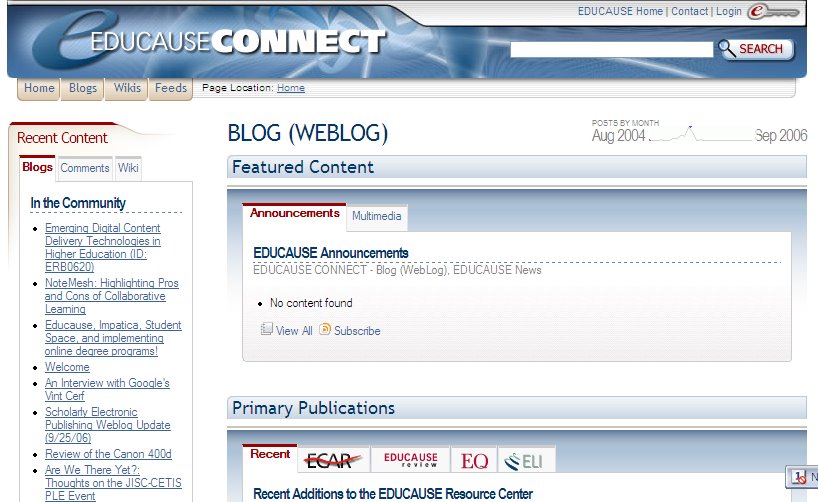
Educause Connect


Educause Connect is a social networking website for people who are interested in all areas of technology in higher education. The site is organized by Tags (they seem to be pre-defined). The tag frequencies as of today were:
  • Open Source (256)
  • Blog (WebLog) (181)
  • EDUCAUSE_ANNUAL (164)
  • Teaching and Learning (159)
  • E-Learning (95)
  • Cybersecurity (94)
  • OSS (Open Source Software) (93)
  • Podcasting (68)
  • Information Systems and Services (63)
  • Policy and Law (59)
  • Instructional Design (58)
  • Social Software/Social Computing (57)
  • Raves (55)
  • Copyright / Intellectual Property Policies (53)
  • CNI - Coalition for Networked Information (51)
  • Rants (48)
  • Events (47)
  • Libraries and Technology (44)
  • EDUCAUSE Conferences (41)
  • Net Generation Learner (36)
  • Intellectual Property Rights (34)
  • Learning Space Design (33)
  • Social Software (33)
  • Blogs (32)
  • Microsoft (30)
Each of these leads to a separate page on which numerous resources are brought together. Major sections on these pages include:
  1. Featured Content and Primary Publications - from several sources, both text and multimedia
  2. Community, including a Wiki, Educause-based Blogs that include the tag word, Jobs, Events, People
  3. Elsewhere on the Net, which has the same categories as Community, but lists information from outside of Educause
All of these sections can also be subscribed to via an RSS feed, which I did for my favorite topics.

I stumbled upon this site through and email from the Educause national meeting that is coming up in October in Dallas, Texas. It looks relatively new, with almost none of the wikis having been started by anyone yet. And the site notes that it will be adding more resources in the future. Very worthwhile way of getting information, news and thoughts on your favorite new media applications in higher education. Check it out!

Minggu, 24 September 2006

Global Voices Online - Blog Voices from Around the World


Global Voices Online was one of the winners of the 2006 Kights-Batten Award for innovations in journalism. The website received this award for developing “an extraordinary site that allows for both editorial gatekeeping and wide access to news and information from underreported parts of the world.“

Global Voices Online is a non-profit citizen news and media outlet for bloggers around the world. Its goals are (from its website:
  1. To call attention to the most interesting conversations and perspectives emerging from citizens’ media around the world by linking to text, audio, and video blogs and other forms of grassroots citizens’ media being produced by people around the world.
  2. To facilitate the emergence of new citizens’ voices through training, online tutorials, and publicizing the ways in which open-source and free tools can be used safely by people around the world to express themselves.
  3. To advocate for freedom of expression around the world and to protect the rights of citizen journalists to report on events and opinions without fear of censorship or persecution.

This is a great site for classes that deal with contemporary global and regional issues. It allows students and teachers to read perspectives on current events directly from bloggers ( all of which are translated into English, for us Anglophones) living in the countries that are experiencing these events.

In my World Regional Geography class, I often send students to local online newspapers in different countries to write reports. Lately, the website I have used for this has been World-Newspapers.com, which I will continue to use. However, I will now add Global Voices Online as an option as well. It will be interesting to see how (and which) student use this blog site, and how the results compare with more traditional online news outlets.

Kamis, 21 September 2006

Learning activities for educational social software

Learning activities for educational social software

This list of activities is designed specifically for the restricted access Me2U system (a version of the open source social software at elgg.org) at Athabasca University. However, the activities can be used on any social software site, including blog sites (MySpace, etc.), discussion forums, and wikis; and especially the Collaborative Learning Tools that bring many of those together in single environments, and which I previously blogged about. Web-based teaching environments, such as Blackboard and WebCT are also suited to these activities.

The activities are all presented in a very brief manner, which is good because they are not overwhelming -- especially since there are so many activities listed. Instead, these are very approachable and allows an instructor to modify any particular approach to meet their class situation. What is striking is how simple many of the activities are, and how familiar they are for anyone who has been involved in student-centered learning, whether online or in the classroom.

Here is an example of one of the activities:

Activity Name: Jigsaws
Number of participants: two or more
Activities:
  • The instructor divides an assignment or topic into equal parts. Each participant is responsible for learning or completing their part.
  • Each student becomes an expert on their topic and uses their blog on the ME2U web site to teach their section. Other students are encouraged to ask questions and post comments.
Assessment: learners are assessed based on the quality of their presentation of topic and follow-up discussion.
Support technologies: blog, learners can use the “Your Files" area of Me2U to upload files (graphics, text files, etc.) that can be used to enhance instruction.
Suggested time to complete: varies based on course topic


In sum, this website is a useful starting point for anyone interested in using social software in education.


Selasa, 15 Agustus 2006

EasyBib: Automatic Bibliography Composer

EasyBib: Free Automatic Bibliography Composer - MLA and APA formatting

Most college students take at least one, and often a couple of English classes before they get into my geography classes. So, you would think (or at least I would) that they would know how to create bibliographic references for the more formal papers that require. However, I am amazed how many have no clue on how to write a reference -- and I am actually very liberal in terms of the format I will accept.

Well, here is a tool that I am now linking to in my classes. It leads students through the information they need to know to create a proper reference, and then actually creates it for them in MLA format. (APA format requires upgrading to a paid version of the service.)

My guess is that after they have used this tool a few times they will figure out how to do themselves, which is probably the faster way to do it.