Cari Blog Ini

Tampilkan postingan dengan label social software. Tampilkan semua postingan

Minggu, 19 Agustus 2007

Twitter Tweets for Higher Education


I love Twitter.com. I usually post a couple of items a day, on average, and tend to follow and interact others who also post in a moderate fashion. Some people post dozens of twits a day and use Twitter as a kind of instant messaging client. I see, and use it, more as a mini-blog. When I click on my name, I see all my posts, which is a sort of summary of things that I do and think about that I want to share with others.

For the uninitiated, Twitter limits you to 140 characters and spaces per post (or per "tweet"). You can follow others Twitter uses on your home page. The graphic above is a snapshot of my Twitter homepage, showing three of the people whose Tweets I follow. They also follow me, though that is not necessary. To see all my posts, go to my Twitter page at: http://twitter.com/alew.

I actually had not considered it as a tool for education until I saw a link posted by Twittown to a blog post on that subject. Doing a little online searching (emphasis on the little), I found the following items related to Twitter and education.

1- Using Twitter with your students on Doug Belshaw's teaching.mrbelshaw.co.uk blog - emphasizes secondary education. Doug says:
  • I think Twitter could be ideal for reminding students about homework, trips and such things, especially as they can enter their mobile phone number to be alerted when one of their ‘friends’ updates their account. The advantage is that you don’t need to know the phone numbers of students to get messages onto their device: they are the ones who authorize their mobile phone from the website and they subscribe to your Twitter feed.
2- The Educause 7 Things You Should Series on the EdVentures in Technology blog - The list is a lot longer than 7 items now. A PDF summary of Twitter was added in July 2007. The summary points out three potential uses of Twitter: (1) as a communications tool for collaborating researchers; (2) As a way to get students to focus in a concise (140 words) way on a topic; and (3) As a way for conference attendees to discuss topics, again in a concise manner.

3- Reference services and Twitter on the Digital Reference blog - Stephen Francoeur cites a couple of examples and suggests that libraries could advertise a Twitter address which people could "follow" to learn about library events, new books, and other announcements. Twitter could also be used to announce responses to library user questions, which might be answered in greater length on a linked webpage.

For a couple more library examples of this, see4- A Guide to Twitter in Libraries on the iLibrarian blog - This is a resource site, broken into the categories of :
  • How to Use it
  • How Libraries are Using it
  • Library Twitter Accounts
  • Twitter Tools & Mashups
  • Twitter Alternatives

Like many Web 2.0 tools, librarians are at the forefront of Twitter use. I am not sure why that is. Perhaps social media is just more core to their work and mission. Or perhaps they just have more time that do classroom teachers. Or perhaps I just did not search deep enough to find teachers using Twitter. Whatever the reason, there are lessons for classroom and online teachers from these sites. These include:
  1. Twitter is very easy to sign-up for and to use
  2. Twitter is an effective communication tool for concise messages and news items, or links to longer messages and news items
  3. Twitter is fun to use and may, therefore, be effective in engaging students in discussions who do not need to write longer essays
There are some interesting Twitter tools (also see #4 above), that students might find of interest, though they tend to not be as easy to use as Twitter.

You can set your Twitter account private ("Protect My Updates") or public. This is changeable in the Settings section. With a private account, your posts are only available to other Twitters who you specifically approve to follow you. This is probably the preferred approach for most classroom situations.

If your account is public, anything that is posted by you on Twitter can be "followed" any any other Twitter member in the world, and indeed is posted to super sites, such as the Twitter Public Timeline and Twittervision, for everyone to see. This, of course, presents privacy issues for students. I personally think that can be dealt with for university students by warning them and encouraging anonymity and thoughtful postings.

A growing issue is a kind of Twitter Spam. There are some Twitter users whose goal seems to be to follow as many people as possible. How can one possibly follow 10,000 people? They do this simply to get others to visit their Twitter site and then click on links that will take them to a different website (some of which may not be safe). When they follow you, anyone who is interested in see who your followers are will see their link. It is easy to permanently "block" these people, which you can do when you click on the list of people who are following you.

So Twitter is basically a potential alternative to email, instant messaging and discussion forums, as ways of communicating with students. And because it is fun to use, I may give it a try in my next class -- after my current sabbatical. By then, however, Twitter may be old hat, replaced by something else.

======
NEW (28Sept 07): Steve Dembo's Teach42 blog has an interesting post titled "What I learned from Twitter Today" which gives yet another interesting perspective on the use of Twitter in education.

NEW (29Jan 08): Twitter for Academia - list of uses of Twitter in a university class based on actual experience.

NEW (8May 08): Academic Research page on the Twitter Fan Wiki site. - not much there yet, but if we can get the word out, perhaps it will grow.

NEW (9Jun08): Twitter for Librarians: The Ultimate Guide - these ideas are not just for librarians - includes a list of about a dozen library twitter blogs

Senin, 21 Mei 2007

Using Social Software in Online and Hybrid Classes


This is the Audio and Powerpoint of the presentation that I gave today about my experience using social software (blogs, wikis, podcasts, and website creation) in an online class this last semester.

The audio is located on my Geography for Travelers podcast. The Powerpoint slides are hosted for viewing and downloading at: http://www.slideshare.net/alew/

----
Note that this version of the Powerpoint presentation is slightly different from the audio file. There are a couple of slides at the start and at the end that were not in the presentation when the audio was recorded, and there is one slide at the end that I mention (very briefly) that is not in the slidecast. --- Long story....

Senin, 11 Desember 2006

Tourism and Social Software Class at NAU

I have added Social Media to my Spring 2007 class, "Planning for Sustainable Tourism". The class is taught 100% online. Hopefully I will not overwhelm the more technologically challenged students in the class! Click on the title above to go to the current version of the class overview. Registration information can be NAU Distance Learning.

OVERVIEW of PL 376 for Spring 2007
- January 16 - May 11, 2007

Click here for Syllabus

Topic Groups: Each student will be assigned to one of the following three groups at the start of the semester. Students will be given the opportunity to switch groups later in the semester. The Final Project will be related to the topic of the group. A couple of sample topics for each group is shown below.

  1. Sustainable Tourism and Money
    • Promoting Destinations and Sustainability Online
    • Monetizing Sustainable Travel and Tourism Websites, Blogs and Podcasts
  2. Sustainable Tourism and the Environment
    • Social Networking for the Environment
    • Online Environmental Education
  3. Sustainable Tourism and Community (Physical and Digital)
    • Online Citizen Participation / Political Activism
    • Virtual Communities and Real Communities

CLASS SCHEDULE - Please See the LEARNING MODULES and CALENDAR for Actual Assignments and Due Dates

This Schedule is Under Construction, though it will probably not change much.

Week
Points
Module 1 - Intro to Class, Sustainability, and Social Media
1-2
Class Intro Assignment: Tourism Development Issues
75
3
Sustainable Development and Tourism
75
4
Social Media and Tourism
75
5
Planners and Planning for Tourism
75
6
Sustainable Tourism, Planning and Social Media
75
7
Midterm Exam #1
100
Module 2 - Tourism Impacts (using collaborative blogs)
8
Economic Impacts of Tourism
75
9
Social Impacts of Tourism
75
10
Environmental Impacts of (and on) Tourism
75
11
Topic Group Wiki Projects: Resources for Manging Tourism Impacts, Greening the Tourism Economy, or Tourism Planning for People
75
12
75
13
Midterm Exam #2
100
Module 3 - Social Media and Destination Marketing
14
Final Project: Place Promotion with Social Media (website creation, podcasting, and other Web 2.0 Travel Tools; there is no final exam)
75
15
75
16
100

Total Points (subject to change)
1200

Definitions: Social Media - Social Software - New Media

Social Software Tools that will be used in this class, include:

  • Message/Discussion Boards (we will use this in Blackboard-Vista)
  • Websites (this will be part of the final project, most student will use the simple online web creator at Weebly.com, or the free domain service from Microsoft Live)
  • Wikis (at a minimum, there will be one wiki for each of the Topic Groups above)
  • Social Bookmarking (e.g., Del.icio.us - optional)
  • Blogs (potentially including video and photo blogging; at a minimum there will be one collaborative group blog for each of the three Topic Groups above)
  • Podcasts ( this will be part of Final Project, and if it is good enough I will put it out on my Geography for Travelers podcast - with your permission, of course; this will also be shared with student at the University of Victoria in Melbourne, Australia)
  • Virtual Reality (optional; can you promote a destination through Second Life? want to try?)
  • Social Networks (all students will be required to join and report on a travel-related social network)

NEW: FYI - I presented a summary of this class, along with a small survey of the students, at my university's eLearning Institute in May. Here is the prsentation (audio and slides):


Minggu, 22 Oktober 2006

Social Networking for Students and (recent) Alumni


Every now and then I scan Emily Chang's eHub as one of my sources for Web 2.0 teaching and travel tools for my two blogs on those topics (this is the education one; the travel one is here). Recently she posted several social networking website for university students and alumni. Unlike Facebook, which is more of a college-based MySpace, these are focused on collaborative learning, networking for future employment, and campus life.

CLASSROOM NETWORKS

NoteMesh - "Collaborate to Graduate: NoteMesh is a free service that allows college students in the same classes to share notes with each other. It works by creating a wiki for individual classes that users can edit." I think this is a good idea and may even create my own wikis for my classes to discuss and share notes. However, when I mentioned this to my daughter, she suggested that the best students might not want to share their notes with the slackers in a class. In addition, just because there are a lot of students contributing to a set of notes does not mean the notes will be error-free.

Notecentric - "Notecentric is a web based note taking application. Notecentric keeps your notes organized and readily available online." Notecentric allows you to keep your notes online for a class that you are in. You can also elect to be connected with other students in the class (if they are registered with Notecentric), who you can then communicate with and, at your option, share your notes. This is an online version of the more traditional face-2-face ways of sharing notes in a class.

CAREER NETWORKING

Alumwire - "Alumwire is a professional college network that provides personal and career opportunities for alumni, students, and faculty." You either need to have a .edu email address or a Facebook account to register with Alumwire. The site appears to be very new. There is almost no information on the public website. Once you register and log in, there are sections on Job Search, Career Interviews, Career Advice Forums, My Connections (other members), and a Calendar tool. The Advice Forum only has a few postings. If you like basic and simple, you may find this of use, though I am not sure just how many job offers will come from it if the use base is small.

IdeaWhip - "An Entrepreneurial Community For Undergrads, Graduate Students, and Young Alumni...by Them." This is a social networking site for future business people to share ideas and experiences in starting their own business. It also included links to related news stories and online presentations.

CAMPUS LIFE

Campus Central - "For Life Outside the Classroom" at Canadian universities. Sections on this website include Books (for selling textbooks), Classified (for selling anything), Events, Articles (on sports, sex + dating, entertainment, studying, etc.), Profiles (of members), and Message Board (for general discussions). It appears to be very new with not many members or postings, as yet.

CampusReader - "America's College Newspaper" - I think I once saw a print version of this -- a collection of news articles from college and university papers around this US. This one is online and has a lot of articles. You can even customize a section of the homepage to show news items from universities in states near your zip code, which I think could be very valuable. Two other sections on the homepage are "Top Stories" and "Reader Roulette" (random stories from a random state).

Selasa, 26 September 2006

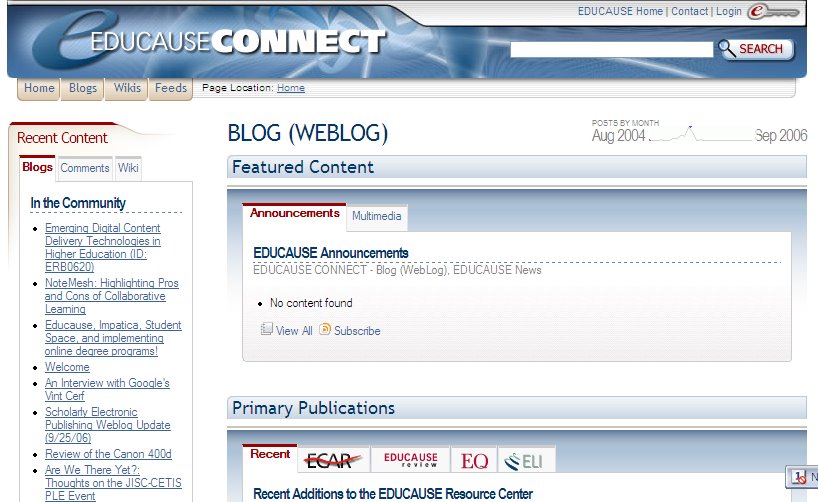
Educause Connect


Educause Connect is a social networking website for people who are interested in all areas of technology in higher education. The site is organized by Tags (they seem to be pre-defined). The tag frequencies as of today were:
  • Open Source (256)
  • Blog (WebLog) (181)
  • EDUCAUSE_ANNUAL (164)
  • Teaching and Learning (159)
  • E-Learning (95)
  • Cybersecurity (94)
  • OSS (Open Source Software) (93)
  • Podcasting (68)
  • Information Systems and Services (63)
  • Policy and Law (59)
  • Instructional Design (58)
  • Social Software/Social Computing (57)
  • Raves (55)
  • Copyright / Intellectual Property Policies (53)
  • CNI - Coalition for Networked Information (51)
  • Rants (48)
  • Events (47)
  • Libraries and Technology (44)
  • EDUCAUSE Conferences (41)
  • Net Generation Learner (36)
  • Intellectual Property Rights (34)
  • Learning Space Design (33)
  • Social Software (33)
  • Blogs (32)
  • Microsoft (30)
Each of these leads to a separate page on which numerous resources are brought together. Major sections on these pages include:
  1. Featured Content and Primary Publications - from several sources, both text and multimedia
  2. Community, including a Wiki, Educause-based Blogs that include the tag word, Jobs, Events, People
  3. Elsewhere on the Net, which has the same categories as Community, but lists information from outside of Educause
All of these sections can also be subscribed to via an RSS feed, which I did for my favorite topics.

I stumbled upon this site through and email from the Educause national meeting that is coming up in October in Dallas, Texas. It looks relatively new, with almost none of the wikis having been started by anyone yet. And the site notes that it will be adding more resources in the future. Very worthwhile way of getting information, news and thoughts on your favorite new media applications in higher education. Check it out!

Kamis, 21 September 2006

Learning activities for educational social software

Learning activities for educational social software

This list of activities is designed specifically for the restricted access Me2U system (a version of the open source social software at elgg.org) at Athabasca University. However, the activities can be used on any social software site, including blog sites (MySpace, etc.), discussion forums, and wikis; and especially the Collaborative Learning Tools that bring many of those together in single environments, and which I previously blogged about. Web-based teaching environments, such as Blackboard and WebCT are also suited to these activities.

The activities are all presented in a very brief manner, which is good because they are not overwhelming -- especially since there are so many activities listed. Instead, these are very approachable and allows an instructor to modify any particular approach to meet their class situation. What is striking is how simple many of the activities are, and how familiar they are for anyone who has been involved in student-centered learning, whether online or in the classroom.

Here is an example of one of the activities:

Activity Name: Jigsaws
Number of participants: two or more
Activities:
  • The instructor divides an assignment or topic into equal parts. Each participant is responsible for learning or completing their part.
  • Each student becomes an expert on their topic and uses their blog on the ME2U web site to teach their section. Other students are encouraged to ask questions and post comments.
Assessment: learners are assessed based on the quality of their presentation of topic and follow-up discussion.
Support technologies: blog, learners can use the “Your Files" area of Me2U to upload files (graphics, text files, etc.) that can be used to enhance instruction.
Suggested time to complete: varies based on course topic


In sum, this website is a useful starting point for anyone interested in using social software in education.