Cari Blog Ini

Tampilkan postingan dengan label posts. Tampilkan semua postingan

Jumat, 26 Juli 2013

Publish Blogger | Website Posts On Facebook | Twitter | LinkedIn | Tumblr Other Social Sites Automatically

In this tutorial i will show you how to Automatically Publish our Blog posts or Website posts on different Social Sites using simple best tricks. If you are not regularly updated your blog post on many of social sites or not share your blog post link on social sites due to less time in your busy life then follow this tutorial and save your time a also share your post on all social site just on click after publishing your post on blogspot or website. And if you can't share your blog post links on social sites then i think you loss a massive traffic from these social sites because social sites are also a big source of too much traffic.

Social Media or Social Sites plays an important role to improve blogger or website SEO. If you have a lot of Subscriber on your social sites account then use this automatically publish posts gadget and get massive traffic from these social sites and improve your ranking in Google Search Engine because Google also like those sites which have more backlinks on other popular or social sites and they also index your blog in search engine quickly and your blog get a lot of organic traffic through these tricks also. For doing this i am going to give you this trick how to use it and publish your posts on different social sites account.

How Use Social Website To Increase Your Website Traffic
Best Blogging Suggestion | Advice For Benefits In Business SEO Professionals

dlvr.it is the best service to publish automatically posts on different social sites and it also free of costs. I am also use this service and feel good. It is also very easy to setup.

Publish Blogger | Website Posts On Facebook | Twitter | LinkedIn | Tumblr Other Social Sites Automatically
Publish Blogger | Website Posts On Facebook | Twitter | LinkedIn | Tumblr Other Social Sites Automatically 1

How To Publish Post Automatically On Different Sites:


Follow below tutorial and done easily without having problem.

Go to divr.it.
After reaching on this website same above first page is shown.
Give your any Email Address and the Strong Password also and click on Signup Button.
Then this type of page is appear on your screen.
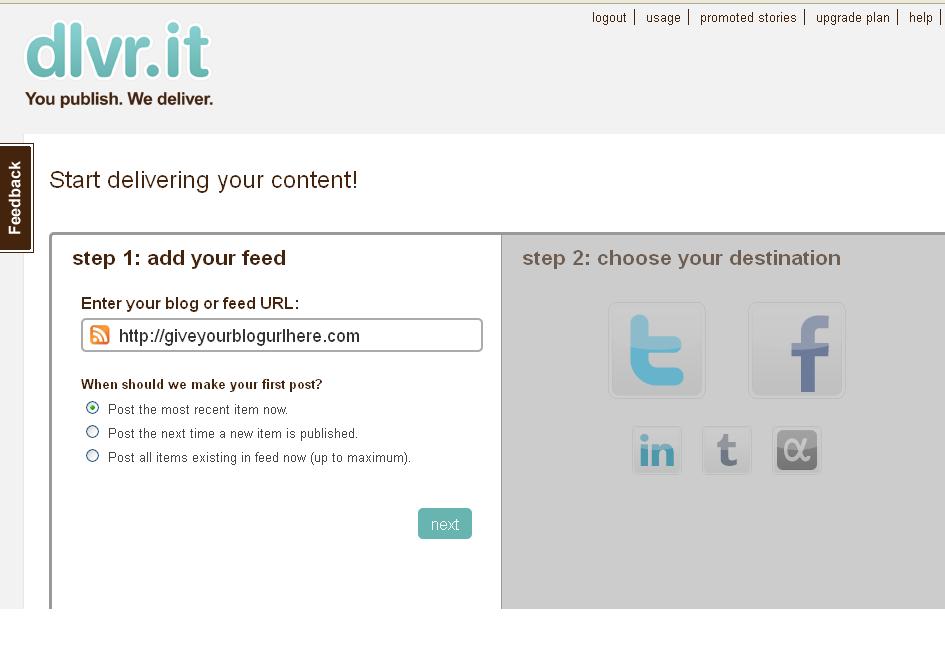
Publish Blogger  Website Posts On Facebook  Twitter  LinkedIn  Tumblr Other Social Sites Automatically 2
Publish Blogger | Website Posts On Facebook | Twitter | LinkedIn | Tumblr Other Social Sites Automatically 2

1) Automatically Publish Post On Twitter:


Here you give your blog link or blog address and click on Next button.
When you press Next button Social Icon Page is highlighted.
Click on Twitter Icon.
And give your account Authorization Access.

Publish Blogger  Website Posts On Facebook  Twitter  LinkedIn  Tumblr Other Social Sites Automatically 3
Publish Blogger | Website Posts On Facebook | Twitter | LinkedIn | Tumblr Other Social Sites Automatically 3

Give your Twitter account Email Address and Password.
Then Click on Authorize App blue button.
When you Press button your blog posts are automatically publish on twitter when you publish your post in blogger same as Google Plus sharing.

How I Can Use Crawlers And Indexing Tool In Blogger
How To Make Backlinks To Other Website To Increas Page Rank


2) Automatically Publish Post On Facebook:


Back To Front Page and Click on Facebook Icon.
Give your Facebook Account Email Address or Fan Page or your blog.
Publish Blogger | Website Posts On Facebook | Twitter | LinkedIn | Tumblr Other Social Sites Automatically  4
Publish Blogger | Website Posts On Facebook | Twitter | LinkedIn | Tumblr Other Social Sites Automatically 4

Also give authorization to Facebook.
And Done.

Now you can repeat this process for all social sites and done easily.
You can also publish your post on LinkedIn or Tumblr.

3) Automatically Publish Post On LinkedIn:


Come Back on front page and click on LinkedIn Icon.
Also give the LinkedIn Account Email or Password.
When you give Email Address then click on blue button Allow Access shown in picture below.

Publish Blogger | Website Posts On Facebook | Twitter | LinkedIn | Tumblr Other Social Sites Automatically 5


 When you press Allow Access button your blog posts also automatically publish on LinkedIn Profile.

4) Automatically Publish Post On Tumblr:


Now do same above tutorial and Click on Tumblr Icon.
Give your Tumblr Account Email or Password and press on login and give access.
Now your work is done.

Do same as last icon i can not give you detail more because this post is already too much long and i am also tired.  If you face any problem then don't forget to comment me and use contact us page for better answer.

Related Articles:


Selasa, 23 Juli 2013

4 Best Tips For Paid Blogging As Career | How To Get A Blogging Job To Make Money

In this tutorial i will discuss some important points and tips which help you to get a Job in Blogging or also tell you how to Change your Blogging Skills into Blogging Career easily. If you want to run a blog or make money then use these below tips and enjoy it.

First i discuss my Four Best Tips or Techniques which give you idea how to get paid blogging.

Four Best Tips Or Suggestion For Paid Blogging As A Career:


Most people World Health Organization have confidence earning cash from blogging have confidence making their own blogs as thanks to promote their existing businesses.

Or they consider blogging on Market Niches, building audiences, so golf shot up with AdSense, or one in every of the sites which can pay them to post product reviews or links to corporations associated with those niches.

1) You'll Be Able To Get Acquired Writing Somebody Else's Diary:


How I Can Use Webmaster Tools Properly For Blogger

But there is another sort of paid blogging which needs nothing of you except that you simply have experience during a bound space, or will do analysis of a high quality that allows you to write as if you are associate knowledgeable.

Many corporations and web site homeowners apprehend that blogs area unit vital selling tools, however do not have the work force to take care of them.

And they area unit over happy to pay somebody to post on their blogs. Freelance blogging, or paid blogging, could be a approach for you to earn an internet financial gain while not knowing a issue concerning secret writing or net selling.

Best Tricks Monetize Your Blogger Blog With Google Ads Increase CPC | CTR And Earning

That is, of course, unless you're asked to diary on secret writing or net selling. however are you able to start on a career in paid blogging?

2) You Must Produce A Sample Diary:


The first issue you must do is build a group of diary posts that you'll be able to look around to prospective employers.

You'll try this by making your own diary on no matter topic can best showcase your writing skills. WordPress is way and away the most effective blogging platform; its free, with associate exceptionally straightforward interface, and lots of themes and plugins to assist you offer your diary knowledgeable look.

It's best to pick out a somewhat impersonal blogging topic on that you'll be able to write instructively and curiously.

4 Best Tips For Paid Blogging As Career | How To Get A Blogging Job To Make Money 1
4 Best Tips For Paid Blogging As Career | How To Get A Blogging Job To Make Money
Your prospective customers can most likely not have an interest in blogging of a private nature, thus keep on with topics like health or nutrition, or cash management, or selling, or parenting.

Write a quick introductory post lease your readers apprehend the aim of your diary, and explaining your interest within the topic. Then begin your regular posts, however continually make certain that you simply will make a copy any statements with analysis if necessary.

Your posts ought to continue topic, and be short enough to carry your readers' attention.

3) You Must Be A Part Of Some Outsourcing Sites:


When you have 10 or twelve posts, started accounts at outsourcing sites like rentacoder.com or elance.com.

These sites act as go-betweens for patrons World Health Organization area unit searching for bloggers and bloggers World Health Organization area unit searching for work. The patrons can post descriptions of what they have, and invite bids.

You can bid on the paid blogging comes that you think that you're qualified, and fasten a link to your diary beside the other data which could offer you a position against competitive bidders.

Most of the patrons can set a most bid, and if you do not assume you'll be able to work for that, don't bid.

4) You Must Build A Name For Excellence:


How Optimize Blogger | Website To Increase Or Make Money With Blogging Tricks

There area unit rating systems on most of those sites, thus once you win a paid blogging job, do no matter it takes to urge the most effective potential rating. it'll pave the approach for additional paid blogging opportunities!


How To Get A Blogging Job To Make Money:


It has been seen that blogging jobs have become a lot of widespread and in demand because the web forever will increase. individuals just like the plan of wakening at 10am, chilling out so writing a web log each one or a pair of hours. It sounds perfect: you are doing very little work for several cash. This unimaginative image individuals portray is wrong. you will end up having to make around ten articles daily at 500 words long. If that sounds simple, attempt to consider} 10 completely different ideas to write down five hundred words about. It's tough. Therefore, once you recognize you wish a blogging job, square measure capable of a doing one and intended enough to begin a 1, you'll then look to the web to search out the proper job for you.

Which Website | Blogger Name Give Best CPC | CTR To Make Money With Google Adsense

Before I begin things off, the most effective manner you'll get yourself a web logging job is to begin a blog yourself. this may assist you in several ways:

Tells plenty regarding yourself. If you've got had the initiative and want to begin a web site from scratch, the blogging employers can check up on you completely different as somebody WHO will severally work.

observe your skills. you will realize that you just do not have the abilities required to accumulate a blogging job. Therefore, through practising blogging as a vicinity time hobby on your own web site can get yourself wont to the idea of blogging. Blogging is completely completely different compared to several jobs out there. From this, it's a good plan to be told from your mistakes on a web log wherever you're able to do mistakes.

4 Best Tips For Paid Blogging As Career  How To Get A Blogging Job To Make Money 2Become a full time blogger. In making a web site, you will have hit the jackpot and made valuable articles that get thousands of views a month (it is feasible to try and do this as a result of I actually have done this myself!) If you discover your web site to achieve success enough, you'll question whether or not you truly want a blogging job or not as a result of your website is also creating enough cash to form yourself freelance. that is the great point regarding beginning a web site. you've got one thing to fall back on that provides systematically safe traffic and revenue.

Once you've got a web site that's obtaining sensible traffic, you'll then accept applying for blogging jobs. The question is, however do I realize the proper blogging job for me?

You need to appear at yourself and also the form of person you're. you wish to grasp that the blogging job you wish you may got to write several several articles regarding. Therefore, ensure you may {write regarding|write on|write of|write|compose|pen|indite} one thing you relish writing about. A negative blogger can shine through to their audience.

The first place you must rummage around for blogging jobs on the web is Google. merely kind the work you wish (e.g.if I needed to be a automotive blogger, i'd kind in 'car blogging jobs') and see what results you get. If you're not made, there's one different place you'll strive wherever you're secure top quality blogging jobs.

Problogger Jobs:


First Check For Blogging Jobs For ProBlogger  http://jobs.problogger.net

Problogger jobs is one amongst the foremost visited sites on the web for bloggers WHO wish jobs. this implies that several websites advertise on the location in hop of finding the proper blogger for the work. With over forty jobs on supply typically, you're bound to realize the proper job. If not, marker the page and return it in a very few weeks time. Blogging jobs come back and endure Problogger jobs plenty.

Once you've got found the proper job, you may then have to be compelled to build a blogging CV. What square measure your achievements? What causes you to right for this job?

  1. You've got a web site.
  2. You've got been writing for a protracted time currently.
  3. You're enthusiastic about the subject.
  4. You're Associate in Nursing knowledgeable within the topic.
  5. You will have expertise within the topic.
  6. You're the proper person for the work.

A word of warning is that you just won't get each job you apply for. Employers should get 100s of candidates for one job decreasing the possibilities of you obtaining it. However, if you do not get several replies to job offers, do not hand over. the proper job can surface for you in time.


Related Articles:


Tricks To Add Simply/Easily/ PayPal Donate Button To Blogger
Best | Latest Blogging Suggestion And Advice For Benefits In Business SEO Professionals
Add Manually CSS Jqeury Drop Down Menu By Replace/Remove Pages On Blogger
Create | Make | Add | Set 404 Error Page In Blogger Blogspot Easily
Simplifying The Practice of Blogging With Software
Use Best Blogger Settings Option Basic For SEO And Others Option Links
Use Language And Formatting | Search Preferences | Others Option Setting In Blogger Blogspot
25 Best Web Blog Directories For URL Submission Quickly Pinging In Google Search Engine 

Jumat, 19 Juli 2013

Best | Latest Blogging Suggestion And Advice For Benefits In Business SEO Professionals

In this tutorial i will guide you how you can choose the best way of Blogging to make money and also make your Business with your blogging professional. I have also write many posts on Marketing or Make Money with Affiliate Programme. If you have interested in these topics then read the article below for more information.

Do you need to be a real Blogger? If you're quite serious concerning this, there are some pointers which will be adopted if you would like to explore blogging as Associate in Nursing income-generating venture. on-line entrepreneurs and marketers ought to bear in mind that whereas web log writing isn't tough, you have got to follow specific tips in computer programme optimization. It needs many processes from low price SEO service that require to be followed strictly simply to makes positive that the articles can take off properly written.

Best | Latest Blogging Suggestion And Advice For Benefits In Business SEO Professionals


The first is to pick a keyword or keyword phrase rigorously. opt for a subject that has one thing to try to to with tips or useful pointers. These are the type of articles that are meant for computer programme optimisation. confirm to target a specialised audience or readers. Avoid too broad topics which will not acquire the interest of consumers. create your articles temporary however pithy that unremarkably ranges from 350 to five hundred words. this can be the quality write-up which will win the fascination of readers. With the help of pros, things are often simply managed and on-line enterprises are often assured of optimum results with their promoting initiatives.

Simplifying The Practice of Blogging With Software
Customise Blogger Default Template To Make Professional Template
Best Blogger Tips And Tricks For My Blog SEO Instantly 

Blogging Platform:


The best SEO service says that you simply have to be compelled to be eager concerning blogs. this can be resembling a cherished possession that you simply are handling for Associate in Nursing extended period. Beginners ought to be prudent in selecting a platform. you'll detect complimentary and paid portals looking on your offered resources. The budget is vital particularly if you're observing blogging as the way of earning cash. the final word objective is to supply traffic. you'll confer with web promoting techniques and on-line advertising to create your web log a lot of convincing.

Once this activity becomes a lot of sustained, you'll proceed to subsequent level and opt for a a lot of subtle advertising strategy. Now, you'll think about the profit side by increasing traffic. don't overlook the very fact that it's necessary to make distinctive content. Duplicates can ne'er be accepted by search engines. Likewise, it's necessary to update your web log frequently. Add content that readers can contemplate valuable to extend the flow of traffic to your web site. you'll publicize your portal by connection social networking sites. Foster relationships since this may be one in every of the foremost effective approaches in earning success through your web log.

Easy | Best | Simple Tricks To Make Money From Youtube | Chitika
How To Increase Index Status In Webmaster Tools Tricks For Better SEO
How I Can Make Internal Links In The Blog Post To Increase Rank 

Benefits for Businesses:


What edges will blogs provide to entrepreneurs? By blogging, a tiny low business can have the chance to share capabilities with an even bigger audience. Besides, web log code isn't tough to use. you just have to be compelled to write down your concepts, create links to resources and publish your web log. The low price SEO service can even share valuable insights. web site homeowners and business managers ought to create the foremost out of blogs if these are used for business functions. Here is one valuable recommendation concerning blogging.

These articles, if literary, will very boost traffic and revenues. Content for computer programme optimisation and will continuously be distinctive, fascinating, informative and original. the essential distinction is that keywords and keyword phrases ought to be strategically placed inside the article body. SEO articles are necessary in serving to qualify potential customers. Readers click your web site primarily as a result of the content of your articles. the most effective SEO service can teach you that by generating sensible quality articles, the website becomes a lot of prestigious and raises the worth among prospective customers.

Related Articles:


The Best Placement of Adsense On Your Blogger Blogspot
SEO Tips How Keyword Take Your Website On Rank
Tricks To Add Simply/Easily/ PayPal Donate Button To Blogger
Get Google Page Rank With In 1 Month By Simple And Easy Tricks
Add | Put HTML Color Code Generator Tool To Your Blogger With Easy Tricks
Add Manually CSS Jqeury Drop Down Menu By Replace/Remove Pages On Blogger
Add | Make About Us Page Widget | Gadget On Your Blog Footer Or Sidebar
Use Best Blogger Settings Option Basic For SEO And Others Option Links  

Senin, 08 Juli 2013

How Optimize Blogger | Website To Increase Or Make Money With Blogging Tricks

In this tutorial i will give you some best tips and techniques which help you to make more money online using Affiliate Programmes or some Niche if you have a good blogger then you just do in minutes by following these tips i have going to start my tutorial with best placement for ads in widget or gadget.

If you're attempting to form cash by Blogging, then you want to optimize your web log for earning cash. WordPress is usually higher than all different blogging platforms. thus if you're new, then you ought to begin blogging with WordPress. It provides you additional feature than the other blogging platforms.

How to optimize your web log to extend your blogging money?

Best Ways Make Money With Blogging Through Google And 5 Profitable Work For Home Tips And Tricks
Best | Easy Tricks To Monetize Your Blogger Blog With Google Ads Increase CPC | CTR And Earning

Use These Techniques:


Chose a horny theme connected along with your niche

Make Money Form Links of Amazon Product to Blogger Posts
Ready to Make Money With Adsense Keywords and Blogger

Change the default theme of WordPress and selected a horny theme. Your theme ought to be connected with the niche of your web log. a decent theme conjointly attracts Search Engines. So, wherever you get free WordPress themes? I've researched for you. Here are some smart WordPress theme supplier sites:

How Optimize Blogger | Website To Increase Or Make Money With Blogging Tricks


Topwptheme.com
Wpkins.org
Freewptheme.net
WordPresstemplates.name


Use Plugins:


The additional helpful plugins you get the additional sure-fire blogger you may become. Plugins are the package that helps bloggers to legalize their blogs simply. Here are some helpful plugins you ought to use.

AdSense Deluxe:


Most web logger use Google AdSense to legalize their blog. however over ninetieth of AdSense publishers aren't able to create tight cash with Google AdSense. AdSense Deluxe could be a plugin that may assist you to position your Google ads in correct places. It permits you to position your Google Ads in your posts. it's terribly useful plugin.

Google Sitemap Generator:


Does one apprehend what sitemap is? If you offer a Sitemap of your web log to Google, then it'll be simple for Google to index your web log on that. Use this plugin; it'll assist you to come up with your sitemap.

Related Posts:


This Plugin can assist you to show your connected post with the present post. It keeps your web log fascinating. once your guests realize another connected posts with the present post, then it'll create them wanting to be your web log. And it's what a blogger need.

Improve RSS visibility:


Every web logger needs the guests keep returning to his blog. the most effective manner for it's to produce obvious RSS Feed button on your web log. If you improve your RSS visibility, you may get additional subscribers. meaning you may increase your blogging cash. you ought to place your RSS button within the finish of every post and conjointly place it on your sidebars.

Use of these techniques to boost your web log and increase your blogging cash. to extend your blogging cash, you would like to follow the techniques of the knowledgeable bloggers. So, it's continuously higher to follow the techniques of the eBook rewritten by Associate in Nursing knowledgeable instead of learning from a trial-and-error method.

Second Best Method Or Tricks And Tips For Blogger Make Money:


A journal is one among the simplest kinds of websites to make and thus one among the simplest ways in which to create cash on-line. once wanting to create cash on the net, you may have to be compelled to produce web site|a web site} and drive traffic thereto site. once your web site starts to visualize an honest quantity of daily traffic, you'll select from a range of monetisation choices to come up with revenue. Once you see however simple it's to create cash blogging, you may marvel to yourself why you probably did not begin doing it a protracted time agone.

Why I Make More Pages On My Blog To Increase Organic Traffic

Blog A Few Acquainted Topic:


Something you may need to stay in mind once attempting to create cash by journalging is to blog a few topic that you just area unit terribly aware of. so as to run a palmy journal, you may have to be compelled to produce plenty of contemporary content. Unless you propose on outsourcing the writing for your journal posts, you may have to be compelled to write your journal topic yourself. the higher you perceive the topic matter, the additional content you may be able to produce for your fans.


Test Many Monetisation Strategies:


Add/Put Banners Ads On Blog To Make Money Easily

There is over a way to legalise your journal. the foremost common strategies area unit with banner ads, affiliate programs, and Adsense. Testing all 3 of those monetisation strategies can alter you to pick out the mix that may manufacture the foremost revenue. Taking the time to investigate your website's traffic can assist you build sound business choices and generate the most important quantity of profit attainable.

Easy | Best | Simple Tricks To Make Money From Youtube Monetisation | Chitika

Promote Your Journal:


It is not enough to simply produce a journal and hope for the cash to begin gushing in. If you really need to possess a palmy cash creating journal, you would like to market your web site. programme improvement, pay per click advertising, and email promoting area unit 3 terrific ways in which to drive traffic to your web site. like the various monetisation strategies mentioned on top of, it's necessary that you just run tests and analyze your blog's information to visualize that variety of promotion produces the foremost quantity of traffic. Also, you wish to pay shut attention to that traffic supply is generating the foremost revenue similarly. If a particular sort of traveller is changing at a better rate, you'll focus your efforts on increasing the quantity of holiday makers you receive through that supply. this can facilitate increase your overall profits and make sure that you create the foremost cash attainable.

Of all of the various ways in which to create cash on-line, blogging is maybe the simplest for a novice to select up and achieve success. making a journal a few subject that you just area unit knowledgeable and captivated with can facilitate make sure you don't run out of contemporary content for your journal. once you've got many posts abreast of your web site, you'll focus your efforts on promoting your journal and monetizing the traffic you receive through a range of strategies.


Related Articles:


Other Tips To Make Money
How Can I Make Earning With My Blogger Blogspot
How I Can Place Adsense Ads Between My Blog Post or Below Title Tags
How I Can Link My Adsense Account With Google Analytic To Check Earning
How I Can Use Crawlers And Indexing Tool In Blogger
How I Can Make One Most Important Tip For SEO In My Blog
Best Blogger Tips And Tricks For My Blog SEO Instantly
How To Increase The Website Ranking From Social Bookmarking Sites 

Selasa, 12 Maret 2013

How I Can Optimize the Post Title Mean My Post Show First

In this tutorial i will show you how to optimize the post title. Optimize Post Title mean first you can see your blog post and then your website title or blog title (your Website Name). If you want to do this then i have a easily tutorial for you now you can easily optimize the post title for search engine ranking. It mean visitor see your post title first and then your URL if you can't do this then your blog title is show first and then your blog post then this thing divert your visitor and they can not visit your site because they can not find his perfect search title. If you want that your visitor not go anywhere then you make these changes.


Now Let's Start The Tutorial:

If you want to optimize the blog title then you have do the following changes which shown given below.
Login to your Blogger.com.
Go Template.
Click Template.
Tip: When ever you make some changes in template then copy your template backup in your computer because if you have done this not correctly then you easily upload this template again on your blog.
When you copy the backup of your template then click Template.
Click Expand Widget.
When you tick the Expand Widget then press CTRL+F to find the below code in your HTML body of your template. When you press CTRL+F then search box is appear in the bottom then you put the code in the box you can easily find it.

 <title><data:blog.pageTitle/></title>

When you find this highlighted code then you can replace it with the below highlighted code and save it. When you add new post then you can see the effect immediately on Google Search Engine. Write your post full in Google Search Engine then you can see how your title is worked.

 <b:if cond='data:blog.pageType == &quot;index&quot;'>                                  
<title><data:blog.pageTitle/></title>
<b:else/>
<title><data:blog.pageName/> | <data:blog.title/></title>
</b:if>


This tutorial is so simply i am also ready many post and blog about the Optimize Post Title but no body write like this i am take to much time about this post mean when i think about which post is publish today then i think about this because it is new feature in blogger. I also make easy and easy for you.

Related Posts:

Social Bookmarking Button Add To Blogger
Hot And Latest Seo Tips For Blogger
How To Added Meta Tag In Your Blogger For Better Optimization
How I Submit Sitemap of My Website In Google Search Engine
How To Embeded Live Streaming On My Blog Or Website

Sabtu, 02 Februari 2013

How To Add Categories Link To Your Blogger Blog

This article is aimed at new bloggers and beginner bloggers although it is suitable for all Blogger bloggers. No changes to the templates are required to add these categories to your Blogger Blog-spot.
Blogger Blog-spot at Blogger.com have no categories only labels. This Blogger Blog-spot tutorial will show you how to manually add categories in your Blogger Blog-spot from you existing labels.

How to Create Categories from Labels in Blogger One easy way to create a categories link in Blogger is to simply rename the title of the labels widget as categories. This solution does not work from me because on this blog i have a huge number of labels and I don't want to show this widget at the top of my sidebar. An easy way round this problem is create a separate categories link. If you look at the sidebar of my blog you will notice that i have several major categories at the top so that a new visitor will find what they are looking for quickly under these broad heading.

Example of Categories Link From Trick Of Blogging Sidebar
To add a categories link to a Blogger Blog follow these simple steps:

1. Now you can Decide what you want to group your articles according to the labels applied and what group heading you want to give to each grouping of articles.


2. For the first category navigate to the individual page of the label you wish to use by clicking on the label in your sidebar. Copy the URL address of this page from the address bar in your browser. For example the URL address of the label of Blogger Tutorial on this site is.

           http://trickofblogging.blogspot.com/search/label/Blogger%20tutorial

3. From the Blogger Dashboard go to Design > Page Elements.
4. Click Add a Gadget in the sidebar and select Links List.
5. In the Configure Link list dialog box that appears paste the link to your label into the new URL box.
6. Enter the name of your label or some alternative text if you wish into the New Site Name text box.
7. Enter Categories as the title.
8. Choose between sort alphabetically, reverse alphabetically or don't sort.
9. Click on Add Link to add the link to your new categories list.
10. Click on Save.

For every label you wish to put into the Categories Link copy the link and add it to the Configure Links List. By the end you will end up with two or more categories in your list.


Jumat, 01 Februari 2013

You Can Easily Manage Permalinks Which Is Search Engine Friendly

For any webmaster of a Blogger Blogspot blog good permalinks will help ensure that your traffic finds your site and is an important SEO consideration. Care needs to be taken to craft permalinks that are keyword rich and accurately describe you post. In this articles I discuss how to manage the permalinks of each post of ensure you make the most of them.

You Now What is Permalinks?
That is your answer. Permalinks are the permanent links to a post page. [Blogger] automatically generates a permalink based on the title of your post. Permalinks provide information to the viewer about the kind of content being pointed to.


Permalinks create permanent links to your Blogger post which are indexed by search engines such as Google. Search engines use permalinks to categories posts. Browsers use permalinks to help navigate to your posts. When you hover over a permalink in your browser you can read the post name in the status bar.

The Permalink for this article is like:

http://trickofblogging.blogspot.com/2013/02/you-can-easily-manage-permalinks-which.html
    
you can also change it like:


http://trickofblogging.blogspot.com/2013/02/manage-your-permalinks.html

Permalink View in Browser:
Tips for working with Permalinks in Blogger Which other Blogging software such as WordPress allows the user to edit permalinks. Blogger has no such feature. For this reason care needs to be taken when creating titles for your post as the permalink generated from the title can't be changed later. The original permalink assigned at the point that the post is created remains the same no matter how many times you change the title of your post.


Another issue with Blogger is that it takes only the first 35-40 characters of your title to create  the permalink so if you have a longer title you can run into problems. My suggestion is that you design you titles carefully if you want to avoid losing the end characters from your permalink. For instance a long title such as the one below would result in a shortened permalink which would lose the important fact that this post is related to working with Blogger.

http://trickofblogging.blogspot.com/2013/02/you-can-easily-manage-permalinks-which.html

Fortunately there is a way around this problem. You will need to publish and then republish as i did with my this post. The method involves creating a shorter title that will adequately summaries the content of your post like (Manage Your Permalink) and then publishing your post. Now go back and change the title to the one you prefer. In this case I changed the title to  "Manage Your Permalink." Now your title can be as long as you like. As you can see mine is longer then 20 characters. The permalinks, however has remained the same even though the title has changed.


Most Recommended Article:

Senin, 21 Januari 2013

Read More Button In Blogger Post With Jump Break Feature

In this Blogger tutorial you will learn how to insert jump breaks into your Blogger posts as an aid to quick navigation for your visitors. Jump Breaks in Blogger provide an easy way to show only a snippet of your whole post on the home page of your blog with a read more link below it for the rest of the story. The advantage of adding jump breaks to your Blogger posts is that your most recent posts for what interest them rather than having to scroll through a whole bunch of long articles. This is definitely a big help for those of us like me who often write articles longer than 500 words. If your posts are short and sweet you may find adding this read more features is unnecessary however you can still apply it when you do have a longer post. Below is an example post which illustrates the Jump Break feature in action.

Example post showing Blogger new jump breaks read more feature.
How to Insert Jump Break (Read More Links) In Blogger Blogspot Blog:
It is easy to insert a jump Break into your Blogger post (Blogspot Posts) at any point of your choosing.
These are two methods of inserting the Jump Breaks in Blogger.
Which method you choose depends on which post editor you are using. If you are not sure which editor your using check this out by going to setting > Basic and Scrolling to the bottom of the page. Under Global Setting you will see a radio Button next to old editor of updated editor.

Select Blogger Editor From Setting: Basic

Step 1:
Insert Jump Breaks - New Blogger Post Editor Only:
In order to use this method you need to be using the updated editor in Blogger or have Blogger in Draft enabled. When creating a new post in the Blogger Post Editor position the cursor in the editor at the point you wish the Jump Break to be inserted. Click on the insert Jump Break icon (currently the last option on the menu).
Click on the Jump Break icon to insert a jump break into a Blogger post. A jagged dividing line will appear to mark the insertion point. A divider line indicates where the jump break will occur.

Publish Your post as Normal.

Step 2:
Insert Jump Breaks - Older Blogger Post Editor Only:
If you are using the old post editor rather than the new post editor you can still insert jump break into your Blogger posts. When creating a new post in the Blogger post editor make sure you are in the Edit HTML mode rather than compose mode.

Insert the following code at the point where you want to break the jump Break to occur:
   
                               <!-- MORE -->


Publish post as normal.

Tips and Troubleshooting:
To Add Jump Breaks to New Posts Automatically:
To save time it is possible to automatically add Jump Breaks to Post with the following method:

Go to Setting > Formatting and Scroll to bottom of the page:
Under Post Template paste <!-- MORE --> into the box and save. The next time you7 create a new post the  <!-- MORE --> will automatically appear. Make sure you are in the Edit HTML mode to See <!-- MORE --> appear.

Add the code to your Post Template  in Setting  | Formatting to automate Jump Break:
To Change the Read More Text:
if you want to change the read more text for something like Read Full Story or Continue Reading You can easily do this by:

Go to Design > Page Element
Edit the Blog Posts Widget

Chang the post page link text Read More Text which appears at the top of the page to your preferred text and save.

Jump Breaks Page Link text can be changed via Blogger Layout Page Element Edit Blog Posts:
To manually add jump breaks to Blogger For Users of Customized Templates. If you are using highly a customized template or have customized your blog posts widget you may experience a problem in getting the blogger jumps break feature to work. In this event you can edit your Blogger Template to enable jumps Breaks.

As a precaution back up your template by downloading full template to your own computer.
Tick the Expand Widget Template Check Box:
Using CTRL + F find the following line of code:

            <data:post.body/>

Directly below this line insert the following code into your Blogger Template:

<b:if cond = 'data:post.hasJumpLink'>
<div class = 'jump-link'>
<a expr:href='data:post.url +"#more"'><data:post.jumpText/></a>
</div>
</b:if>

Jumat, 18 Januari 2013

Other Tips To Make Money

Always write original content. Never Copy another blogger material. Despite being unethical to plagiarize duplicate material is easy to identify and can mean that you get penalized by search engines like Google and run the risk of being banned from Google Adsense. My take on what is know as blog scraping is that if you need to copy what some else has written clearly you don't understand your blog topic well enough and you are probably better to write about something you do know something about.
Your readers will see through you very quickly if you don't fully understand the depths of your blog topic.  

Google Adsense Tips for Blogger Blog-spot:
Add your main keyword to your title tag make sure that your main keyword for each of your 15-20 article from part of your title tag as this is important if your article is to rank highly in search engine results. If you can use two keywords or keyword phrases all the better. You will note that i have added three keyword in my title: make money, Google Adsense and Blogger.


Use the Main keyword in the Body of your Posts:
Make sure you use the main keyword throughout the body of your articles. Ensure that your main keyword appears in the first and last paragraph of your post. There are keyword  density tools available to help you check the ratio of keywords used. 


Make sure you Tag Your Main Keyword:
Tagging your main keyword and other keywords and keyword phrases is also important if readers are to find your articles. Your post will do better in search engine results if they are appropriately tagged. And of course the better your blog is search engine optimized the more traffic your blog will receive and the greater the potential for Google Adsense revenue.

Make sure your Blog is Search Engine Optimized:
Optimized your Blogger Blog by adjusting your title tags and adding meta tags for better SEO.
SEO is important as it generates search engine traffic and building traffic is paramount for high earnings from Google Adsense.

Develop Back-links For Your Blog:
Some of the factors that determine how high your articles will appear in search engines results are back-links and the age of your blog. If you have some good back-links to highly ranked websites your blog articles are likely to be promoted in search engine results. Use blog directories,forums, and comment on other blogs in your niche to build a good range of back-links. Submit your best articles to article directories to generate traffic and links. Also submitting your article to social bookmarking sites like Digg and StumbleUpon can provide back-links and boost traffic at the same time.

Give Your Old Blogger Posts a Keyword Makeover:
Go back through your previous blog posts and identify posts that are not receiving a lot of traffic. Read through them and look for opportunities to rewrite small portions of the content to insert keywords and keyword phrases. Check the tags too and add any keywords and keyword phrases that may help to boost traffic.Identify any posts that need to be rewritten from a slightly different angle and with more scope for the addition of keywords.

 Publish Posts at least 300-450 Words Long Check the number of your articles Google has indexed. Shorter articles can often be missed out particularly if your blog is only recently created. Plus shorter articles do not give enough scope for keywords to target when serving ads.

Optimize Google Adsense Placement, Size and Appearance:
Some locations for Google Adsense work better than others. Make sure you read up on Google Adsense placement as this will ensure you make the most money from your Adsense ads. Some Adsense ad unit sizes are better performers than others. Consider the appearance of your Adsense ad unit. Blend it in or make it stand out the choice is yours.

Kamis, 17 Januari 2013

Ready to Make Money With Adsense Keywords and Blogger

If you are new to blogging with Blogger and wondering how to make money with Adsense this article is for you. If you have Google Adsense on your blog but are disappointed with the revenue generated so far then read on. Even if Google Adsense is performing well for you i am going to give you some tips that will mean you will earn extra money from Google Adsense.

Why are Keywords so important for Blogger?
In order to make money from blogging with Blogger it is important first to understand the significance of keywords and keywords phrases. Via Google Adwords, the sister of Google Adsense, advertisers bid for keywords and keyword phrases. The more frequently these keyword terms are searched for the higher make money or make money online which receive a huge number of monthly searches are to paying keywords and are worth so much to advertisers.
To make money with Google Adsense all you need do once your blog is receiving traffic is sign up with Google Adsense, receive a unique code and then place Google Adsense ads on your Blogger blog. These ad units are targeted automatically based on the keywords and keyword phrases which appear in the content of your posts. You get paid for every click on one of your Google Adsense ads. The amount you get paid is determined by the value of the keywords or keyword phrases used.


As a web publisher it is important to be mindful when crafting your content that you use Google keywords and keyword phrases relevant to your blog's content. This does not mean that you stuff your posts with Google keywords to generate higher Google Adsense payments. In fact having too many keywords stuffing and could mean your blog is penalized by Google. A good rule of thumb is to have 3-5% of your content made up of your blog's keywords. A keyword density over 7% is too high and risks penalty.