Cari Blog Ini

Tampilkan postingan dengan label backlinks. Tampilkan semua postingan

Jumat, 26 Juli 2013

Publish Blogger | Website Posts On Facebook | Twitter | LinkedIn | Tumblr Other Social Sites Automatically

In this tutorial i will show you how to Automatically Publish our Blog posts or Website posts on different Social Sites using simple best tricks. If you are not regularly updated your blog post on many of social sites or not share your blog post link on social sites due to less time in your busy life then follow this tutorial and save your time a also share your post on all social site just on click after publishing your post on blogspot or website. And if you can't share your blog post links on social sites then i think you loss a massive traffic from these social sites because social sites are also a big source of too much traffic.

Social Media or Social Sites plays an important role to improve blogger or website SEO. If you have a lot of Subscriber on your social sites account then use this automatically publish posts gadget and get massive traffic from these social sites and improve your ranking in Google Search Engine because Google also like those sites which have more backlinks on other popular or social sites and they also index your blog in search engine quickly and your blog get a lot of organic traffic through these tricks also. For doing this i am going to give you this trick how to use it and publish your posts on different social sites account.

How Use Social Website To Increase Your Website Traffic
Best Blogging Suggestion | Advice For Benefits In Business SEO Professionals

dlvr.it is the best service to publish automatically posts on different social sites and it also free of costs. I am also use this service and feel good. It is also very easy to setup.

Publish Blogger | Website Posts On Facebook | Twitter | LinkedIn | Tumblr Other Social Sites Automatically
Publish Blogger | Website Posts On Facebook | Twitter | LinkedIn | Tumblr Other Social Sites Automatically 1

How To Publish Post Automatically On Different Sites:


Follow below tutorial and done easily without having problem.

Go to divr.it.
After reaching on this website same above first page is shown.
Give your any Email Address and the Strong Password also and click on Signup Button.
Then this type of page is appear on your screen.
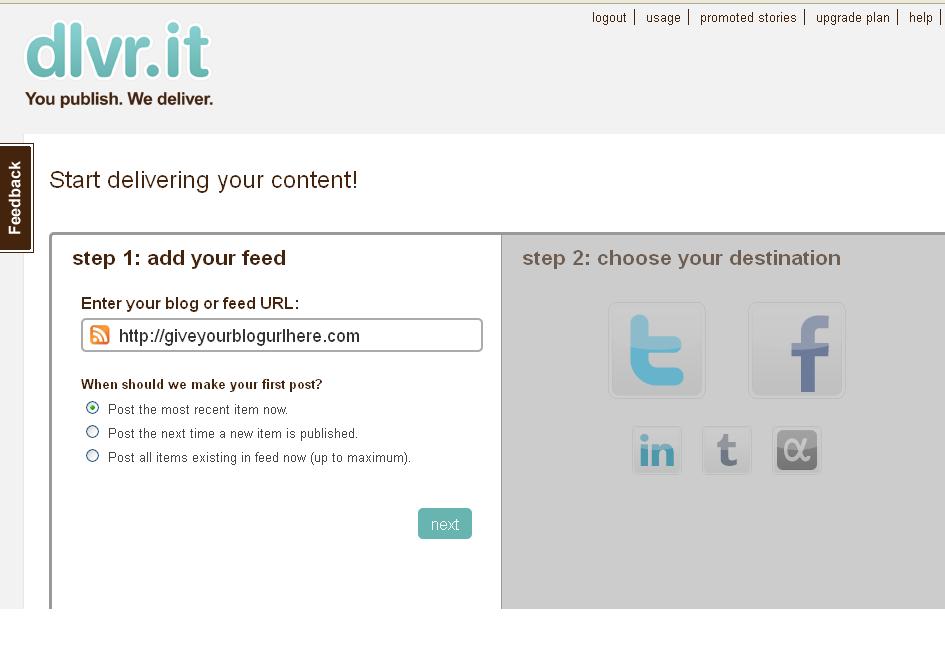
Publish Blogger  Website Posts On Facebook  Twitter  LinkedIn  Tumblr Other Social Sites Automatically 2
Publish Blogger | Website Posts On Facebook | Twitter | LinkedIn | Tumblr Other Social Sites Automatically 2

1) Automatically Publish Post On Twitter:


Here you give your blog link or blog address and click on Next button.
When you press Next button Social Icon Page is highlighted.
Click on Twitter Icon.
And give your account Authorization Access.

Publish Blogger  Website Posts On Facebook  Twitter  LinkedIn  Tumblr Other Social Sites Automatically 3
Publish Blogger | Website Posts On Facebook | Twitter | LinkedIn | Tumblr Other Social Sites Automatically 3

Give your Twitter account Email Address and Password.
Then Click on Authorize App blue button.
When you Press button your blog posts are automatically publish on twitter when you publish your post in blogger same as Google Plus sharing.

How I Can Use Crawlers And Indexing Tool In Blogger
How To Make Backlinks To Other Website To Increas Page Rank


2) Automatically Publish Post On Facebook:


Back To Front Page and Click on Facebook Icon.
Give your Facebook Account Email Address or Fan Page or your blog.
Publish Blogger | Website Posts On Facebook | Twitter | LinkedIn | Tumblr Other Social Sites Automatically  4
Publish Blogger | Website Posts On Facebook | Twitter | LinkedIn | Tumblr Other Social Sites Automatically 4

Also give authorization to Facebook.
And Done.

Now you can repeat this process for all social sites and done easily.
You can also publish your post on LinkedIn or Tumblr.

3) Automatically Publish Post On LinkedIn:


Come Back on front page and click on LinkedIn Icon.
Also give the LinkedIn Account Email or Password.
When you give Email Address then click on blue button Allow Access shown in picture below.

Publish Blogger | Website Posts On Facebook | Twitter | LinkedIn | Tumblr Other Social Sites Automatically 5


 When you press Allow Access button your blog posts also automatically publish on LinkedIn Profile.

4) Automatically Publish Post On Tumblr:


Now do same above tutorial and Click on Tumblr Icon.
Give your Tumblr Account Email or Password and press on login and give access.
Now your work is done.

Do same as last icon i can not give you detail more because this post is already too much long and i am also tired.  If you face any problem then don't forget to comment me and use contact us page for better answer.

Related Articles:


Rabu, 24 Juli 2013

Best | Top Blog Marketing Tips Given To Successful Blogger And Free Tips Marketing Your Blog

In this tutorial i will discuss best points which give you better idea of Marketing Your Blog and also Best Tips To Marketing Successful Blogger. Blogger Blogspot is also same thing and when you want to by best Name for your Niche or Blog then first you decide about name to get better results. In my opinion any type of blog but must unique.

Which Website Name Give Best CPC | CTR To Make More Money
First i tell you in my below article words Journal means (Blogger or Blog) for better results means i want to fully optimize my post that's why i not use Blog commonly.

Everyone United Nations agency encompasses a journal desires it to achieve success and even have plenty of internet traffic. you wish your readers to be excited concerning your content so they keep coming to go to. There area unit 3 promoting tips that you just will to try to to to assist you be a booming blogger. To be a booming blogger, you would like to own a RSS Feeds, update on a regular basis and inquire into different relevant blogs.

Marketing Tips And Techniques Using RSS Feed:


When you begin a replacement journal, nobody is aware of concerning it unless you truly provide them the link. you truly ought to do some promoting to let folks grasp that you just exists. There area unit some simple ways in which to induce the word out concerning your new journal. the primary issue you ought to do is about up a RSS feed. you wish to permit RSS feeds to be taken from your journal. RSS feeds area unit a good means for promoting and obtaining your journal out there. you ought to embody a contrivance on your sidebar therefore folks will register for your RSS feed.

Best Ways Make Money With Blogging Through Google 5 Profitable Work
Easy | Best | Simple Tricks To Make Money From Youtube | Chitika


Marketing Tips And Techniques Using Update Journal Often:


The second tip is to update your journal often and on a regular basis. If you've got committed to change your journal daily, then update it daily. The minimum is to form a replacement journal post once every week. If you develop a regular pattern, then your readers can begin to return back to your Website probing for new content. I will tell you from personal expertise that you just have to be compelled to be consistent. If not, you'll be able to begin to lose your audience.

Marketing Tips And Techniques Using Journal Commenting:


Best | Top Blog Marketing Tips Given To Successful Blogger And Free Tips Marketing Your Blog

Another way to induce a lot of readers to your journal is to inquire into different relevant blogs. you ought to realize blogs that area unit like yours. browse the posts and create relevant helpful comments. do not simply say "Nice journal post". most of the people permit you to go away the URL of your journal within the comments. In some cases, this can conjointly produce a backlink to your journal. If your comments add worth then folks can return to your journal to search out out a lot of concerning you. There area unit many tools that you just will use to search out relevant blogs. 2 of those tools area unit Technorati or the Google journal search tool.

How To Make Backlinks To Other Website To Increas Page Rank

Now below is my second part of my article which tell you how to Marketing Your Blog for better optimization or make money.


With many blogs being made each day, it's a mystery to several web loggers a way to build their blog stand out. it's very easy. folks wish to browse effective content, and with smart content arrives ad revenue. Well, perhaps it's not that abundant straightforward. you've got finally loosed the secrets of flourishing web log promoting. Do note that these aren't assured to change of magnitude your click-through ratios and that they won't bestow smart fate to you or your adverts. However, the following pointers ought to gain for your web log and create it additional simply accessible, easy and additional content-modified.

Best | Easy Tricks To Monetize Your Blogger Blog With Google Ads

A web log directory categorizes and organizes blogs in such the way that anyone will verify blogs associated to any topic simply. you'll be able to notice a web log directory with connected keywords or dig broad within the directory to zero in to the category that you just area unit checking out. it's very similar to the web site directories rather like Yahoo! And Dmoz.

Acquiring an inventory in an exceedingly best web log directory ascertains you of a good quantity of subject matter in terms of the exposure that your web log gets. once anybody explores for your connected searches or keyword a category during which you're registered, they're going to notice your web log. you'll further notice a permanent link back to you web log.

Articles promoting area unit what all serious blogger ought to comprise in its promoting strategy. All the tampered web marketers take reward of this vehicle, why? simply since it works and acts upon within the long-term. Beginners usually area unit unconscious of the ability article promoting admits and that is probably why they fall inadequate of properly exploitation it. create a habit of posting a minimum of 2 of your higher written articles every week or each 10-12 days to article directories. you are doing not need to suggests what you've got written already and announce on the web log. If you'd ideally wish to keep your well composed stuff to your web log, no problem, simply retell the data, alter a trifle, and supply it a singular bit.

Optimize Blogger Website To Increase Or Make Money With Blogging Tricks

If you're a little business owner with a web site, the good thanks to change of magnitude your organic traffic is to jot down compelling and fascinating content that's focused towards your target market.

If your content is best, as compare to alternative web sites can after all begin linking to your website. The search engines promptly develop on this and simply offer your web site additional "authority." Higher authority suggests that additional directed free traffic approaching your manner.

This theme involves submitting your computing machine to superior internet directories that review manually every web site. In most of the cases, you'll bear a fee for the reviewing method. many folks can tell you that the Search Engines don't type paid links and devalue them.

Bloggorati.com could be a distinctive web site providing wondrous platform for web log directory submission [Bloggorati.com]. It guarantees to supply large traffic to individual or business blogs. To fancy the many edges of quality web log directory submission and drive organic traffic to a web site, webmasters will visit promoting Your web log [Bloggoratic]


Related Articles:


Ready to Make Money With Adsense Keywords and Blogger 
SEO Tips How Keyword Take Your Website On Rank
How Can I Make Earning With My Blogger Blogspot
Best Blogging Suggestion And Advice For Benefits In Business SEO Professionals
Use Language And Formatting | Search Preferences | Setting In Blogger Blogspot
Simplifying The Practice of Blogging With Software
Customise Blogger Default Template To Make Professional Template
Get Google Page Rank With In 1 Month By Simple And Easy Tricks

Kamis, 30 Mei 2013

Add | Put | Embed Three Or Four Column Footer Widget/Gadget In Blogger Blogspot

In this tutorial i will show you how to easily add Three Column Footer Gadget in blogger. Best blogging tricks are always easy and customize or make many changes easily. To make Blogger beautiful or Good Looking we should spend a lot of time on our blog or website. If you want a lot of visitors daily on your blog or in these visitors you want some visitors are returning people then put all your focus on your blog looking means make best and stunning blogger. When some one visit your blog then he/she just shocked to see your blog and say "What a Nice Blog". Now i am going to tell you how you can easily add the footer widget/gadget in your blog bottom easily with simple tricks. When ever you start blogging your focus should be on SEO, Good Looking Blog, Best Internal Linking, Best Google Page Rank, Good Strength Of Backlinks and Best Alexa Ranking. I have write many post on Manage Page Layout for better blog looking. If you want to also make beautiful blog then start with first adding widget or gadget in blog then add this below footer widget in blog it is the last step of manage page layout.
Add | Put | Embed Three Or Four Column Footer Widget/Gadget In Blogger Blogspot

Now Let's Start The Four Column Footer Adding:


If you want to add the four column footer in blog layout by adding gadget then work according to below tutorial.

Go to Blogger.com.
Go to Template.
Go to Edit HTML.
Now first download your full template in your computer before make changes any time.
Press Ctrl+F in HTML body box. Like i tell in article of Handle New Interface Of Blogger HTML Editor.
Paste this below Code in the search box and press enter.

]]></b:skin>


Now paste the below CSS Code just above/before this code.


/* -----   LOWER SECTION   ----- */
#lower {
       margin:auto;
       padding: 0px 0px 10px 0px;
       width: 100%;
       background:#333434;
} 
#lower-wrapper {
       margin:auto;
       padding: 20px 0px 20px 0px;
       width: 960px;
}
#lowerbar-wrapper {

     border:1px solid #DEDEDE;
       background:#fff;
       float: left;
       margin: 0px 5px auto;
       padding-bottom: 20px;
       width: 32%;
       text-align: justify;
       font-size:100%;
       line-height: 1.6em;
       word-wrap: break-word; 
       overflow: hidden;
}
       .lowerbar {margin: 0; padding: 0;}

       .lowerbar .widget {margin: 0; padding: 10px 20px 0px 20px;}
.lowerbar h2 {

      margin: 0px 0px 10px 0px;
       padding: 3px 0px 3px 0px;
       text-align: left;
       color:#0084ce;
        text-transform:uppercase;
      font: bold 14px Arial, Tahoma, Verdana;
       border-bottom:3px solid #0084ce;
}
.lowerbar ul {

      margin: 0px 0px 0px 0px;
      padding: 0px 0px 0px 0px;
      list-style-type: none;
}
.lowerbar li {

      margin: 0px 0px 2px 0px;
      padding: 0px 0px 1px 0px;
      border-bottom: 1px dotted #ccc
}

Save Template.
You have done.

Improve Content Keywords Significance
Use Custom Robots Tags Selection Blogger For SEO
Best Blogger Tips And Tricks For My Blog SEO Instantly


Add Lower Wrapper Lower Bar Widget From Lowerbar1 to Lowerbar 3 or 4:


By adding Lower Wrapper and Lower Bar we see three or four Add A Gadget Links in the page layout where you can easily add which you want like Blog Author Info, Blog Followers, Google+ Followers and many more option. Now we are going to add this Gadget in template and then go to Layout to check this out.

Go to Blogger.com.
Go to Template.
Paste below tag in search box and find.

</body>


When you find this above tag then copy below code.
Paste below code just above/before this </body> tag.


<div id='lower'>
<div id='lower-wrapper'>
<div id='lowerbar-wrapper'>
<b:section class='lowerbar' id='lowerbar1' preferred='yes'>
</b:section>
</div>
<div id='lowerbar-wrapper'>
<b:section class='lowerbar' id='lowerbar2' preferred='yes'>
</b:section>
</div>
<div id='lowerbar-wrapper'>
<b:section class='lowerbar' id='lowerbar3' preferred='yes'>
</b:section>
</div>
<div style='clear: both;'/>
</div> </div>


Again Save Template.
Your Work is finished and your three column footer is ready for work and if you want to four footer then simply add below code above last two highlighted red background lines correctly.

Make Money Form Links of Amazon Product to Blogger Posts
You Put Chitika Ads to Blogger Blogspot with Simple Steps
Easy | Best | Simple Tricks To Make Money From Youtube | Chitika


<div id='lowerbar-wrapper'>
<b:section class='lowerbar' id='lowerbar4' preferred='yes'>
</b:section>
</div>


And give the lowerbar4 name with your choice number.

Changes And Customization For Footer Column Widget By Color:


If you want to customize or change the color of background text and width and many more then generate the color by using below Color Code Generator Tools and use according to above tutorial.


Color Code Generator Tool:


Change the Background color of your desire by replace the #333434
Change the Widget Width with your desire by replace the  960px 
Change the Background 2 color by replace the  #fff
Change the Widget Width 2 by replace the  32%
Change the of Text by replace the #0084ce 
Change the  Font of Widget just add desire font font: bold 14px Arial, Tahoma, Verdana;
border-bottom:3px solid #0084ce 
Change the Bottom Border Dotted by replace the #ccc.

Now save template and go to layout and check in the footer of your Page Layout you will see three or four column just add which you want and your blog make perfect and beautiful.

Related Articles:


Ready to Make Money With Adsense Keywords and Blogger
Affilate Banner Put Below in your Blogger Post
The Best Placement of Adsense On Your Blogger Blogspot
How To Increase The Website Ranking From Social Bookmarking Sites
How to Verify My Blogger Blogspot in Webmaster Tools
How Use Social Website To Increase Your Website Traffic
How to Remove 404 Errors in Blogger Blogspot
Why I Make More Pages On My Blog To Increase Organic Traffic

Senin, 13 Mei 2013

Get Google Page Rank With In 1 Month By Simple And Easy Tricks

Google Page Rank (PR) is very important for any blog or website worth and make page rank is also very tough in those days. But If you right content full post and use better keywords then you got easily Page Rank. If you achieve to make 10 External links or Inbound links then your blog get easily Page Rank 1 or If you get 50 backlinks by related content keywords then blog will get PR 3 easily. This tutorial is also teach you about how to easily get Google PR by using Internal Linking, External Links, Inbound Links, Backlinks what you say these are all work as same type to get Page Rank. If you are blogging with full passion and work on your blog or website daily to get rank in Google Search Results then you should first make best internal linking with in your blog post and external linking on Social Bookmarking Sites and also Join the Blog Directories to tell about your blog existence to Google Search Engine.


Many people are create Thousand of Blogger or Website Daily and start blogging on their new blog but they can't achieve the better position in search engine. I also handle this situation when i start blogging on my blog. I get Better Alexa Rank but yet not get Google Page Rank but coming days i definitely achieve that point. Because recently i get information about Google Page Rank then i thought i want to share with you first and then work on this.

I get 27 Backlinks easily with in one month and when Google Update my website content or worth after Three Months then i get definitely Page Rank 2.

How To Get Google Page Ranking:

The main focus of this post is on increase the Google Page Ranking of your blogger blogspot. If you want to gain Page Ranking then your mission is to get Index Your Blog/Website To Google Webmaster Tools or using best and latest SEO Techniques. First make site with search engine optimization and Search Engine Friendly.

Hot And Latest Seo Tips For Blogger
How To Increase Index Status In Webmaster Tools Tricks For Better SEO
You Can Easily Manage Permalinks Which Is Search Engine Friendly

Get Google Page Rank With In 1 Months By Simple And Easy Tricks

SEO Easy And More Reliable Techniques:


I read number of SEO techniques but i put some important and most recently updated techniques on my blog and get Alexa Rank With In 3 Months nearly 50,0000 which is better for me. If you want also then apply Blogger SEO Tips And Techniques On Your Blog immediately and get beautiful rank of your blog by using Meta Tags, Using Content Keyword Significance, Keywords Phrases, Improve Keyword Density, Submit Your Blog Sitemap To Major Search Engine and you are done. I have all these tips in links below. One by One check it out and make changes and then reply me what you feel now by getting organic traffic.


What Is Internal Linking And Inbound Links To Get PR:


Internal linking is very important and if you want to index your blog immediately then take a load to Google Search Engine and it become index your site quickly. Google Bot crawl those site first which has deeply linking and content full post and internal linking also take more Pageviews of your blog and that's very important for every blog to decrease Bounce Rate (Visitor Left the website/blog on first page or home page). To make internal linking in your blog or inbound link go to below related post and my best tips to submit your blog to High Ranking Social Bookmarking Sites.

Related Posts:

You Should Make Internal Links And Backlinks and Increase in Blogger Blogspot
How To Increase The Website Ranking From Social Bookmarking Sites
How Use Social Website To Increase Your Website Traffic
How to Remove 404 Errors in Blogger Blogspot
How I Can Use Crawlers And Indexing Tool In Blogger
How I Can Get More Pageviews Using Social Bookmarking.Com
How I Can Boost Traffic With Targeted Country On Blogger
Now Ready To Increase Google Page Ranking And Alexa Ranking

Kamis, 25 April 2013

Easy Trick To Add Twitter Updates Gadget To Blogspot Blogger

In this tutorial you get trick to how add Twitter Widget to Blogger.com. Blogging is so simple if you want to add twitter followers gadget to blogspot then visitors attract to your blog. If twitter is used regularly then hundred of visitors you can daily get by twitter page. I have many tricks and methods of adding a Twitter updates widget/gadget to blogspot. Twitter is one of the best social working site to get a lot of visitors by just update your blog daily on twitter page. Twitter is also high ranking website and if your blog twitter page is available then your one backlinks is already make on search engine and when someone write your blog name on search results then your blog with twitter page is immediately appears on search results.

I know if you are new comers to Twitter then you feel it is very tough work but i tell you that it just very easy and you can easily do all of these easy tricks. First you sign up for Twitter on Twitter.com.

How I Can Boost Traffic With Targeted Country On Blogger
Easy Tricks To Get Lot Of Visitors On My Blogger
How To Increase Index Status In Webmaster Tools Tricks For Better SEO

Now Easy Tips And Tricks To Add Twitter Updates Gadget For Blogger.com:

I discuss easy tricks or method today but some points or tricks about Twitter Updates are discuss in next posts. The Twitter Updates gadget/widget are give a basic gadget only and if your are not too bothered with styling. This gadget/widget uses the styling from your blog based on the Blogger template you are using because we cannot changes there appearance at this moment. If you are interested more latest and fancy Twitter Updates Widget/Gadget then keep visiting my blog till that post which is about Twitter Updates Widget/Gadget.

Let's Start The Tutorial Adding Twitter Updates Gadget/Widget To Blogger:

  • Go to Blogger.com.
  • Go to Layout.
  • Click Add a Gadget/Widget.
  • Click on More Gadget/Widget and select the Twitter Updates Gadget/Widget for blogger.
  • Blogger changes their interfaces daily then don't worry if you not find it there then try to looking in Featured or Popular.
  • Enter your Twitter page name which you can make with your blog name.
  • Select the number of updates to appears on your blog twitter updates gadget/widget.
  • Click Updated to Preview.
  • Click Save Changes.

Your work is done now check how your trick is work.

Related Articles:

How i Can Put Facebook Like Button in Blogger Post
How I Make My Blogger Good Looking Best Tricks
How To Make Blogger Header Image
Live Traffic Counter Put In Your Blogger Blogspot
Avoid From Six Very Common Blogger Mistakes


Sabtu, 20 April 2013

How To Increase Index Status In Webmaster Tools Tricks For Better SEO

The tutorial is about how to index your blog very quickly on search engine because index pages are first appear in search results. If some one make a blog or website and submit sitemap to Google Webmasters then your pages are index by Google and appear in search results but if you have not submit your blog sitemap then your pages are not crawl or index by Google Search Engine or Google Bot.

What Is Mean By Index Status In Webmaster Tools:

In webmaster index status is how many pages or Url is index by Google of your blog. Their are lot of
tricks to index your pages quickly in search engine and get more visitors on your blog with organic search but if you have original content on your blog. Webmaster tools is very important to apply SEO on your blog or website like to make sitelinks, internal links, backlinks, authorship, sitemap, verification of blogger or website, and targeted country to get tons of visitors from targeted country.
How To Increase Index Status In Webmaster Tools Tricks For Better SEO

How To Index Our Blog Pages Or URL Immediately:

If you want to index your pages or URL immediately in search engine with in one or two days then i tell you about very important tips or tricks to do so.

Now Lets Start Tutorial To Index Your Blog Quickly:

When you are going to publish your post first check your time and write your post which you want to publish when post is published then submit your sitemap in webmaster tools. If you have not submit sitemap of your blog then first submit blog sitemap in webmaster tools by help of below links which tell you about how to submit blog sitemap.

Sitemap of Your Blogger Is Submitt to Major Search Engine
How to Verify My Blogger Blogspot in Webmaster Tools 

When you submit your blogger sitemap to webmaster tools then take time about 6 hours and publish new post on your blog and you should publish about 3 to 4 post daily to your blog and submit your blog sitemap one by one and your pages or blog is index quickly on search engine and you get organic visitors about 5 posts on your blog if your blog is index.

Tips and Troubleshooting:

If you want to write 5 to 10 post daily then doesn't matter you can do this also but remember one thing submit your blog URL sitemap one by one means when your write post 1 then submit your sitemap in webmaster tools and after write your post 2 also submit sitemap like this you can publish to many post in a day to index your pages quickly.

Related Articles:

Add Webmaster Tools And Google Analytics to a Blogger Blog
Avoid From Six Very Common Blogger Mistakes
Create Internal Links And Backlinks To Different Blogger Blog Post
Method of Getting Free Backlinks From Your Blogger Or Website In Simple 5 Trick or Tips
How Use Social Website To Increase Your Website Traffic  

Jumat, 19 April 2013

Easy Tricks To Get Lot Of Visitors On My Blogger

The tutorial is about perfect tricks with blogging to get more visitors on your blog by make internal links or backlinks and also SEO to do with your website or blog. When we start blogging with our blog or website our aim is to make perfect blog which get Google Page Rank or Alexa Rank. It is very important some one to get every type of rank of blog. Visitors are the main source of earning with Google Adsense or Affiliate Programme. My suggestion is if you make a blog then first choose better name of your blog which you want to make or try to make small or remember able blog name. Blogger.com is the best way to make money online with Google Adsense when you make your blog and you get daily 100 visitors to your blog which is organic or original then your chance is to much high to get approval from Google Adsense Account easily. One thing is always publish original or content full post.

Get More Visitors To Your Blog With SEO:

Visitors are the main thing to make earning with our blog if visitors are not visit your site or blog then you can't make a little peny to get visitors i have some beautiful post which is very effective and take your website or blog on rank. If you want to make your blog perfect then you make some changes on your blog background to do SEO (Search Engine Optimization). For Google search engine i am given some links to make these changes.

Hot And Latest Seo Tips For Blogger
You Should Make Internal Links And Backlinks and Increase in Blogger Blogspot


If you can easily do these changes then your blog get rank easily and perfect blog is ready for you to get more and organic visitors. Organic visitors means those visitors who visit your site by search results and its very important to get approval form Google Adsense.

All In One SEO Pack For Blogger:

Easy Tricks To Get Lot Of Visitors On My Blogger
SEO is one of the best way to get visitors form search engine and it also important for blog or website. backlinks or internal links or your website or blog then your website get to many visitors daily. When i am start blogging then i have 10 post and only 100 visitor in Two months but when i apply these SEO pack for blogger on my blog then i feel big change on my blog and i have get daily 500 visitors and 800 pageviews daily. It is not stop on daily basis it increase and increase and also get daily new rank in Alexa or Google. I suggest you also use those tricks which i collect for you and i give these tricks in links below check this out.
If you do SEO with your website or blog and make

SEO Tips How Keyword Take Your Website On Rank
How To Increase The Website Ranking From Social Bookmarking Sites
How Use Social Website To Increase Your Website Or Blog Traffic
Why I Make More Pages On My Blog To Increase Organic Traffic


Tips and Troubleshooting:

If you want to get 1000 visitors daily then make strong SEO and backlinks of your website or blog. If you also make internal links then your visitors and pageviews also increase day by day because internal linking work but take time and when its work then your rank and visitors increase and after 1 years your blog get rank nearly one lac so keep blogging and don't forget comment me.

Related Posts:

How I Can Optimize the Post Title Mean My Post Show First
How I Can Make One Most Important Tip For SEO In My Blog
How To Make Backlinks To Other Website To Increas Page Rank
How I Can Make Internal Links In The Blog Post To Increase Rank
How I Can Get Approval From Google Adsense My Blog Or Website

Minggu, 07 April 2013

How I Can Make Internal Links In The Blog Post To Increase Rank

This tutorial is about to make internal links in between post. Blogging tricks are very important to increase Google rank when you optimize your blog for better rank then this trick is very effective. I have already write very much post related to this problem some people comments me how we increase Google rank i really appreciate them and tell him use this tutorial to solve this problem.


When we optimize our blog for better Search Engine Optimization then these links very effective but
i am going to tell you about best and simple way to create internal links. Which also increase your page rank and Alexa rank.

When i start blogging then i realize the internal links are best way to make your blog perfect and also get more pageviews and original traffic from Google. Because Google increase rank those website which have more internal links and backlinks.

Now Let's Start The Tutorial:

When you start blogging then keep in mind you should make more internal links and backlinks. The best way to increase internal link is repeat your post in the blog post which you want publish. When you are going to publish your post then save your links which you have already publish. Save links on your notepad file and when you going to publish your post give your link in these post which you are going to publish.

How To Make Internal Links:

Go to Blogger.com.
Go to New post.
Write your post which you want to publish now.
Pick up your save links and put then in your post.
You can easily put internal link your post by using the link tools.
When you are writing your post pick link which are related to your post which you are going to publish.
Give the perfect title of your post.
When your doing this then you have see to links Open in New tab and Add "rel=nofollow'.
Tick the 'rel=nofollow' because Google crawler don't save duplicate content of your post.
When you done this then submit your blog post in sitemap in webmaster tools.

Submit Sitemap

When you submit sitemap then your blog is perfect and you done this with your all blog post later.
Your blog is get rank in one or two months it also take three months.
Your blog is ready to get more pageviews and original traffic from Google.

Related Posts: 

How To Make Sitelink For Better SEO
Create Internal Links And Backlinks To Different Blogger Blog Post
How I Can Remov Or Fix Broken URL For Google Adsense Crawler
How I Can Write 100% Original Content For Blogger
How To Make Backlinks To Other Website To Increas Page Ranka

Selasa, 21 April 2009

Backlinks - New Blog Feature

Backlinks have now been enabled on the Etsy Twitter Team (ETT) Blog, making it easier and faster to share articles, news about the Shop of the Week, ETT Treasuries and more, on your own blog.

What are backlinks? They are posts on a person’s blog which contain a link to an original post or article on another blog. They work much the same way that Re-Tweeting does, sharing the original article with your readers. The more backlinks to a blog, the higher it will rise in the search rankings, the more viewers and followers it will get, and ultimately, the more exposure it will generate for the team and all of its member shops.

So creating a backlink to a post on the ETT blog is a great way to help everyone on the team, get your participation credits for the month, and solve the “what am I going to post on my blog today?” dilemma all at the same time!

First, scroll down to the end of the blog post, and next to word “Comments”, you will see “Links to This Post”.


Click on"Links to This Post" and then on "Create a Link", and it will pop up a screen with the link code and generate a new Blogger blog post with the original link in it.


This window is the same as if you had clicked "New Post" from your Blogger dashboard. You can add more writing to it before posting. Then click publish and you are done!

If you have more than one blog, you will see a drop-down list in the upper right hand corner that allows you to select which blog to use.

For non-Blogger blogs, the link code provided will allow you to backlink to the original post.

The backlink will only be logged if you use this process and not if you just make a link to the team blog from your blog. Having the links logged this way helps our search results. In addition, when you create a backlink, your link shows up on the team blog at the end of the post you linked to. So it's more advertising for your blog!

Please use this new feature, as it will help get more views to our team blog! Try it! You might like it! Thanks!