Cari Blog Ini

Selasa, 14 Mei 2013

Add | Put | Embed Google Map Between Blog Post Blogger Tricks

How to add or put Google Maps inside the Blog post or Website easily and simple tutorial is discuss below. If you want to put it on your blog sidebar or below Gadget/Widget under all post then you can do also this by easy tricks. Now let's start our tutorial. Why i choose this post to write today because my Blog Member ask me i am so worried how i embed my own home address Google Map on my blog to tell about my blog visitors about me properly then i promise that i will definitely write post on How To Embed Google Maps Inside Blog Or Website. Now go below tutorial and do easy tricks and enjoy.

How Easliy/Simple To Manage Page Layout In Blogger Blogspot
How I Make My Blogger Good Looking Best Tricks
Easy | Best | Simple Tricks To Make Money From Youtube | Chitika

How To Add Google Maps Between Or Inside Blog Post:

Google Maps in between post is embed easily but why we put it inside our blog post i give you example if you are Business Man and a Marketer Shopkeeper and you want to tell about your shop address or your office address to someone to contact with you after seeing this Blog post map easily then it is very important features of Google.


Method To Put Google Map Inside Blogpost:

Add | Put | Embed Google Map Between Blog Post Blogger Tricks

  1. Go to Google.com.
  2. Write Google Map in Google search box you can also see below picture/image to clarify.
  3. Now click on first heading Google Maps.
  4. Now write the correct address in address bar which you want to show in blog post map.
  5. You can also use Satellite Maps by selecting it.
  6. Make changes which you want with your map.
  7. Now copy the code which is available in two form HTML Form or URL Form.
  8. You can also use or paste this link in Email Or IM.
  9. Also you can Short URL by checking the box. See in picture with full detail.
  10. Now When you find the desire Address Map then copy the URL Link short or full its up to your.
  11. You can also paste it with in post by adding link option and when some one click on this link it directly go the map which you have already select.
  12. Now in between blog post you also easily do copy the HTML Code Form.
  13. Add | Put | Embed Google Map Between Blog Post Blogger Tricks 2
    Add | Put | Embed Google Map Between Blog Post Blogger Tricks 2
  14. Paste it on Notepad file and follow the below small tutorial.

Easy Trick To Add Twitter Updates Gadget To Blogspot Blogger
How To Easily Make Money With Affiliate Marketing Blogger

    HTML  Code Form In Blogspot:


    • Go to Blogger.com.
    • Create New Post.
    • When you write your post.
    • Go to Compose Or HTML Button which is located on left top side of post page also show in image.

                   
    Add  Put  Embed Google Map Between Blog Post Blogger Tricks 2
    Add  Put  Embed Google Map Between Blog Post Blogger Tricks 2

    • Click HTML Button same as in pictures.
    • Where you want to paste your Google Map means in the above post section, between post section or below post section then just find this highlighted tag  <br /> and paste your Google Map HTML code above/before this tag and return to Compose Form.
    • Check now your Blog post Google Map is embed in your post.
    • Now Publish your post and enjoy.

    Related Articles:

    Get Google Page Rank With In 1 Month By Simple And Easy Tricks
    Now You can Replace Old Style Templates in Blogger in new one
    Social Bookmarking Button Add To Blogger
    Live Traffic Counter Put In Your Blogger Blogspot
    Read More Button In Blogger Post With Jump Break Feature
    How To Add Facebook Page On Blog To Attract More Visitors

      Cara mengidentifikasi akun Twitter Terverifikasi

      Cara mengidentifikasi akun Twitter Terverifikasi

      » Berikut ini adalah langkah-langkah untuk mengidentifikasikan apakah sebuah akun twitter telah terverifikasi secara resmi oleh pihak Twitter
      • Lencana terverifikasi akan muncul di kanan atas halaman profil pengguna tepat di atas nama, lokasi, dan bio.
      • Jika lencana terverifikasi muncul di mana saja di halaman profil pengguna (seperti avatar atau latar belakang), itu bukanlah akun yang terverifikasi.
      • Lencana terverifikasi tidak dapat digunakan kecuali disediakan oleh Twitter. Akun yang menggunakan lencana sebagai bagian dari gambar profil, gambar latar belakang, atau apa pun yang menyiratkan verifikasi palsu akan selamanya ditangguhkan.
      • Lencana terverifikasi juga akan muncul di sebelah nama pengguna pada pencarian orang di Twitter.
      • Lencana terverifikasi akan memiliki warna yang sama bahkan jika pengguna menyesuaikan latar belakang halaman profil mereka atau mengubah warna pada bilah samping.
      Posting Sebelumnya:

      Verifikasi Akun Twitter

      Verifikasi Akun Twitter

      » Setiap pengguna Twitter, pasti sangat mendambakan akunnya terverifikasi, nah berikut ini adalah penjelasan singkat tentang Verifikasi Akun Twitter.

      Setiap akun yang memiliki lencana verifikasi berwarna biru di profil Twitter mereka adalah akun terverifikasi. Verifikasi saat ini digunakan untuk menetapkan keaslian identitas di Twitter. Lencana verifikasi membantu pengguna menemukan sumber informasi berkualitas dan mempercayai bahwa sumber tersebut adalah sah dengan pengguna yang sebenarnya.

      Twitter secara proaktif dan terus-menerus akan melakukan verifikasi akun untuk membuat pengguna lebih mudah menemukan apa yang mereka cari. Twitter mengutamakan pengguna yang sangat berminat pada musik, akting, fashion, pemerintahan, politik, agama, jurnalisme, media, iklan, bisnis, dan bidang minat utama lainnya. Twitter melakukan verifikasi dari waktu ke waktu baik terhadap mitra bisnis, maupun terhadap invidivu yang memiliki akun yang sangat rentan terhadap peniruan.

      Dalam proses verifikasi, Twitter tidak menerima permintaan untuk verifikasi dari pengguna umum, namun bila anda termasuk salah satu kategori di atas dan akun Twitter anda memenuhi kualifikasi untuk diverifikasi oleh Twitter, maka ada kemungkinan pihak Twitter akan menghubungi anda di kemudian hari.

      Bila menurut pandangan anda, bahwa anda memenuhi kriteria untuk diverifikasi dan belum menerima lencana, maka diharapkan agar bersabar. karena pihak Twitter memfokuskan bidang minat utama untuk memverifikasi akun yang paling dicari oleh pengguna Twitter lain.

      Perlu untuk digarisbawahi lagi bawah pihak Twitter tidak menerima permintaan verifikasi dari pengguna umum, tetapi Twitter senantiasa mendorong agar kita dapat untuk terus menggunakan Twitter dengan cara yang berarti, dan anda mungkin diverifikasi di kemudian hari.
      Perhatikan bahwa jumlah pengikut atau jumlah follower bukanlah faktor dalam menentukan apakah sebuah akun memenuhi kriteria verifikasi.

      Menautkan profil Twitter anda dari situs web resmi adalah cara termudah untuk mengonfirmasikan keaslian akun Twitter anda. Termasuk tombol ikuti Twitter di halaman web anda adalah cara terbaik untuk mempermudah proses verifikasi.

      Posting Sebelumnya:

      Senin, 13 Mei 2013

      Get Google Page Rank With In 1 Month By Simple And Easy Tricks

      Google Page Rank (PR) is very important for any blog or website worth and make page rank is also very tough in those days. But If you right content full post and use better keywords then you got easily Page Rank. If you achieve to make 10 External links or Inbound links then your blog get easily Page Rank 1 or If you get 50 backlinks by related content keywords then blog will get PR 3 easily. This tutorial is also teach you about how to easily get Google PR by using Internal Linking, External Links, Inbound Links, Backlinks what you say these are all work as same type to get Page Rank. If you are blogging with full passion and work on your blog or website daily to get rank in Google Search Results then you should first make best internal linking with in your blog post and external linking on Social Bookmarking Sites and also Join the Blog Directories to tell about your blog existence to Google Search Engine.


      Many people are create Thousand of Blogger or Website Daily and start blogging on their new blog but they can't achieve the better position in search engine. I also handle this situation when i start blogging on my blog. I get Better Alexa Rank but yet not get Google Page Rank but coming days i definitely achieve that point. Because recently i get information about Google Page Rank then i thought i want to share with you first and then work on this.

      I get 27 Backlinks easily with in one month and when Google Update my website content or worth after Three Months then i get definitely Page Rank 2.

      How To Get Google Page Ranking:

      The main focus of this post is on increase the Google Page Ranking of your blogger blogspot. If you want to gain Page Ranking then your mission is to get Index Your Blog/Website To Google Webmaster Tools or using best and latest SEO Techniques. First make site with search engine optimization and Search Engine Friendly.

      Hot And Latest Seo Tips For Blogger
      How To Increase Index Status In Webmaster Tools Tricks For Better SEO
      You Can Easily Manage Permalinks Which Is Search Engine Friendly

      Get Google Page Rank With In 1 Months By Simple And Easy Tricks

      SEO Easy And More Reliable Techniques:


      I read number of SEO techniques but i put some important and most recently updated techniques on my blog and get Alexa Rank With In 3 Months nearly 50,0000 which is better for me. If you want also then apply Blogger SEO Tips And Techniques On Your Blog immediately and get beautiful rank of your blog by using Meta Tags, Using Content Keyword Significance, Keywords Phrases, Improve Keyword Density, Submit Your Blog Sitemap To Major Search Engine and you are done. I have all these tips in links below. One by One check it out and make changes and then reply me what you feel now by getting organic traffic.


      What Is Internal Linking And Inbound Links To Get PR:


      Internal linking is very important and if you want to index your blog immediately then take a load to Google Search Engine and it become index your site quickly. Google Bot crawl those site first which has deeply linking and content full post and internal linking also take more Pageviews of your blog and that's very important for every blog to decrease Bounce Rate (Visitor Left the website/blog on first page or home page). To make internal linking in your blog or inbound link go to below related post and my best tips to submit your blog to High Ranking Social Bookmarking Sites.

      Related Posts:

      You Should Make Internal Links And Backlinks and Increase in Blogger Blogspot
      How To Increase The Website Ranking From Social Bookmarking Sites
      How Use Social Website To Increase Your Website Traffic
      How to Remove 404 Errors in Blogger Blogspot
      How I Can Use Crawlers And Indexing Tool In Blogger
      How I Can Get More Pageviews Using Social Bookmarking.Com
      How I Can Boost Traffic With Targeted Country On Blogger
      Now Ready To Increase Google Page Ranking And Alexa Ranking

      Minggu, 12 Mei 2013

      Add Flickr/Picasa Web/Photobucket/Other Albums Slideshow On Blog Easy Tricks

      You can easily put Slideshow of Flickr, Picasa Web Albums, Photobucket on your blogger blogspot simply by adding widget/gadget in layout to manage blog albums to make beautiful blog and show your albums to your blog visitors.

      In this beautiful and easy tutorial i will show you how to put or add Flickr Albums, Picasa Albums, Photobucket Albums slideshow on blogger blogspot these are the main Photostream Albums which i want to tell you how it is embed on blog sidebar or in footer for make blog looking better.

      How To Add A Photostream Flickr Slideshow On Blog Using Layout:

      If you want to add Flickr Slideshow on your blog sidebar then follow the below tutorial to put them on your blog with simply tricks.

      Easy Tricks To Get Lot Of Visitors On My Blogger
      Easy Trick To Add Twitter Updates Gadget To Blogspot Blogger

      Flickr Account:


      • First make Flickr Account by signing up if you have already then go with tutorial.
      • When you make Flick account then login in to your account.
      • After login you should go to You link like which you can see in picture with black arrow.
      • When go to YOU link click to Photostream link.
      • After clicking on Photostream link you can see the link with address bar in your browser like my photostream link.
      • You can see easily in pic with arrow head in browser URL address box.
      • Copy photostream link only your photo names not a previous link i will clearly cut the the previous link with red color.

        Add Flickr/Picasa Web/Photobucket/Other Albums Slideshow On Blog Easy Tricks

        Now next step in Blogger.


        1. Go to Blogger.com.
        2. Go to Layout.
        3. Click on Add A Gadget.
        4. Go to Slideshow Link.
        5. Click on Slideshow.
        6. Give the title name of your Slideshow which you want by removing Slideshow.
        7. Choose the Source Flickr.
        8. Click on User.
        9. Give User name which you already copy from your address bar.
        10. Choose the Speed of Slideshow which type of speed you want to show.
        11. Choose Option link open image on new tab or Random Images.
        12. You can also check both of two option.
        13. Now you can see the live Preview of your Photostream Images.
        14. Click on Save with Orange Button. 

        Best Blogger Tips And Tricks For My Blog SEO Instantly
        How Remove Photos/Images Border In Simple Or Awesome Inc Templates Blogger


            How To Add A Picasa Web Albums Slideshow On Blog Using Keyword or User Name:

            You can also add picasa web albums on your blog it also very easy. For this make picasa account and use the below tutorial.

            1. Go to Blogger.com.
            2. Go to Layout.
            3. Go to Add Gadget.
            4. Go to Slideshow.
            5. Select the Source Picasa Web Albums. Here you can see two option Keywords or Albums.
            6. If you want to add albums with help of keyword then just write keywords which pictures/images you want to show on your blog. Like you write the word moon you can see all pictures or images of about moon.
            7. If you want to add albums with using your user name then paste your Picasa Web Albums user name and show your own pic on blog.
            8. Now select the speed of picture slideshow which speed you want.
            9. Select also two option with open window new tab or random images.
            10. Take preview and save the setting.

            Now if you want to add also Photobucket or Other types of albums on your blog then i will definitely write post about Photobucket Slideshow. If you have any question about this tutorial then comments me and i will answer your problem as soon as possible. I have also a big collection of tutorial to make your blog good looking or perfect and you can easily put seo on your blog or monetize your blog with Chitika, Amazon and other affiliate Ads.

            Related Articles:

            Easy | Best | Simple Tricks To Make Money From Youtube | Chitika
            Make Money Form Links of Amazon Product to Blogger Posts
            Add/Put Banners Ads On Blog To Make Money Easily
            Tricks To Add Simply/Easily/ PayPal Donate Button To Blogger
            How To Make Website Like My Blogger Tricks To Get Best Alexa Rank
            Best Blogger Tips And Tricks For My Blog SEO Instantly
            How To Make Backlinks To Other Website To Increas Page Rank
            How Manage Blogger Title Tags to Improve SEO

            Sabtu, 11 Mei 2013

            2013 Summer Bucket List

            House in BozKoy, Karaburun, Izmir, Turkey.
            I've been noticing some folks in my PLN sharing out their 2013 Summer Bucket List and the idea intrigued me, so here goes my list. We will be heading to Turkey for the summer to finish furnishing our house. I will begin the list there:

            1. Furnish the house in Bozkoy. It seems like a lame task to many people probably, but it is very important for us to finish. The good news is that we should be finished with everything in a week or two and then we will be able to enjoy the house for the rest of the summer.
            2. Begin the landscaping around the house. For this summer, I don't expect to accomplish too much, but it would be great to get some top soil down and have at least 7-8 trees planted around the house. In addition we want to add some cacti along the back wall near the road to act as a natural fence.
            3. Finish reading Schooling by Design. The Leadership team at KIS has been reading the book this year and I'd like to be on the same page as them with regard to planning the future of KIS's EdTech team.
            4. Reflect on Out of Our Minds. Several of the faculty at KIS formed a think-tank to read Sir Robinson's book and discuss how creativity can be merged with the culture of learning at KIS. Due to several projects and conferences, I was unable to attend many of the meetings, but I want to take some time this summer and reflect on the book and what it means to us as educators. I'm envisioning some blog posts about this topic in the future.
            5. Study my Turkish more diligently. I have several relatives and friends in Turkey and now that I'm also a home owner, it is time to get serious about learning this language. It is nice to be able to get around and order things, but I want to be able to hold an actual conversation with someone. There is no better place than the village to do it, because nobody speaks English out there. My goal for the summer is to be able to communicate with a local villager that I don't already know for a full three to five minutes in Turkish. I have a great app for this by the way that works on both iOS and Android.
            6. Music and Movie production. Everybody needs some down time to engage in hobbies and creating music and movies are mine, so I'm giving myself an opportunity to do both as part of my summer bucket list. I will create at least five completely new songs inspired by Karaburun and I will create two three-five minute movies about the villages and/or village lifestyle. I've actually wanted to make a couple of short films about Bozkoy and Karaburun for years, but whenever we are back, we are always too busy doing something; this time I'm going to do it.
            7. International Ethical Educational Leadership website. This is something I want to plan during the summer and then launch in the fall. Sadly, I've seen some fairly dubious behavior in international educational leadership. Don't get me wrong, I've seen some amazing leaders, too, but I think overall international educational leaders could really step up their game with regard to ethics. The plan is to form a website community that would share case studies about situations with ethical dilemmas and then discuss our solutions to the dilemmas to encourage discourse and pre-reflection. Pre-reflection? Yes, to think through or role play a scenario that could happen to consider better solutions and alternatives before an actual problem occurs. This way, when a sticky situation does happen in real life, you can stop and reflect on things you role played before and have a better list of options to choose from than the ones that come to mind in the heat of the moment. I know, I'm a nerd.
            If I can accomplish the seven items on this list, I will feel like it has been a very productive summer and I will return to KIS renewed.

            Cara Membuat Berita Terbaru pada Blog

            Ketika Anda melihat siaran berita di televisi pasti pernah menjumpai berita berjalan atau informasi yang muncul pada bagian bawah layar televisi. Pada kesempatan ini kita akan membahas cara membuat berita terbaru/headline news pada blog seperti yang kita ketahui pada siaran berita televisi.

            Selain untuk mempercantik tampilan blog, pemasangan widget untuk memudahkan pengunjung mencari informasi atau berita terbaru pada blog. Berikut ikuti langkah-langkah cara membuat berita terbaru/headline news pada blog :

            1. Login akun blogger Anda.
            2. Pilih Tata Letak ---> Tambah Gadget ---> HTML/JavaScript
            3. Copy kode berikut dan letakkan pada HTML/JavaScript.
            <script type="text/javascript">
            var hn_url_blog = "http://id-pemula.blogspot.com";
            var hn_jumlah_post = 8;
            var hn_warna_latar = "#EEEEEE";
            var hn_warna_garis = "#000000";
            var hn_posisi = "bottom";
            var hn_tampilkan_judul = true;
            var hn_backlink = true;
            </script>
            <script src=" http://id-pemula-javascript.googlecode.com/files/headline-news.js">
            </script>
            Keterangan :
            http://id-pemula.blogspot.com : ganti dengan alamat URL Anda.
            8 : jumlah posting yang akan ditampilkan.
            #EEEEEE : warna background yang ditampilkan.
            #000000 : warna bingkai atau border.
            bottom : posisi headline berada dibawah, jika ingin diatas ganti dengan top.
            true : menampilkan tulisan Headline news of NAMABLOG, jika tidak ingin ditampilkan ganti dengan false.
            4. Kemudian Simpan.

            Nah, kini blog Anda jadi lebih menarik dengan adanya widget berita terbaru pada blog dan pengunjung dapat dengan mudah mencari postingan terbaru pada blog Anda.

            Margahayuland 42 Tahun Membangun Ruang Hidup

            Oke, pada hari ini saya akan jelaskan tentang Margahayuland secara mendetail untuk anda. Margahayuland adalah perusahaan properti nasional yang mewujudkan keinginan anda untuk memiliki kualitas unit perumahan dan komersial yang strategis dan tentunya memiliki nilai investasi yang tinggi. Margahayuland atau yang disebut dengan PT Margahayu Raya merupakan bisnis milik keluarga yang didirikan oleh Bp. H. Ma'sum Sudrajat (alm), Ibu Hj. Djoeliya Purwita (alm) dan Bp. Drs. H. Jajat Priyanta Purwita MBA sejak tahun 1971, jadi di tahun 2013 ini Margahayuland sudah 42 tahun membangun ruang hidup dalam properti dari masa ke masa, sehingga Margahayuland Developer sangat terpercaya membangun produk properti di sebagian besar wilayah Indonesia seperti di Jawa Barat, Jakarta, Bekasi, Bandung, Karawang dan Bali.

            Margahayuland


            Margahayuland sangat fokus pada pembangunan bertingkat tinggi, termasuk perumahan, komersial, layanan apartemen, serta hotel. Jadi sangat sesuai sekali dengan visi Marahayuland yang pernah mazinu baca di situs Maragahayuland, yaitu "Menjadi perusahaan properti Nasional terkemuka dan terpercaya yang fokus pada pengembangan bisnis menguntungkan melalui Konsep, Desain, Teknologi yang inovatif dengan mengutamakan nilai tambah dan kepuasan pagi para Stakeholder". Dan mazinu sendiri juga sangat terkesan dengan Misi Margahayuland yang menurut mazinu sangat bijaksana yaitu Margahayuland menjalankan kegiatan bisnis property yang berorientasi pada program pemerintahan maupun peluang permintaaan pasar yang berkembang, Menciptakan proyek berkesinambungan setiap tahun untuk minimum masa periode 5 tahun, Mengikuti perkembangan iptek secara proaktif untuk mempertahankan eksistensi bisnis perusahaan, dan Memperhatikan kelestarian lingkungan hidup sebagai bagian dari program pembangunan property secara utuh.

            Setelah Margahayuland sukses membangun puluhan ribu unit perumahan maupun komersial di sebagian besar wilayah Indonesia dari masa ke masa, Margahayuland mendapatkan banyak sekali penghargaan diantaranya adalah :
            • Perusahan Pembangunan Perumahan Sederhana Berprestasi Pertama dari Bank Tabungan Negara, tahun 1984.
            • European Gold Star for Quality 1988 dari CIEMIP, Spanyol.
            • The Gold Cup for "Leading Enterprises", tahun 1988 dari CIEMIp, Spanyol
            • Perusahaan Pembangunan Perumahan Teladan di Daerah Bandung dari PT. Papan Sejahtera, tahun 1990.
            • Plopor Pembangunan Rumah Sederhana Sehat (RS Sehat/ RSH) dari Departemen Pemukiman dan Prasarana Wilayah RI tahun 2003.
            • Karya Madya Pembangunan Rumah Sederhana Sehat (RS Sehat/ RSH dari Departemen Pemukiman dan Prasarana Wilayah RI tahun 2003.
            Dengan demikian memiliki rumah sendiri bukanlah hal yang sulit bagi anda. Margahayuland hadir sebagai sarana sekaligus sahabat bagi anda yang ingin memiliki rumah sendiri. Bagi anda yang berminat untuk memiliki hunian yang nyaman dan mewah, disini mazinu sedikit akan berbagi tentang beberapa produk dari Margahayuland yang bisa di andalkan diantaranya adalah :


            The Kencana Apartment - Jakarta
            Produk Margahayuland (The Kencana Apartment - Jakarta)
            Ada banyak sekali properti apartemen yang terletak di kawasan perumahan kelas atas dari Pondok Indah. Yang kediamannya dekat dengan kompleks perbelanjaan besar seperti Pondok Indah Mall 1 & 2, dan juga jarak ke menara perkantoran sangat dekat, di mana banyak perusahaan multinasional disitu berada. Fasilitas-fasilitas di Kencana Apartemen (Somerset Kencana) yang lengkap menjadikan anda betah dan nyaman tinggal disitu. Manjakan diri anda dengan kolam renang infinity yang menarik dengan air kristal yang meluas ke cakrawala, menghibur anak-anak anda dengan shadedplayground aman. Kamera CCTV ditempatkan di bidang-bidang penting, sehingga keamanan anda terjamin 24 Jam. Disitu juga disediakan Coffee Shop, anda bisa Beristirahat dan bersantai di coffee shop, dengan rekan bisnis, teman, atau buku yang bagus. Dan tidak kalah lagi, di Kencana Apartemen juga disediakan tempat Fitnes untuk anda, serta tersedia juga Lapangan Tenis yang membuat anda betah tinggal di Kencana Apartemen. (untuk info lebih lanjut bisa anda buka salah satu produk Margahayuland ini di : http://thekencana.co.id/)

            Newton The Hybrid Park - Bandung
            Margahayuland
            Newton The Hybrid Park adalah kawasan Superblock pertama di Bandung persembahan terbaik Developer Margahayuland sejak 1971 di bidang property. Newton The Hybrid Park merupakan Hunian secara vertikal yang mempunyai gaya hidup berkualitas ditengah perkotaan di Bandung. Fasiltas di Newton The Hybrid Park yaitu : Swimming Pool Olympic size, Children Pool / Sand Pool, Spa Pool, Play Ground Area, Area Yoga, Mini Golf, Jogging Track, Basket 3 on 3, GYM, BAR Pool (Snack Corner & Resto), Terracering Garden, Healthy Garden, Lazy Garden, Reading Garden, Floating Garden / Roof Garden, Security 24 hours, CCTV, Parking Lot 1 : 1, Access Card. Sehingga sangat nyaman dan aman  bagi anda yang tinggal disana. (info lebih lanjut bisa anda buka salah satu produk Margahayuland ini di :http://newtonbandung.com)

            Dan masih banyak lagi produk-produk property yang di bangun oleh Developer Margahayuland yaitu : Margahayu Raya, Metro Soekarno Hatta Estate, Margahayu Raya Indah, Sukasari Indah Dayeuh Kolot, Padasuka Indah Cimahi, Melong Green Garden, Bandung Indah Raya I dan II, Graha Alam Raya, Permata Hijau Rancaekek, Puri Cipageran I dan II Cimahi, Griya Bandung Asri I Bojongsoang, Griya Bandung Asri II Ciganitri, Griya Bandung Asri II Cipagalo, Griya Bandung Asri Barat, Graha Bukit Raya Cilame, Bukit Galudra Cilame, Griya Bandung Indah I, II dan III Bojongsoang, Griya Indah Raya, Griya Permata Asri, Griya Permata Raya, Bumi Orange, De`Orange, Metro Regency 2, Griya Asri Raya 2 Bali View, The Suite@Metro - Apartement, De Marrakesh, Pilang Mas Garden Cirebon, Griya Timur Indah Bekasi, Pondok Timur Indah I dan II Bekasi, Duta Kencan Bogor, Villa Mas Garden Bekasi, Griya Pesona Karawang, Green Field. dan masih banyak lagi! Bagi anda yang berminat untuk memiliki rumah idaman dari Margahayuland atau ingin menjadi bagian dari Margahayuland bisa menghubungi Info Kontak berikut :

            Bandung
            Jl. Soekarno-Hatta No.638 Bandung Indonesia 40292
            Telp. (022) 756 2088
            Fax.  (022) 756 2085

            Jakarta
            Menara Anugrah
            Kantor Taman E3.3 Unit A3
            Jl. Mega Kuningan Lot 8.6-8.7
            Setiabudi-Jakarta 12950
            Telp. (021) 578 52540
            Fax.  (021) 578 52541

            Atau untuk informasi lebih lengkap silahkan anda buka website resmi Margahayuland dengan alamat http://www.margahayuland.co.id/ atau Klik Disini.
            Semoga dengan informasi margahayuland yang saya posting ini bermanfaat bagi anda yang membaca, dan semoga produk Margahayuland menjadi sasaran utama anda. Sukses!

              How To Easily Make Money With Affiliate Marketing Blogger

              Affiliate Marketing Programme allow to make money online by selling products advertising on blog or website. Tricks are a lot to make money but most important is Blog Readers or Visitors. If you can get too much visitors you can easily make healthy money. Different type of money make categories section in blogger blogspot blog but most effective and useful are give below.

              For Getting more visitors on your blog or website i have a large amount of easy tutorial of SEO (Search Engine Optimization). Or Content Keywords Significance, Adsense Make Money Keywords, Webmaster Tools Control Properly easy tutorial, Google Analytics, Write 100% Original Content for your blog for better SEO.

              What is Affiliate Marketing With Great Blog Blogspot?

              It merely means that, commercialism people merchandise.

              You can sale others/different stuff by promoting at your WordPress Blog Or Blogger.com:


              You will be paid by the merchant(affiliate program) if your readers/customers build an acquisition. In alternative words, you’ll be paid for this if anyone of your readers get one thing that you refer on your Blogspot blog or WordPress blog. Understood? I hope thus. Let’s get into successive step.

              How To Become Associate Affiliate?


              Affiliate Marketing is that the best thanks to monetize your blogger blogspot blog or wordpress blog instead of creating cash with the other programs like Google AdSense, BSA, infolinks and many other which i discuss below also and in previouse post.

              There area unit thousands of merchants that have affiliate programs that they require to sell their stuff. You’ll earn cash if you sell their porducts or some things refer with your blog. You can easily collect big money in 30 days to run your lifestyle.

              How To Easily Make Money With Affiliate Marketing Blogger

              Few Things To Stay In Mind Whereas Doing Affiliate Selling:


              • You will easily build or get extra money by using your email list.
              • Before you suggest, use it personally and associated write an honest and good content review post.
              • Your choice always relevant products to promote.
              • Put/Add and use best affiliate links in your email links, blog posts, blog header, below post, sidebars etc.
              • Keep tracking your affiliate sales exploitation bit.ly

              Affilate Banner Put Below in your Blogger Post
              You Put Chitika Ads to Blogger Blogspot with Simple Steps


                Top affiliate programs you would possibly need to Join or Signup Easily:

                Clickbank: 


                Clickbank is one in every of the highest affiliate programs. you'll build good cash with this affiliate network as a result of it pays superb commissions. You can find/select or pick tens of thousands of digital thinks or products to your blogger blog or on website.

                E-junkie: 


                If you wish to sell your own things or products like eBooks, podcasts or videos then this is often the most effective alternative.

                Tricks To Add Simply/Easily/ PayPal Donate Button To Blogger
                Add/Put Banners Ads On Blog To Make Money Easily

                Few options of E-junkie.

                1. Simply you can just pay $5 per month to E-junkie.
                2. In E-junkie their is no transaction limit
                3. In E-junkie also no transaction fee

                Amazon Associates Program: 


                 Make Money Form Links of Amazon Product to Blogger Posts

                You’ll notice all types of things or products here. regardless of that blogging niche you’re in, you'll still notice relevant product for your Website or Blogger blog also exploitation this program. In my experience it pay less commission, still you'll keep cash.

                Share A Sale: 


                Most of the highest net marketers area unit exploitation this program. You don’t have to be compelled to pay single penny be a part of|to hitch|to affix} this program as a result of it’s liberated to join the ShareASale network.

                You can also use the below individual products to try and do affiliate selling
                You can conjointly promote individual products like

                • AWeber.
                • HostGator
                • Premium Themes.
                • EBooks , alternative helpful resources.
                • Membership Programs.

                I in person suggest exploitation individual merchandise if you’re simply beginning. as a result of you don’t want huge traffic to create good quantity within the youth of your journal monetisation method.

                How To Promote Affiliate Programs To Earn Cash From Your Blog?:


                Though there area unit many ways to push affiliate programs, the subsequent area unit the most
                effective ways that to create extra money while not commercialism your soul!

                Easy | Best | Simple Tricks To Make Money From Youtube | Chitika
                How I Can Boost Traffic With Targeted Country On Blogger

                By Writing Reviews: 


                If you’re exploitation few things or products on your blog or website, then write some reviews concerning them. If you’re exploitation AWeber, you'll write a review concerning it and use affiliate links. If you are a good marketer and convince your blog reader concerning the products, the probabilities of their getting rate are high.

                Using Banner Ads: 


                If you are good blogger and you can put or add the links or Affiliate Ads on your blog like 280*336 Larger Rectangle, 728*90 Leaderboard, and 160*600Wide Skyscraper with good placement ads then you can big CPM or CPC and make more money inserting them within the right places. It all depends upon your own skills of blogging. The a lot of you're into affiliate selling, the a lot of skills you'll gain!

                Promoting With email lists:


                In my previous tutorial and in above paragraph already tell you about email list ought to be your weapon to push your products. If you’ve designed an excellent list, the probabilities of obtaining paid via affiliate programs are a lot of. You can easily send affiliate links in your emails exploitation AWeber and you can easily do it with using MailChimp!

                Related Articles:

                Social Bookmarking Button Add To Blogger
                Live Traffic Counter Put In Your Blogger Blogspot
                You Should Make Internal Links And Backlinks and Increase in Blogger Blogspot
                How I Can Get More Pageviews Using Social Bookmarking.Com
                Simple | Easy Tutorial For Transfer Blogspot To Website
                Add/Put Blog Table In Blog Post Best Blogger Tricks
                How Add RSS And Live Traffic Feed For More Visitors On Blogger Blogspot
                How Easily Delete/Remove/Get Rid Blogger Blog Tricks In Blogspot
                 

                Jumat, 10 Mei 2013

                Add/Put Banners Ads On Blog To Make Money Easily

                Banner Ads are also a big source of income by displaying Banners Ads on blog or website. I have many tricks to add banner ads in sidebar, blog header, above post, in between/middle post, below post, and in the footer. You can easily do also by reading my small tutorial which is given below. When you are going to advertise some links or ads on your blog or website keep in mind not add too much advertising banners or links on your blog because when you put banners in larger amount then visitors of your blog think he/she is not promoting blogging he/she just make money from your blog and visitors can't read your content and left your blog immediately it also decrease your visitors and increase your bounce rate (left blog on first page) and people who visit your blog one time like these then they can not come again to your site.

                What Is Banner Ads How We Make Money From These Banners:

                Blogging is great and blog also provide us to add advertising to your Blogger Blogspot Blog and make money from it. In this tutorial i will discuss how we make money from banner advertisements easily. Banner advertising is different from Google Adsense, Chitika, Adbrite, Amazon. Google Adsense ads are already add on 80% blog but if you have not added Google Adsense Ads on blog or website then go with this link to put it on your blog.  How I Can Place Adsense Ads Between My Blog Post or Below Title Tags . If you can't approved by Google to show ads on you blog then i have a easy tricks to get Google Account.

                How I Can Get Approval From Google Adsense My Blog Or Website


                Adding Advertising Banner Is Totally Free And Make Money:


                It is not a secret that banners make money provided you choose your merchant program carefully but you have get enough traffic means a huge traffic on your blog or site to make money. If you are pass to get 300 visitors daily on your blog or website then you can easily make money from your blog with banner ads.


                Affiliate Banner Put On Blog To Make Money:

                Affiliate Marketing Banners are easily make money for publisher like you. When you are sign up for advertising banner for your blog to make money then Affiliate Programme gives a snippet of code in HTML which you add to your blog layout Add Gadget or in the between or below post to make money online. When you paste the code in HTML code it display like a banner on your blog page. When some one click on a banner on your website or blog that click is counted as originating from your blog and you make money as a result. How you can earn per click no one tell you about this but its depend upon the merchant programme that you have signed up for you can earn a commission and a few percentage of the sale.

                Affilate Banner Put Below in your Blogger Post

                How Banner Ads Work To Make Money:

                When you put banners ad on that blog which get 300 visitors in a day then out of 300 people 10 people click on your banner ads which takes the visitor to merchant's website. From those 10 people 2  person purchase a thing nearly $200 assuming your commission is 10% of the sale then you get $20 in a day it just easy.  

                Tutorial How To Place Banner Ads On Blog:

                To place or put a banner ads on blog is very easy and anyone can do this easily you just copy the code and paste in your blog page element. If you want to add the affiliate banner below post then go with above link Add Banner Put Below Blogger Post. It is hard to get more visitors on your blog i have a very good trick which i always use to get more visitors on my website. How I Can Get More Pageviews Using Social Bookmarking.Com .


                For Make More Money Get More Visitors On Blog:

                To get more visitors on your blog is to much difficult but don't worry i have a tutorial to get more visitors on your blog its really work when i start blogging on my blog i use these tricks which gives me daily 250 visitors on my blog. I have put SEO techniques also on my blog if you want to do also then the links below explain you briefly about Search Engine Optimization.


                Related Articles:


                Hot And Latest Seo Tips For Blogger
                How To Added Meta Tag In Your Blogger For Better Optimization
                How to Verify My Blogger Blogspot in Webmaster Tools
                If You want to Increase Google Ranking Then Sitemap of Your Blogger Is Submitt to Major Search Engines
                Now Next Step To Add Webmaster Tools And Google Analytics to a Blogger Blog
                You Can Easily Manage Permalinks Which Is Search Engine Friendly
                You Should Make Internal Links And Backlinks and Increase in Blogger Blogspot
                Method of Getting Free Backlinks From Your Blogger Or Website In Simple 5 Trick or Tips

                Kamis, 09 Mei 2013

                Perjalanan Margahayuland dari Masa ke Masa

                Hay Sahabat mazinu? Sahabat mazinu pastinya ingin tahu banget tentang Margahayuland bukan? Oke, pada hari ini saya akan jelaskan tentang Margahayuland secara mendetail untuk anda. Margahayuland adalah perusahaan properti nasional yang mewujudkan keinginan anda untuk memiliki kualitas unit perumahan dan komersial yang strategis dan tentunya memiliki nilai investasi yang tinggi. Margahayuland atau yang disebut dengan PT Margahayu Raya merupakan bisnis milik keluarga yang didirikan oleh Bp. H. Ma'sum Sudrajat (alm), Ibu Hj. Djoeliya Purwita (alm) dan Bp. Drs. H. Jajat Priyanta Purwita MBA sejak tahun 1971, jadi di tahun 2013 ini Margahayuland sudah 42 tahun membangun ruang hidup dalam properti dari masa ke masa, sehingga Margahayuland Developer sangat terpercaya membangun produk properti di sebagian besar wilayah Indonesia seperti di Jawa Barat, Jakarta, Bekasi, Bandung, Karawang dan Bali.

                Margahayuland

                Margahayuland sangat fokus pada pembangunan bertingkat tinggi, termasuk perumahan, komersial, layanan apartemen, serta hotel. Jadi sangat sesuai sekali dengan visi Marahayuland yang pernah mazinu baca di situs Maragahayuland, yaitu "Menjadi perusahaan properti Nasional terkemuka dan terpercaya yang fokus pada pengembangan bisnis menguntungkan melalui Konsep, Desain, Teknologi yang inovatif dengan mengutamakan nilai tambah dan kepuasan pagi para Stakeholder". Dan mazinu sendiri juga sangat terkesan dengan Misi Margahayuland yang menurut mazinu sangat bijaksana yaitu Margahayuland menjalankan kegiatan bisnis property yang berorientasi pada program pemerintahan maupun peluang permintaaan pasar yang berkembang, Menciptakan proyek berkesinambungan setiap tahun untuk minimum masa periode 5 tahun, Mengikuti perkembangan iptek secara proaktif untuk mempertahankan eksistensi bisnis perusahaan, dan Memperhatikan kelestarian lingkungan hidup sebagai bagian dari program pembangunan property secara utuh.

                Setelah Margahayuland sukses membangun puluhan ribu unit perumahan maupun komersial di sebagian besar wilayah Indonesia dari masa ke masa, Margahayuland mendapatkan banyak sekali penghargaan diantaranya adalah :
                • Perusahan Pembangunan Perumahan Sederhana Berprestasi Pertama dari Bank Tabungan Negara, tahun 1984.
                • European Gold Star for Quality 1988 dari CIEMIP, Spanyol.
                • The Gold Cup for "Leading Enterprises", tahun 1988 dari CIEMIp, Spanyol
                • Perusahaan Pembangunan Perumahan Teladan di Daerah Bandung dari PT. Papan Sejahtera, tahun 1990.
                • Plopor Pembangunan Rumah Sederhana Sehat (RS Sehat/ RSH) dari Departemen Pemukiman dan Prasarana Wilayah RI tahun 2003.
                • Karya Madya Pembangunan Rumah Sederhana Sehat (RS Sehat/ RSH dari Departemen Pemukiman dan Prasarana Wilayah RI tahun 2003.
                Dengan demikian memiliki rumah sendiri bukanlah hal yang sulit bagi anda. Margahayuland hadir sebagai sarana sekaligus sahabat bagi anda yang ingin memiliki rumah sendiri. Bagi anda yang berminat untuk memiliki hunian yang nyaman dan mewah, disini mazinu sedikit akan berbagi tentang beberapa produk dari Margahayuland yang bisa di andalkan diantaranya adalah :

                The Kencana Apartment - Jakarta
                margahayuland
                Ada banyak sekali properti apartemen yang terletak di kawasan perumahan kelas atas dari Pondok Indah. Yang kediamannya dekat dengan kompleks perbelanjaan besar seperti Pondok Indah Mall 1 & 2, dan juga jarak ke menara perkantoran sangat dekat, di mana banyak perusahaan multinasional disitu berada. Fasilitas-fasilitas di Kencana Apartemen (Somerset Kencana) yang lengkap menjadikan anda betah dan nyaman tinggal disitu. Manjakan diri anda dengan kolam renang infinity yang menarik dengan air kristal yang meluas ke cakrawala, menghibur anak-anak anda dengan shadedplayground aman. Kamera CCTV ditempatkan di bidang-bidang penting, sehingga keamanan anda terjamin 24 Jam. Disitu juga disediakan Coffee Shop, anda bisa Beristirahat dan bersantai di coffee shop, dengan rekan bisnis, teman, atau buku yang bagus. Dan tidak kalah lagi, di Kencana Apartemen juga disediakan tempat Fitnes untuk anda, serta tersedia juga Lapangan Tenis yang membuat anda betah tinggal di Kencana Apartemen. (untuk info lebih lanjut bisa anda buka salah satu produk Margahayuland ini di : http://thekencana.co.id/)

                Newton The Hybrid Park - Bandung
                Margahayuland
                Newton The Hybrid Park adalah kawasan Superblock pertama di Bandung persembahan terbaik Developer Margahayuland sejak 1971 di bidang property. Newton The Hybrid Park merupakan Hunian secara vertikal yang mempunyai gaya hidup berkualitas ditengah perkotaan di Bandung. Fasiltas di Newton The Hybrid Park yaitu : Swimming Pool Olympic size, Children Pool / Sand Pool, Spa Pool, Play Ground Area, Area Yoga, Mini Golf, Jogging Track, Basket 3 on 3, GYM, BAR Pool (Snack Corner & Resto), Terracering Garden, Healthy Garden, Lazy Garden, Reading Garden, Floating Garden / Roof Garden, Security 24 hours, CCTV, Parking Lot 1 : 1, Access Card. Sehingga sangat nyaman dan aman  bagi anda yang tinggal disana. (info lebih lanjut bisa anda buka salah satu produk Margahayuland ini di :http://newtonbandung.com)

                Dan masih banyak lagi produk-produk property yang di bangun oleh Developer Margahayuland yaitu : Margahayu Raya, Metro Soekarno Hatta Estate, Margahayu Raya Indah, Sukasari Indah Dayeuh Kolot, Padasuka Indah Cimahi, Melong Green Garden, Bandung Indah Raya I dan II, Graha Alam Raya, Permata Hijau Rancaekek, Puri Cipageran I dan II Cimahi, Griya Bandung Asri I Bojongsoang, Griya Bandung Asri II Ciganitri, Griya Bandung Asri II Cipagalo, Griya Bandung Asri Barat, Graha Bukit Raya Cilame, Bukit Galudra Cilame, Griya Bandung Indah I, II dan III Bojongsoang, Griya Indah Raya, Griya Permata Asri, Griya Permata Raya, Bumi Orange, De`Orange, Metro Regency 2, Griya Asri Raya 2 Bali View, The Suite@Metro - Apartement, De Marrakesh, Pilang Mas Garden Cirebon, Griya Timur Indah Bekasi, Pondok Timur Indah I dan II Bekasi, Duta Kencan Bogor, Villa Mas Garden Bekasi, Griya Pesona Karawang, Green Field. dan masih banyak lagi! Bagi anda yang berminat untuk memiliki rumah idaman dari Margahayuland atau ingin menjadi bagian dari Margahayuland bisa menghubungi Info Kontak berikut :

                Bandung
                Jl. Soekarno-Hatta No.638 Bandung Indonesia 40292
                Telp. (022) 756 2088
                Fax.  (022) 756 2085

                Jakarta
                Menara Anugrah
                Kantor Taman E3.3 Unit A3
                Jl. Mega Kuningan Lot 8.6-8.7
                Setiabudi-Jakarta 12950
                Telp. (021) 578 52540
                Fax.  (021) 578 52541

                Atau untuk informasi lebih lengkap silahkan anda buka website resmi Margahayuland dengan alamat http://www.margahayuland.co.id/ atau Klik Disini.

                Semoga dengan informasi margahayuland yang saya posting dengan URL http://mazinubersahabat.blogspot.com/2013/05/margahayuland-margahayuland.html ini bermanfaat bagi anda yang membaca, dan semoga produk Margahayuland menjadi sasaran utama anda. Sukses!

                  Tricks To Add Simply/Easily/ PayPal Donate Button To Blogger

                  In this tutorial i will show you how to add or put PayPal Donate Button in blog post, sidebar, footer, above post title and below post. PayPal Button widget is manage in commonly sidebar or in footer.


                  PayPal Account Information What Is That:

                  Tricks To Add Simply/Easily/ PayPal Donate Button To Blogger
                  PayPal account is use to receive or sent money and if you want to make a few cents or some bucks from all the hardworking when you are blogging on your Blogger Blog or Website then you should add a PayPal Donate Button to your blogger (Blogspot Blog) or Website. Adding donation button will encourage all those happy readers to say a big thanks you for helping them out but don't think every one donate some money to your blog or website they are few of who will willingly donate some chumps.

                  Easily adding a gadget to the blogger sidebar or in the footer of your blogger template you can get some money. We will using a widget to contain our PayPal Donate Button and we have not required to changing template of our blog. If you want to add the PayPal Donate Button in between blog post then it is also very easy to do.

                  The Best Placement of Adsense On Your Blogger Blogspot
                  How to Verify My Blogger Blogspot in Webmaster Tools
                  How Can I Make Earning With My Blogger Blogspot  

                  Add A PayPal Donate Button To Blogger Sidebar Or Blogger Footer:

                  Create or Make PayPal Account first if you have not already create.
                  Login to your PayPal account.
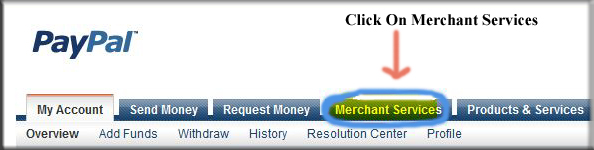
                  Click on the Merchant Services Tab like shown in the picture.

                  Tricks To Add SimplyEasily PayPal Donate Button To Blogger 1
                  Select Donation from the list of keys features displayed in the right sidebar of the PayPal Website Payments Standard Option 3 Payment Solutions. PayPal have changed its interface. You now need to select PayPal Website Payment Standard from Merchant Service drop down and then under the option 1 you will see in ting writing words I must say (There are also Buttons for Donation and Gift certificates). "Click On Donations".

                                          
                  Tricks To Add SimplyEasily PayPal Donate Button To Blogger 2
                  Select Donation link in PayPal from PayPal Website Payments Standard Option 1 to add a donations button to Blogger Blogspot Blog.
                  From the PayPal Create a Donation Button Now link (One of Two).

                                                   
                  Tricks To Add SimplyEasily PayPal Donate Button To Blogger 3

                  Manage the default button which you want and customize it.
                  Select the Currency which is adjusting by your country or area and depending on your need location.
                  Select Donors enter their own contribution amount radio button unless you want to have a set amount.

                                                   
                  Tricks To Add SimplyEasily PayPal Donate Button To Blogger 4

                  Ensure the Secure Merchant ID radio button is selected. This will always prevent spammers getting hold of your email address.
                  At Step 2 it is worth saving your button.
                  At Step 3 customize your checkout page by allowing donors to write a short comment by selecting the Yes radio button to special instruction to seller.
                  Select the No radio button for customer's shipping address. Select the create Button.
                  When PayPal make or creates the PayPal Donation Button HTML code then copy it on your notepad file to further use. Now Sign out of your PayPal Account. Now next work in blogger.com.

                  How I Can Add Recent Post Moving In Down And Upward Direction
                  How to Remove 404 Errors in Blogger Blogspot
                  Why I Make More Pages On My Blog To Increase Organic Traffic 
                  Easy | Best | Simple Tricks To Make Money From Youtube | Chitika

                  Now Working In Blogger When PayPal Donation Button Code Is Get:

                  In blogger you can make more and more changes you can easily add or put your PayPal Donation Button where you want but i have best placement of paypal button which i already use on my website.


                  PayPal Button Adding Tutorial In Blogger Sidebar Or Footer:


                  Go to Blogger.com.
                  Go to Layout.
                  Click Add A Gadget.
                  Select HTML/Javascript widget which is located on 11th no in the list.
                  Now copy your PayPal Donate Button Code from notepad file where you can save it and paste the HTML code into the HTML coding box.
                  Now Pick the gadget with mouse and place it sidebar of your template where you want left or right its depends on your choice.
                  Now give the name of gadget/widget which you want. Like "Donate For My Blog".
                  Click the save button.
                  Visit your blog and your PayPal Donation Button is appear in your blog sidebar.
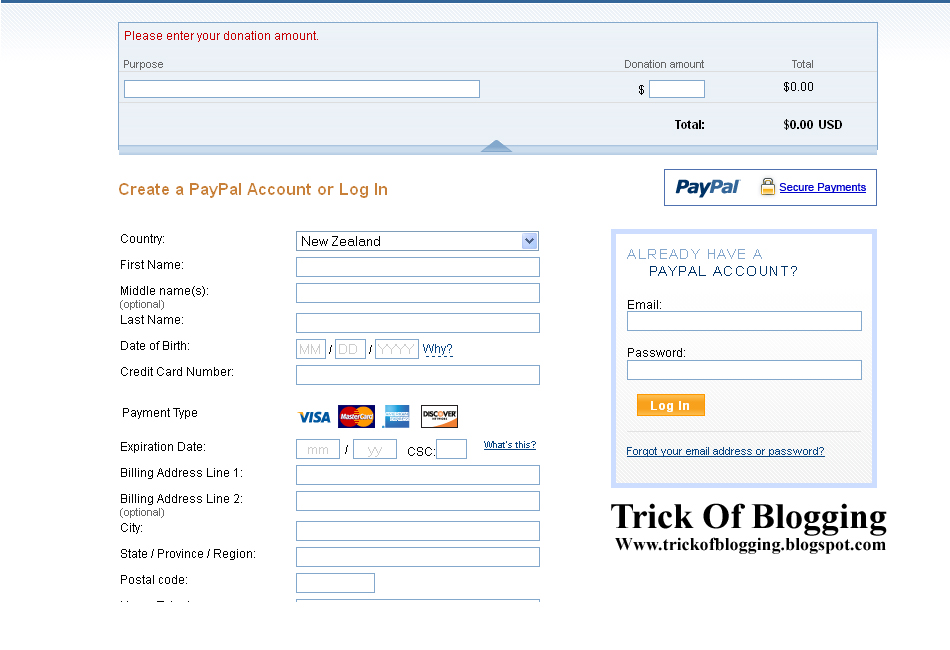
                  Now for checking donate button will it work or not click your button you can see this type of page which is given below appear after your blog page then its mean your PayPal Account is working for your blog.

                                 
                  Tricks To Add SimplyEasily PayPal Donate Button To Blogger 5


                  PayPal Button Adding Tutorial In Blogger Post Footer After Every New Post:


                  In this small tutorial you can easily add the PayPal Donation Code in the footer of every post but remember your previous post can not work like future post. Before adding the PayPal Button first copy your button code in HTML form.

                  Go to Blogger.com.
                  Go to Setting.
                  Go to Post and Comments.
                  Click on Post Template Add links.
                  Paste the code into the Post Template Box and save it.
                  Click to Writing New Post you can see the code in Compose form if you want to see the PayPal Donation Button Code then you should go to HTML form to see the code.

                  How I Can Use Crawlers And Indexing Tool In Blogger
                  How I Can Get Approval From Google Adsense My Blog Or Website
                  How I Can Make Internal Links In The Blog Post To Increase Rank


                  PayPal Button Adding Tutorial In Anywhere In Blog Post:


                  If you want to add the PayPal Donation Button in between blog post then copy your button code and go to HTML form and where you want to show your button paste this code after breaking the <br> tags and you can easily add the code in your blog post and enjoy it.


                  Related Articles:

                  How Easily Delete/Remove/Get Rid Blogger Blog Tricks In Blogspot
                  How I Remove Or Change Blogger Post Image Border In Blogspot
                  Best Blogger Tips And Tricks For My Blog SEO Instantly
                  Easy Trick To Add Twitter Updates Gadget To Blogspot Blogger
                  How I Make My Blogger Good Looking Best Tricks
                  Easy Tricks To Get Lot Of Visitors On My Blogger
                  How I Can Get More Pageviews Using Social Bookmarking.Com
                  How I Can Import And Export My Blog To Other Blogspot 

                  Rabu, 08 Mei 2013

                  BACKLINK GRATIS OTOMATIS

                  Mungkin ini judul yang sangat cocok untuk  Backlink Gratis Otomatis sebagai sarana pertukaran link para blogger ini merupakan layanan pertukaran backlink instan, gratis dan otomatis. Backlink instan, gratis dan otomatis ini merupakan layanan gratis untuk pemilik web dan blog untuk meningkatkan trafik melalui backlink instan, gratis dan otomatis. Para Webmaster dan blogger pasti tahu betapa pentingnya SEO untuk meningkatkan sumber lalu lintas pengunjung website/blognya.

                  Backlink Gratis Otomatis ini saya alihkan BACKLINK GRATIS OTOMATIS
                  terima kasih atas partisipasi anda dan mohon maaf link blog anda apabila belum terpasang