Cari Blog Ini

Tampilkan postingan dengan label blog or website. Tampilkan semua postingan

Rabu, 26 Juni 2013

25 Best | Top | High | Web Blog Directories For URL Submission Quickly Pinging In Google Search Engine

In this tutorial i have to much Blog Directories Links/URL in which we submit our blog or website to attract more visitors on blogspot or website easily by submitting our Blogger URL. These directories are the biggest source to ping our blog in Google Search Engine. Because when we submit our blog URL then Google pick the URL of our website for these already indexed website. Then our blog also make his seat in Google Search Engine and also Google Crawler or Google Bot like this blog which easily indexed by Google Bot. But one thing is very important always write Original Content or Publish Content Full post on your blog if you want to get more organic traffic.


List Of Best And Good Web Blog Directories To Indexed Your Blog In Search Engine Instantly:


I am going to give you a list of blog directories URL which increase your traffic and worth also in Google Search Engine. SEO is also very important fact. It is also a type of SEO (Search Engine  Optimization). I get this tricks by doing many time means i nearly make 10 blog on blogspot and i put this trick again and again and i get good results With in 1 Month my blog is quickly indexed by Google Crawler. If you also want to do this then i show you how to easily add your blog link in these directories and also how to make account in these directories.
25 Best | Top | High | Web Blog Directories For URL Submission Quickly Pinging In Google Search Engine

Top 2 Blog Directories Which Is Very Important:


BlogCatalog
Mybloglog

These two blog directories are useful for new bloggers/newbie to get or drive more readers or traffic to their blog. Keep in mind one think don't get the widget/buttons/gadget or reciprocal links and also don't put or embed them these link on your blogger these things are useless but add your blog in these directories and also if you want to reciprocal link the put it in your template background. 

First add your blog above two directories and then use or add your Blogger home URL in these below links directories.

      1. http://alltop.com  
      2. http://www.blogarama.com  
      3. http://directory.blogaz.net/submit.html 
      4. http://www.blog-collector.com/submit.php 
      5. http://www.blogs-collection.com/ 
      6. http://www.directory-free.com/submit/submitted.php  
      7. http://www.directory.ldmstudio.com 
      8. http://www.blogdire.com/add-blog.php 
      9. http://www.blog-directory.org/add-blog.php 
      10. http://www.blogdirectory.ws/suggest-listing.php?id=0  
      11. http://www.blogflux.com/  
      12. www.blogfolders.com/ 
      13. www.bloggernity.com/  
      14. http://www.bloghints.com/submit.php 
      15. http://dashboard.bloglines.com/signup 
      16. http://www.blogpopular.net/  
      17. http://www.blogrankings.com  
      18. http://www.blogrollcenter.com/index.php 
      19. http://www.blogsavenue.com/  
      20. http://www.blogratedirectory.com/ 
      21. http://blogsearch.google.com/ping 
      22. http://blogsrater.com 
      23. http://www.blogtoplist.com/ 
      24. http://topofblogs.com/  
      25. http://www.blogarama.com 

          One Of Biggest Search Engine For Newbie Blogger And Its (Google and Bing):


          Add your blogger blogspot Sitemap to these major search engine first and then write second post. I give you some best and most popular search engine tips for adding sitemap of your website or blog to these search engine.

          Sitemap of Your Blogger Is Submitt to Major Search Engines
          How to Verify My Blogger Blogspot in Webmaster Tools And Submit Sitemap

          I have also best tips for blogger blogspot SEO after doing these tips you can really get more visitors on your blogspot or website easily.

          Easy Tricks To Get Lot Of Visitors On My Blogger

          If you want to indexing your blog in search engine quickly then i have also a big trick for having that follow the link below properly and get visitors with lot of hits on your blogger or website blog.

          How I Can Use Crawlers And Indexing Tool In Blogger


          Now if you have face any problem about your blog SEO, Blogger Template, Blogger Widget or Gadget and any CSS installation in your blog template or also to make beautiful and best looking blogger then give your important comments on my blog and i definitely check this out and also guide or reply you with my best and easy trick to you. Also like my blog and subscribe it.  I have also give you some beautiful widget links for adding in your blog template or also make your blog best looking blogger.

          Related Articles:


          How I Make My Blogger Good Looking Best Tricks  
          How To Make Website Like My Blogger Tricks To Get Best Alexa Rank  
          Customise Blogger Default Template To Make Professional Template  
          Add Manually CSS Jqeury Drop Down Menu By Replace/Remove Pages On Blogger  
          Add | Put | Embed Three Or Four Column Footer Widget/Gadget In Blogger Blogspot  
          Add Facebook Like Box Widget/Gadget On Blogger By Facebook Developer Plugin  
          Add | Put 50 Flag Translator Widget | Gadget On Your Blogger Blogspot 
          Add | Put Three Tab Gadget/Widget In Blog Layout Sidebar On Blogspot  

            Jumat, 07 Juni 2013

            Create | Make | Add | Set 404 Error Page In Blogger Blogspot Easily

            In this tutorial i will show you how you can easily Add or Create 404 Error Page in your Blog. This error is drop very bad effect on your blog because visitors can not visit your blog or website properly and they left your blog from this page. To setup this page follow my simple tutorial with best tricks. Blogging is one of the best way to introduce yourself that's why keep blogging with full of joy and make you a perfect blogger. For adding this page on your blog i write a small tutorial for you which help to add this amazing thin on your blog homepage.

            Create | Make | Add | Set 404 Error Page In Blogger Blogspot Easily
            Create | Make | Add | Set 404 Error Page In Blogger Blogspot Easily 1

            What Is 404 Errors:


            404 Error then create if some one visit your blog with your blog link and after your link some keywords are written. This is not effect on your blog health for SEO (Search Engine Optimization Ranking) but it effect on blog readers. If you set this then your visitors are not go without visiting your blog properly.

            Best Blogger Tips And Tricks For My Blog SEO Instantly 

            Add 404 Error Page In Your Search Preferences:


            For adding this 404 Error Page follow below tutorial and work according to which i write. By adding this your visitors also report you about your 404 Error using your Contact Us Page. Also you give the home page link in the Error Page by click on this link your visitors come on your blog home page.

            Add | Make About Us Page Widget | Gadget On Your Blog Footer Or Sidebar
            Customise Blogger Default Template To Make Professional Template
            Add | Put | Embed Three Or Four Column Footer Widget/Gadget In Blogger Blogspot

            Go to Blogger.com.
            Go to Settings.
            Go to Search Preferences.
            Click on Edit. See below picture/image.


            Create | Make | Add | Set 404 Error Page In Blogger Blogspot Easily 2
            Create | Make | Add | Set 404 Error Page In Blogger Blogspot Easily 2


            Now pick/copy the below code and paste in the Custom Page Not Found Box after further customization in your 404 Error page.


            <!-- TOB Default Template -->
            <div class='TOB-404-box'>
              <p style='line-height: 30px'><strong>
            <font color='#ff0000' size='5'>
            Oops What Happen!
            </font> <font color='#666666'>
            My Blog Reader you click a broken link or a page which is removed from this blog now. Please Do any one of the Following.
            </font></strong></p>
              <ol style='line-height: 25px'>
                <li><a href='javascript:history.go(-1)'>&#171; Go Back</a> </li>
                <li>Contact Us to Report this problem <a href='http://trickofblogging.blogspot.com/p/blog-page_1262.html'>Click Here</a>&#160;&#160;&#160; (<em>This will help us to serve you even better</em>) </li>
                <li>Go To Homepage by <a href='http://trickofblogging.blogspot.com/'>Click Here</a>
                  <br/></li>
              </ol>
              <p>
                <br/>
                <br/>
                <br/></p>
              <p align='center'><font color='#0080ff' style='font-size: 150px'><strong>404</strong></font></p>
              <p>&#160;</p>
              <p align='center'/>
              <p align='center'><font size='5'>Page Not Found</font></p>
            </div>
                  

            Customize the some Features:


            Change the Red Highlighted Color Text with your desire text. Oops What Happen.
            Change the Orange Highlighted Color Text with your desire text.
            Change the Blue Highlighted Color link with your own Contact Us Page link.
            Change the Grey Highlighted Color link with your own Blog Homepage Link.
            Change the Pink Highlighted Color Text with your own desire words. Page Not Found.


            Now your half work is done.
            Now Go to Template.
            Go to Edit HTML.
            In the HTML Body Box.
            Press Ctrl+F to find the below code/tag.

            ]]></b:skin>


            Paste this above code in the search box and press enter.
            When you find this code.
            Copy the below CSS Style sheet Code and paste it below/after this code/tag.

            <b:if cond='data:blog.pageType == &quot;error_page&quot;'>
            <style type='text/css'>
            .status-msg-wrap {
                font-size: 100%;
                margin: none;
                position: static;
                width: 100%;
            }
            .status-msg-border {
                display:none
            }
            .status-msg-body {
                padding: none;
                position: static;
                text-align: inherit;
                width: 100%;
                z-index: auto;
            }
            .status-msg-wrap a {
                padding: none;
                text-decoration: inherit;
            }
            .TOB-404-box {
              background:#B27D00;
              width:98%;
              margin:10px 0px;
              padding:20px 10px;
              border:1px solid #ddd;
              -moz-border-radius:6px;
              -webkit-border-radius:6px;
              border-radius:6px;
              box-shadow: 5px 5px 5px #CCCCCC;
            }
            </style>
            </b:if>

            Now if you want to change the Background Color of your box then change the #B27D00
            Save your Template.
            Now you have done all work.
            Now if you want to check it is working or not write any keywords after your blog homepage link.

            If you want to ask any question about this or about Blogger SEO, Blogger Verification, WordPress, WordPress SEO, Make Money, Blogging Tips, Webmasters Tool Tutorial then just contact us using contact us page and feel free.

            Related Articles:


            How to Remove 404 Errors in Blogger Blogspot
            How I Can Remov Or Fix Broken URL For Google Adsense Crawler
            5 Ways How to Make your Blogger Blog Like WordPress Website
            How To Make Backlinks To Other Website To Increas Page Rank
            Get Google Page Rank With In 1 Month By Simple And Easy Tricks
            Add | Put | Embed Three Or Four Column Footer Widget/Gadget In Blogger Blogspot
            Add Manually CSS Jqeury Drop Down Menu By Replace/Remove Pages On Blogger
            Add Facebook Like Box Widget/Gadget On Blogger By Facebook Developer Plugin

            Kamis, 30 Mei 2013

            Add | Put | Embed Three Or Four Column Footer Widget/Gadget In Blogger Blogspot

            In this tutorial i will show you how to easily add Three Column Footer Gadget in blogger. Best blogging tricks are always easy and customize or make many changes easily. To make Blogger beautiful or Good Looking we should spend a lot of time on our blog or website. If you want a lot of visitors daily on your blog or in these visitors you want some visitors are returning people then put all your focus on your blog looking means make best and stunning blogger. When some one visit your blog then he/she just shocked to see your blog and say "What a Nice Blog". Now i am going to tell you how you can easily add the footer widget/gadget in your blog bottom easily with simple tricks. When ever you start blogging your focus should be on SEO, Good Looking Blog, Best Internal Linking, Best Google Page Rank, Good Strength Of Backlinks and Best Alexa Ranking. I have write many post on Manage Page Layout for better blog looking. If you want to also make beautiful blog then start with first adding widget or gadget in blog then add this below footer widget in blog it is the last step of manage page layout.
            Add | Put | Embed Three Or Four Column Footer Widget/Gadget In Blogger Blogspot
            Add | Put | Embed Three Or Four Column Footer Widget/Gadget In Blogger Blogspot

            Now Let's Start The Four Column Footer Adding:


            If you want to add the four column footer in blog layout by adding gadget then work according to below tutorial.

            Go to Blogger.com.
            Go to Template.
            Go to Edit HTML.
            Now first download your full template in your computer before make changes any time.
            Press Ctrl+F in HTML body box. Like i tell in article of Handle New Interface Of Blogger HTML Editor.
            Paste this below Code in the search box and press enter.

            ]]></b:skin>


            Now paste the below CSS Code just above/before this code.


            /* -----   LOWER SECTION   ----- */
            #lower {
                   margin:auto;
                   padding: 0px 0px 10px 0px;
                   width: 100%;
                   background:#333434;
            } 
            #lower-wrapper {
                   margin:auto;
                   padding: 20px 0px 20px 0px;
                   width: 960px;
            }
            #lowerbar-wrapper {

                 border:1px solid #DEDEDE;
                   background:#fff;
                   float: left;
                   margin: 0px 5px auto;
                   padding-bottom: 20px;
                   width: 32%;
                   text-align: justify;
                   font-size:100%;
                   line-height: 1.6em;
                   word-wrap: break-word; 
                   overflow: hidden;
            }
                   .lowerbar {margin: 0; padding: 0;}

                   .lowerbar .widget {margin: 0; padding: 10px 20px 0px 20px;}
            .lowerbar h2 {

                  margin: 0px 0px 10px 0px;
                   padding: 3px 0px 3px 0px;
                   text-align: left;
                   color:#0084ce;
                    text-transform:uppercase;
                  font: bold 14px Arial, Tahoma, Verdana;
                   border-bottom:3px solid #0084ce;
            }
            .lowerbar ul {

                  margin: 0px 0px 0px 0px;
                  padding: 0px 0px 0px 0px;
                  list-style-type: none;
            }
            .lowerbar li {

                  margin: 0px 0px 2px 0px;
                  padding: 0px 0px 1px 0px;
                  border-bottom: 1px dotted #ccc
            }

            Save Template.
            You have done.

            Improve Content Keywords Significance
            Use Custom Robots Tags Selection Blogger For SEO
            Best Blogger Tips And Tricks For My Blog SEO Instantly


            Add Lower Wrapper Lower Bar Widget From Lowerbar1 to Lowerbar 3 or 4:


            By adding Lower Wrapper and Lower Bar we see three or four Add A Gadget Links in the page layout where you can easily add which you want like Blog Author Info, Blog Followers, Google+ Followers and many more option. Now we are going to add this Gadget in template and then go to Layout to check this out.

            Go to Blogger.com.
            Go to Template.
            Paste below tag in search box and find.

            </body>


            When you find this above tag then copy below code.
            Paste below code just above/before this </body> tag.


            <div id='lower'>
            <div id='lower-wrapper'>
            <div id='lowerbar-wrapper'>
            <b:section class='lowerbar' id='lowerbar1' preferred='yes'>
            </b:section>
            </div>
            <div id='lowerbar-wrapper'>
            <b:section class='lowerbar' id='lowerbar2' preferred='yes'>
            </b:section>
            </div>
            <div id='lowerbar-wrapper'>
            <b:section class='lowerbar' id='lowerbar3' preferred='yes'>
            </b:section>
            </div>
            <div style='clear: both;'/>
            </div> </div>


            Again Save Template.
            Your Work is finished and your three column footer is ready for work and if you want to four footer then simply add below code above last two highlighted red background lines correctly.

            Make Money Form Links of Amazon Product to Blogger Posts
            You Put Chitika Ads to Blogger Blogspot with Simple Steps
            Easy | Best | Simple Tricks To Make Money From Youtube | Chitika


            <div id='lowerbar-wrapper'>
            <b:section class='lowerbar' id='lowerbar4' preferred='yes'>
            </b:section>
            </div>


            And give the lowerbar4 name with your choice number.

            Changes And Customization For Footer Column Widget By Color:


            If you want to customize or change the color of background text and width and many more then generate the color by using below Color Code Generator Tools and use according to above tutorial.


            Color Code Generator Tool:


            Change the Background color of your desire by replace the #333434
            Change the Widget Width with your desire by replace the  960px 
            Change the Background 2 color by replace the  #fff
            Change the Widget Width 2 by replace the  32%
            Change the of Text by replace the #0084ce 
            Change the  Font of Widget just add desire font font: bold 14px Arial, Tahoma, Verdana;
            border-bottom:3px solid #0084ce 
            Change the Bottom Border Dotted by replace the #ccc.

            Now save template and go to layout and check in the footer of your Page Layout you will see three or four column just add which you want and your blog make perfect and beautiful.

            Related Articles:


            Ready to Make Money With Adsense Keywords and Blogger
            Affilate Banner Put Below in your Blogger Post
            The Best Placement of Adsense On Your Blogger Blogspot
            How To Increase The Website Ranking From Social Bookmarking Sites
            How to Verify My Blogger Blogspot in Webmaster Tools
            How Use Social Website To Increase Your Website Traffic
            How to Remove 404 Errors in Blogger Blogspot
            Why I Make More Pages On My Blog To Increase Organic Traffic

            Rabu, 15 Mei 2013

            How To Set | Select | Choose | Change Desire Blog Post Date And Time In Blogger

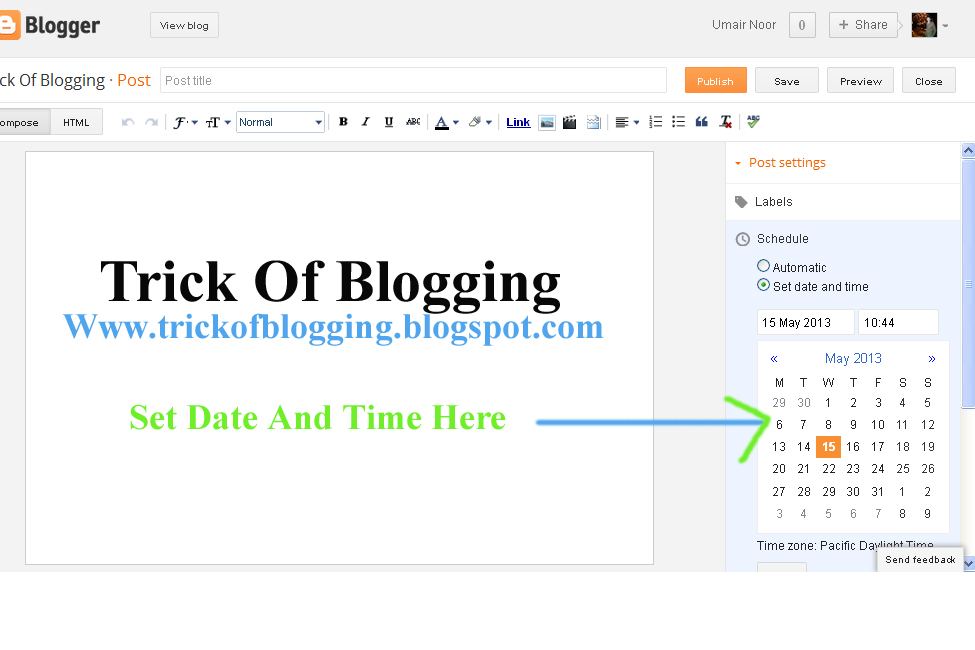
            I am gona show you how to Change or Set Blog Post Date and Time in blogger blogspot. To customize the blog post simply using small tutorial and make blog post beautiful by selecting daily or weekly its up to you. Now if you want to show your blog post with arrangement to make perfect then you use this feature. Publish On feature on right hand side of your post page is for that if you have miss some days or forget to write post then make changes and return back your post on that date which you want.

            Setup A Different Date Of Your Blog Post:

            In Blogger.com we set date easily. Blogger allow a Blog Administrator or Webmaster to set any publication date for a post which they choose. For setting up there are many reason for set a particular publishing date for a blog post. To keep continuity with  sequence for blog articles we use this feature. You also use this feature if you forget to write a post/articles with sequence or you can decide afterwards to add an extra article to the sequence. When we start blogging on our blog we always forget to make About Author Page in blog and after we decide to set up them. It also take you several years back if you want.

            Social Bookmarking Button Add To Blogger
            5 Ways How to Make your Blogger Blog Like WordPress Website
            How Use Social Website To Increase Your Website Traffic 

            Tips And Troubleshooting:


            • I suggest you to setup the About Page Date first because it appears first at the beginning of your RSS feeds.
            • Remember when you are posting with changing date that the post will still appear in your recent posts Rss Feeds even you setup this post date in past.
               

            How To Setting Up User Defined Publish Date In Blogger Blogspot:

            1. Create a new post of your blog as usual.
            2. Click on the Published On.
            3. Set your desire Date or Time like below picture/image.
            4. Click on Done Link.
            5. Click Update Orange Button.
            6. And preview your blog post it is list in those post where you want.
            How To Set | Select | Choose | Change Desire Blog Post Date And Time In Blogger
            How To Set | Select | Choose | Change Desire Blog Post Date And Time In Blogger
            In this post you will learn how to select or changes the desire post date or time. I have also a big and detailed tutorial about how to make money from blog or website, Blogger SEO Tips and Tricks, Alexa Ranking, Google Page Rank, Get Backlinks, Make Internal links, Get lot of visitors on your blog by Search Engine Optimization, Submitting sitemap of blog or website to Google Search Engine or Major Search Engine.

            Related Articles:


            Senin, 13 Mei 2013

            Get Google Page Rank With In 1 Month By Simple And Easy Tricks

            Google Page Rank (PR) is very important for any blog or website worth and make page rank is also very tough in those days. But If you right content full post and use better keywords then you got easily Page Rank. If you achieve to make 10 External links or Inbound links then your blog get easily Page Rank 1 or If you get 50 backlinks by related content keywords then blog will get PR 3 easily. This tutorial is also teach you about how to easily get Google PR by using Internal Linking, External Links, Inbound Links, Backlinks what you say these are all work as same type to get Page Rank. If you are blogging with full passion and work on your blog or website daily to get rank in Google Search Results then you should first make best internal linking with in your blog post and external linking on Social Bookmarking Sites and also Join the Blog Directories to tell about your blog existence to Google Search Engine.


            Many people are create Thousand of Blogger or Website Daily and start blogging on their new blog but they can't achieve the better position in search engine. I also handle this situation when i start blogging on my blog. I get Better Alexa Rank but yet not get Google Page Rank but coming days i definitely achieve that point. Because recently i get information about Google Page Rank then i thought i want to share with you first and then work on this.

            I get 27 Backlinks easily with in one month and when Google Update my website content or worth after Three Months then i get definitely Page Rank 2.

            How To Get Google Page Ranking:

            The main focus of this post is on increase the Google Page Ranking of your blogger blogspot. If you want to gain Page Ranking then your mission is to get Index Your Blog/Website To Google Webmaster Tools or using best and latest SEO Techniques. First make site with search engine optimization and Search Engine Friendly.

            Hot And Latest Seo Tips For Blogger
            How To Increase Index Status In Webmaster Tools Tricks For Better SEO
            You Can Easily Manage Permalinks Which Is Search Engine Friendly

            Get Google Page Rank With In 1 Months By Simple And Easy Tricks

            SEO Easy And More Reliable Techniques:


            I read number of SEO techniques but i put some important and most recently updated techniques on my blog and get Alexa Rank With In 3 Months nearly 50,0000 which is better for me. If you want also then apply Blogger SEO Tips And Techniques On Your Blog immediately and get beautiful rank of your blog by using Meta Tags, Using Content Keyword Significance, Keywords Phrases, Improve Keyword Density, Submit Your Blog Sitemap To Major Search Engine and you are done. I have all these tips in links below. One by One check it out and make changes and then reply me what you feel now by getting organic traffic.


            What Is Internal Linking And Inbound Links To Get PR:


            Internal linking is very important and if you want to index your blog immediately then take a load to Google Search Engine and it become index your site quickly. Google Bot crawl those site first which has deeply linking and content full post and internal linking also take more Pageviews of your blog and that's very important for every blog to decrease Bounce Rate (Visitor Left the website/blog on first page or home page). To make internal linking in your blog or inbound link go to below related post and my best tips to submit your blog to High Ranking Social Bookmarking Sites.

            Related Posts:

            You Should Make Internal Links And Backlinks and Increase in Blogger Blogspot
            How To Increase The Website Ranking From Social Bookmarking Sites
            How Use Social Website To Increase Your Website Traffic
            How to Remove 404 Errors in Blogger Blogspot
            How I Can Use Crawlers And Indexing Tool In Blogger
            How I Can Get More Pageviews Using Social Bookmarking.Com
            How I Can Boost Traffic With Targeted Country On Blogger
            Now Ready To Increase Google Page Ranking And Alexa Ranking

            Sabtu, 11 Mei 2013

            How To Easily Make Money With Affiliate Marketing Blogger

            Affiliate Marketing Programme allow to make money online by selling products advertising on blog or website. Tricks are a lot to make money but most important is Blog Readers or Visitors. If you can get too much visitors you can easily make healthy money. Different type of money make categories section in blogger blogspot blog but most effective and useful are give below.

            For Getting more visitors on your blog or website i have a large amount of easy tutorial of SEO (Search Engine Optimization). Or Content Keywords Significance, Adsense Make Money Keywords, Webmaster Tools Control Properly easy tutorial, Google Analytics, Write 100% Original Content for your blog for better SEO.

            What is Affiliate Marketing With Great Blog Blogspot?

            It merely means that, commercialism people merchandise.

            You can sale others/different stuff by promoting at your WordPress Blog Or Blogger.com:


            You will be paid by the merchant(affiliate program) if your readers/customers build an acquisition. In alternative words, you’ll be paid for this if anyone of your readers get one thing that you refer on your Blogspot blog or WordPress blog. Understood? I hope thus. Let’s get into successive step.

            How To Become Associate Affiliate?


            Affiliate Marketing is that the best thanks to monetize your blogger blogspot blog or wordpress blog instead of creating cash with the other programs like Google AdSense, BSA, infolinks and many other which i discuss below also and in previouse post.

            There area unit thousands of merchants that have affiliate programs that they require to sell their stuff. You’ll earn cash if you sell their porducts or some things refer with your blog. You can easily collect big money in 30 days to run your lifestyle.

            How To Easily Make Money With Affiliate Marketing Blogger

            Few Things To Stay In Mind Whereas Doing Affiliate Selling:


            • You will easily build or get extra money by using your email list.
            • Before you suggest, use it personally and associated write an honest and good content review post.
            • Your choice always relevant products to promote.
            • Put/Add and use best affiliate links in your email links, blog posts, blog header, below post, sidebars etc.
            • Keep tracking your affiliate sales exploitation bit.ly

            Affilate Banner Put Below in your Blogger Post
            You Put Chitika Ads to Blogger Blogspot with Simple Steps


              Top affiliate programs you would possibly need to Join or Signup Easily:

              Clickbank: 


              Clickbank is one in every of the highest affiliate programs. you'll build good cash with this affiliate network as a result of it pays superb commissions. You can find/select or pick tens of thousands of digital thinks or products to your blogger blog or on website.

              E-junkie: 


              If you wish to sell your own things or products like eBooks, podcasts or videos then this is often the most effective alternative.

              Tricks To Add Simply/Easily/ PayPal Donate Button To Blogger
              Add/Put Banners Ads On Blog To Make Money Easily

              Few options of E-junkie.

              1. Simply you can just pay $5 per month to E-junkie.
              2. In E-junkie their is no transaction limit
              3. In E-junkie also no transaction fee

              Amazon Associates Program: 


               Make Money Form Links of Amazon Product to Blogger Posts

              You’ll notice all types of things or products here. regardless of that blogging niche you’re in, you'll still notice relevant product for your Website or Blogger blog also exploitation this program. In my experience it pay less commission, still you'll keep cash.

              Share A Sale: 


              Most of the highest net marketers area unit exploitation this program. You don’t have to be compelled to pay single penny be a part of|to hitch|to affix} this program as a result of it’s liberated to join the ShareASale network.

              You can also use the below individual products to try and do affiliate selling
              You can conjointly promote individual products like

              • AWeber.
              • HostGator
              • Premium Themes.
              • EBooks , alternative helpful resources.
              • Membership Programs.

              I in person suggest exploitation individual merchandise if you’re simply beginning. as a result of you don’t want huge traffic to create good quantity within the youth of your journal monetisation method.

              How To Promote Affiliate Programs To Earn Cash From Your Blog?:


              Though there area unit many ways to push affiliate programs, the subsequent area unit the most
              effective ways that to create extra money while not commercialism your soul!

              Easy | Best | Simple Tricks To Make Money From Youtube | Chitika
              How I Can Boost Traffic With Targeted Country On Blogger

              By Writing Reviews: 


              If you’re exploitation few things or products on your blog or website, then write some reviews concerning them. If you’re exploitation AWeber, you'll write a review concerning it and use affiliate links. If you are a good marketer and convince your blog reader concerning the products, the probabilities of their getting rate are high.

              Using Banner Ads: 


              If you are good blogger and you can put or add the links or Affiliate Ads on your blog like 280*336 Larger Rectangle, 728*90 Leaderboard, and 160*600Wide Skyscraper with good placement ads then you can big CPM or CPC and make more money inserting them within the right places. It all depends upon your own skills of blogging. The a lot of you're into affiliate selling, the a lot of skills you'll gain!

              Promoting With email lists:


              In my previous tutorial and in above paragraph already tell you about email list ought to be your weapon to push your products. If you’ve designed an excellent list, the probabilities of obtaining paid via affiliate programs are a lot of. You can easily send affiliate links in your emails exploitation AWeber and you can easily do it with using MailChimp!

              Related Articles:

              Social Bookmarking Button Add To Blogger
              Live Traffic Counter Put In Your Blogger Blogspot
              You Should Make Internal Links And Backlinks and Increase in Blogger Blogspot
              How I Can Get More Pageviews Using Social Bookmarking.Com
              Simple | Easy Tutorial For Transfer Blogspot To Website
              Add/Put Blog Table In Blog Post Best Blogger Tricks
              How Add RSS And Live Traffic Feed For More Visitors On Blogger Blogspot
              How Easily Delete/Remove/Get Rid Blogger Blog Tricks In Blogspot
               

              Jumat, 10 Mei 2013

              Add/Put Banners Ads On Blog To Make Money Easily

              Banner Ads are also a big source of income by displaying Banners Ads on blog or website. I have many tricks to add banner ads in sidebar, blog header, above post, in between/middle post, below post, and in the footer. You can easily do also by reading my small tutorial which is given below. When you are going to advertise some links or ads on your blog or website keep in mind not add too much advertising banners or links on your blog because when you put banners in larger amount then visitors of your blog think he/she is not promoting blogging he/she just make money from your blog and visitors can't read your content and left your blog immediately it also decrease your visitors and increase your bounce rate (left blog on first page) and people who visit your blog one time like these then they can not come again to your site.

              What Is Banner Ads How We Make Money From These Banners:

              Blogging is great and blog also provide us to add advertising to your Blogger Blogspot Blog and make money from it. In this tutorial i will discuss how we make money from banner advertisements easily. Banner advertising is different from Google Adsense, Chitika, Adbrite, Amazon. Google Adsense ads are already add on 80% blog but if you have not added Google Adsense Ads on blog or website then go with this link to put it on your blog.  How I Can Place Adsense Ads Between My Blog Post or Below Title Tags . If you can't approved by Google to show ads on you blog then i have a easy tricks to get Google Account.

              How I Can Get Approval From Google Adsense My Blog Or Website


              Adding Advertising Banner Is Totally Free And Make Money:


              It is not a secret that banners make money provided you choose your merchant program carefully but you have get enough traffic means a huge traffic on your blog or site to make money. If you are pass to get 300 visitors daily on your blog or website then you can easily make money from your blog with banner ads.


              Affiliate Banner Put On Blog To Make Money:

              Affiliate Marketing Banners are easily make money for publisher like you. When you are sign up for advertising banner for your blog to make money then Affiliate Programme gives a snippet of code in HTML which you add to your blog layout Add Gadget or in the between or below post to make money online. When you paste the code in HTML code it display like a banner on your blog page. When some one click on a banner on your website or blog that click is counted as originating from your blog and you make money as a result. How you can earn per click no one tell you about this but its depend upon the merchant programme that you have signed up for you can earn a commission and a few percentage of the sale.

              Affilate Banner Put Below in your Blogger Post

              How Banner Ads Work To Make Money:

              When you put banners ad on that blog which get 300 visitors in a day then out of 300 people 10 people click on your banner ads which takes the visitor to merchant's website. From those 10 people 2  person purchase a thing nearly $200 assuming your commission is 10% of the sale then you get $20 in a day it just easy.  

              Tutorial How To Place Banner Ads On Blog:

              To place or put a banner ads on blog is very easy and anyone can do this easily you just copy the code and paste in your blog page element. If you want to add the affiliate banner below post then go with above link Add Banner Put Below Blogger Post. It is hard to get more visitors on your blog i have a very good trick which i always use to get more visitors on my website. How I Can Get More Pageviews Using Social Bookmarking.Com .


              For Make More Money Get More Visitors On Blog:

              To get more visitors on your blog is to much difficult but don't worry i have a tutorial to get more visitors on your blog its really work when i start blogging on my blog i use these tricks which gives me daily 250 visitors on my blog. I have put SEO techniques also on my blog if you want to do also then the links below explain you briefly about Search Engine Optimization.


              Related Articles:


              Hot And Latest Seo Tips For Blogger
              How To Added Meta Tag In Your Blogger For Better Optimization
              How to Verify My Blogger Blogspot in Webmaster Tools
              If You want to Increase Google Ranking Then Sitemap of Your Blogger Is Submitt to Major Search Engines
              Now Next Step To Add Webmaster Tools And Google Analytics to a Blogger Blog
              You Can Easily Manage Permalinks Which Is Search Engine Friendly
              You Should Make Internal Links And Backlinks and Increase in Blogger Blogspot
              Method of Getting Free Backlinks From Your Blogger Or Website In Simple 5 Trick or Tips

              Senin, 06 Mei 2013

              How Add RSS And Live Traffic Feed For More Visitors On Blogger Blogspot

              Add or put RSS feeds on blog with easy tricks to get more visitors and pageviews. Google RSS Feed Burner is one of main source to get a lot of traffic on blog or website by making account on Google RSS feeds.

              In this small tutorial you will learn how you can easily make account in Google RSS feeds of your blog or website. RSS feeds is important in such that when some one visit RSS Feed then you get a visitor by visiting your blog or website from RSS Feeds.

              Why We Should Make An Account Of RSS Feeds Burner:

              It is important for some one when visitors come on your site or blog and if they like your content or articles of your blog and they want to visit your blog daily then they Subscribe your blog RSS feeds and get daily updates of your blog content. Like when you write a new post then they can easily access your blog for new articles.

              Method of Getting Free Backlinks From Your Blogger Or Website In Simple 5 Trick or Tips
              How To Add Categories Link To Your Blogger Blog
              Make Money Form Links of Amazon Product to Blogger Posts

              How To Make Account On Google RSS Feeds Burner:

              You can easily make account on RSS feed by visiting Google RSS Feed Burner. I am going to give you some steps below how to Add RSS feed and how to Active RSS feeds.

              1. Go to Blogger.com.
              2. Go to Google.com
              3. Search this word RSS Feeds Burner.
              4. Now click the link with RSS feeds Burner.
              5. When RSS Feed Burner is open then first you give your Password of your already login gmail account.
              6. When Feed Burner is open make sure your account is created and now active it.
              7. Click your blog or website feed title. Shown in the pic given below.
              8. When you click your blog title then click on Optimize Link near Analyze link.
              9. Go to Convert Format Burner link left side second last link.
              10. Now Active your feeds.
              Your work is done now enjoy your feeds to make money also in Adsense and get more visitors by feed burner.


              Related Articles:

              How I Can Use Webmaster Tools Properly For Blogger
              How I Can Get More Pageviews Using Social Bookmarking.Com
              How I Make My Blogger Good Looking Best Tricks
              Why I Make More Pages On My Blog To Increase Organic Traffic
              How To Verify Custom Domain With Analytic Code In Webmaster Tools
              How I Submit Sitemap of My Website In Google Search Engine

              Minggu, 28 April 2013

              How To Make Website Like My Blogger Tricks To Get Best Alexa Rank

              My Blogger Tricks is one of the best site related to blogger tips and SEO. On Blogging platform there are many sites but it get better rank in Alexa nearly 3500+ if you want to get also this type of blog then you should work with your blog or website to take too much time.

                                          
              I also want to make my blog like this website but i can't take too much time on my blog but one day i take my site on better rank in Alexa. I just publish one post daily and not share a link on social site with huge amount that's why my site is not like this blog. If you also want to make your blog or website like this then i give you some tips and tricks which i also use and get huge amount of visitors daily that's why my blog get also rank in Alexa. There are many points about blog to make perfect on blogging platform but i discuss most important points in this tutorial.

              Start With A Blogger Making Point:

              When you think about you should make a good blog and choose a blogging platform to tell about you to whole world then first you make a blog with better name and advertise to your blog on social sites and other platform. If you make a blog then you put some changes with your blog to get rank on Google or Alexa Ranking. I have Given some tips about that how to make blog or how i put SEO in my blog easily. If you have a blog already then jumps to the tutorial points but if you have not make your blog till then click below link and get tips and tutorial how to make a blog on blogger.com.

              Make Your Own Free Blog At Blogger.Com

              How To Make Website Like My Blogger Tricks To Get Best Alexa Rank
              When you make your blog then you also write something on it that is most and very important thing whats to write and which type of content is write on blog. Because if you paste a copy content then Google can not take you approval of you Adsense Account and you can't make money too. That's why you should write original content on your blog with your writing skills. To check how write original content on your blog click below link.

              How I Can Write 100% Original Content For Blogger

              And when you are writing on your blog then one question is arise on your mind if someone stole my content then what you do at this time. Don't worry i have some tips and tricks how to make your post save. Many type of tricks on blogging platform to keep your content save like this i have given a small tutorial on it.

              How I Can Save My Blog Post Duplicate Content Problems

              Huge Tips Of Blogger SEO Tutorials:

              When you start writing post then you put some SEO tips on your blog which is given below links.

              Hot And Latest Seo Tips For Blogger
              How To Added Meta Tag In Your Blogger For Better Optimization
              How Manage Blogger Title Tags to Improve SEO
              Now Next Step To Add Webmaster Tools And Google Analytics to a Blogger Blog  
              Other New Tools for a Blogger To Make Like Website


              Now Small Tutorial On Webmaster Tools To Handle SEO Points:

              When you make a blog and start posting on it then you should also check your blog health which is only check in webmaster tools it is the best tool to take your site save form hackers and viruses. Good Ranking website or Blog always take a time to get perfect that's why not you can make a blog perfect in between the night it take time. Below tutorial is how to use webmaster tools to check blog health.

              How I Can Use Webmaster Tools Properly For Blogger
              How I Can Use Crawlers And Indexing Tool In Blogger 
              How to Remove 404 Errors in Blogger Blogspot

              First Use Social Bookmarking Sites:

              With SEO tips you can get more visitors on your blog or website and more pageviews which is organic. But you can also get more visitors to your blog or website using Social Sites like Facebook, Twitter, Stumbleupon, Digg, Google Bookmark, Technoriti and many more. I give you some tips to add your blog or site on these social bookmarking sites easily.

              Social Bookmarking Button Add To Blogger
              How Use Social Website To Increase Your Website Traffic
              How I Can Get More Pageviews Using Social Bookmarking.Com 


              Making Money With Google And Other Advertising Links:

              When we start blogging our first aim is to make money form blog or website by using Google Adsense, Chitika, Amazon Links, Ad Hitz and many more advertising links. I have some tricks and tips about how to make money form these links easily and how to get approve form these Advertising Companies.

              Make Money Form Links of Amazon Product to Blogger Posts
              Easy | Best | Simple Tricks To Make Money From Youtube | Chitika
              Other Tips To Make Money
              How I Can Get Approval From Google Adsense My Blog Or Website
              How To Add Google Custom Search On Blog Or Website To Make Money

              How To Put These Advertising Links or Ads On Blog or Website:


              When you get approved from Google Adsense, Chitika, Amazon, Ads Hitz and Affiliate Banners then how to put it on blog or website easily and simple tricks the large amount of tutorial is given below for putting different advertising links or Ads on blog.

              You Put Chitika Ads to Blogger Blogspot with Simple Steps
              Affilate Banner Put Below in your Blogger Post
              The Best Placement of Adsense On Your Blogger Blogspot
              How I Can Place Adsense Ads Between My Blog Post or Below Title Tags

              When you can do all these tips and tricks with your blog then you can easily get more visitors to your blog and make more money with your blog or website easily if your aim is to take website to good rank in Alexa or Google then you should work on them with more time spend on your website for better optimization. SEO is the most important thing in now days then work it form get something form this huge world.

              Related Articles:

              If You want to Increase Google Ranking Then Sitemap of Your Blogger Is Submitt to Major Search Engines
              Now Going To Track Visitors to Your Blogger
              The Most Essential Tools for a Blogger Analytics
              Now You can Replace Old Style Templates in Blogger in new one
              Avoid From Six Very Common Blogger Mistakes
              Live Traffic Counter Put In Your Blogger Blogspot